Brand-New Complete Series of TV Shows Sold On DVDs Are Sometimes Bootlegs

by James Wallace Harris, 9/24/26

I recently bought Barney Miller on DVD. I got it on eBay. It was advertised as brand-new, in the shrink wrap. It was $8 cheaper than the set on Amazon, so I ordered it. The box looked mint. It was in the cellophane, with stickers. But when I went to rip it to my NAS, I had all kinds of problems.

Ripping DVDs is seldom straightforward. I use both Windows and a Mac. I have three different DVD/BD drives. I have three different ripping programs. Usually, switching combinations of these three factors will eventually rip a problematic disc. But some of the Barney Miller discs resisted all efforts.

I asked my AI. It informed me that bootlegs are common. It said to check the disc with MakeMKV. If the DVD was a single-layer disc, it was probably a bootleg. They were. Evidently, bootleggers try to save a few cents per disc by buying the cheaper single-layer discs rather than dual-layer discs. Look for Data capacity under Disc Information using MakeMKV. Under 5GB is single-layer; above is dual-layer.

This means they compress the files, reducing the playback bitrate. That means inferior picture quality. Even when playing the Barney Miller discs on my Blu-ray player, the picture quality was somewhat fuzzy. I thought it was because the TV show was old.

While ripping the discs with MakeMKV, it warned me that the discs were probably bootlegs made with DVD Fab Mac Ripper. That gave me an idea. I downloaded the free trial of DVD Fab Mac Ripper. It ripped the bad discs. I then paid $55 to buy the full version. I’d been wanting an alternative to MakeMKV for ripping Blu-ray discs on the Mac anyway. And the rips made with DVD Fab Mac Ripper didn’t look that bad. They were watchable.

I reported my findings to the seller. He said he’d give me a refund. I let him off the hook. I figured that after working so hard to rip the discs, I would keep them. I could have sent Barney Miller back and kept my files, but I didn’t want to be a ripoff artist too.

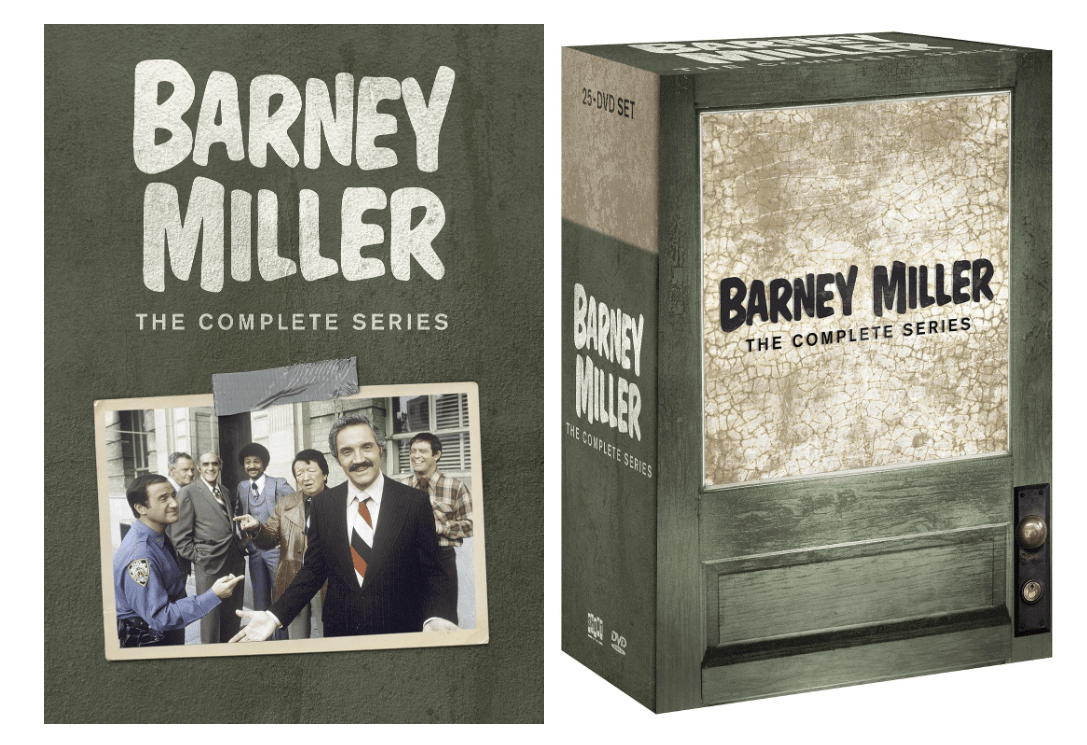
The lesson here is to be leery of great deals on eBay when buying complete TV series on DVDs sold as new. I noticed the DVD set I got was the 2011 edition – the one pictured on the right above, with the door. Amazon still sells that edition, but it ships from a 3rd party. Amazon also sells and ships a 2019 edition, the one pictured on the right. Both are $40. Even buying from Amazon might get you a bootleg if it’s from a 3rd party.l

I’m curious: if I had spent the extra $8 and bought the newer set, the one sold by Amazon. Is it legit and recorded on dual-layer DVDs? If anyone bought that set from Amazon and uses MakeMKV, let me know.

I really enjoy great picture quality. I hate to think Barney Miller could be sharper.

Checking some recent buys:

  • Barney Miller – Single-layer (eBay)
  • Downton Abbey – Dual-layer (Amazon)
  • Quantum Leap – Dual-layer (eBay)
  • Hazel – Single-layer (eBay)
  • The Loner – Dual-layer (Amazon)
  • Frasier – Dual-layer (Amazon)
  • MASH – Dual-layer (Amazon)

I guess I need to stick with Amazon. Two out of three sets from eBay were probably bootlegs. However, they were from sellers who had multiple copies to sell, all labeled new. Individuals selling “used” copies might be safe.

I’ve also seen people online say they are willing to buy bootlegs if no one else is selling the series. That might be true for me too. I’d love to find the second season of Mr. Kovak.

I still wish the publishers of old TV shows would sell them as digital files. See my essay about this. Messing with discs is a pain.

JWH

Could UGreen Create a NAS/Media Server That People With No Tech Skills Could Use?

by James Wallace Harris, 9/12/26

The other day, my wife told me her friends wanted a Jellyfin server like ours. I was surprised by this. I asked why. Susan said she told them how she watched TV, and they wanted to do the same thing. I had to explain that my UGREEN NAS DXP2800 cost $300, and two Seagate IronWolf 12TB drives cost $800. Plus, it was very difficult to set up.

That ended the discussion.

I should have told her that any computer could be a Jellyfin server as long as it had the space to store files and had a DVD/BD player to rip discs with the free MakeMKV. That’s zero cost. But I doubt they even had the technical know-how to go with that low-ball route.

And even if they could set up a Jellyfin server, it’s not practical unless you have a bunch of old DVDs lying around. We have an IKEA bookcase, shelved two-deep with DVDs and Blu-ray discs.

Jellyfin is best for people who like to own their own content. Jellyfin is a pain to set up on a NAS, but somewhat easy on a local computer. For day-to-day use, it’s far more convenient than using a DVD/BD player.

I initially bought my Jellyfin setup to save money. Susan likes to watch the same old TV shows over and over while sewing. We were subscribing to Netflix, Hulu, Paramount, HBO, Amazon, and Apple just so Susan could watch about a dozen old TV series.

We already owned several of them on DVD, but she hates messing with the DVD player. I told Susan I could buy the others, set up the server so watching was as convenient as using Netflix, and we could cancel all those subscriptions. Which we did.

Susan was skeptical at first. And she thought using the streaming services was nicer than using Jellyfin, but she’s since adapted and is happy. I’ve already paid for the NAS and drives.

The UGREEN DXP2800 turned out to be even more useful for me. I cancelled Dropbox. Now all my computers use the NAS for file services. But I also set up YACReader Server. That gives me a library to manage my digital books and magazines. My digital library is available from my computers, tablets, and iPhone. That’s a lot of utility. Unfortunately, it’s not practical for the average user.

Yesterday, I started ripping my CDs to FLAC and turned on DLNA on the NAS. I can now play my CDs from my WiiM stereo systems, iPhone, or computers.

We can play movies, TV shows, audiobooks, ebooks, and music from any device. All of this made having the NAS big fun.

But this got me thinking. What would it take for Susan’s friends to have the same functionality without any technical hassle? Ripping DVDs, BDs, and CDs is a lot of work. Often it’s annoying because of frequent problems.

Could UGREEN create an all-in-one box that rips discs and also functions as a media player? Ripping discs is finicky. I have three different drives for two computers, using five different programs. If one drive and program refuse to rip a disc, I try another program or drive. UGREEN would need bulletproof software to sell such a user-friendly consumer product.

Would it be legal to ship it preconfigured with Jellyfin and YACReader? UGREEN has its own software that serves various kinds of media, but it isn’t very good. They also need a program like dBpoweramp. Plus, ripping discs is a legal gray area.

Over the years, I’ve bought some complete TV series on Amazon – the kind that Amazon maintains for me to stream when I want. I only bought from them when they were a good buy. Most of the time, buying a digital copy of a complete TV series on Amazon is more expensive than buying the complete series on DVD or Blu-ray. That’s really ridiculous.

For example, Barney Miller is $40 for the DVD set, but each season is $15 for the digital edition. That show has eight seasons, so $120 for the complete series. Plus, Amazon doesn’t sell all eight seasons.

But using Amazon would save people the expense of buying and maintaining a media server. If Amazon sold all eight digital seasons of Barney Miller for $40 for perpetual use, it would be a better deal. No ripping, no server, and no backup.

However, many people believe buying digital copies is renting because someday the company managing that content will go under or decide to quit supplying the service. Amazon is not likely to go bankrupt. If Amazon, or another company, can be trusted, this would be the solution for Susan’s friends. It would actually be my choice too.

Maintaining a server, worrying about backups, and ripping discs is a pain.

I don’t like the current streaming model for TV and movies. Too many subscriptions to cover all the shows we want available. And more and more, many TV shows aren’t available to stream.

A New Paradigm

What if Amazon, or other companies, sold us digital content – movies, TV shows, music, ebooks – but instead of solely relying on them to always provide that content, they would also allow us to download the content to our own servers?

This would feel like owning – not renting. Amazon would be the backup for when we need to reinstall the content. Sure, some people want something physical to hold, but once I rip my content, the boxes of discs are stuffed into a bookcase I never look at.

If you don’t want to run a server, just let Amazon stream it.

There’s a growing backlash to subscriptions. I know corporations love subscriptions, but people don’t. I hate when I’m subscribed to Netflix and realize I haven’t used it in months. Netflix has a pause policy, but the pauses are limited. I’m about to cancel Netflix because I can’t pause as long as I want.

I hate messing with discs. And I don’t want to steal stuff off the internet. Companies should be able to sell digital content cheaper than manufacturing discs, boxes, and shipping. I’d feel like I owned what I bought. UGREEN and other companies could make servers for those people who aren’t skilled enough technically to set them up and maintain them, but I doubt they will

Most people should just stick with stream subscription services. But for those people who don’t like renting their content, we’d love a new paradigm that feels like owning. I do feel like I own my Kindle and Audible books even if it’s an illusion. I have thousands in my libraries.

Amazon offers a limited form of this for movies and TV shows, but their current pricing is too much. And I like buying complete series. For example, I’d like to own The Big Bang Theory. Currently, it’s $73 for 37 discs. That’s more than I’m willing to pay. The same box, listed as new, is $42 on eBay. The company that sells The Big Bang Theory should be able to sell a digital version for $35 and make the same profit.

However, even the $73 price isn’t bad compared to HBO, where it currently streams. We typically watch 1 episode a night when we’re going through a complete series. 279 episodes is almost 10 months of HBO. That’s $185.00 at the current subscription price. Since we seldom watch movies, we’d need to watch several TV series while subscribing to HBO to make it cost-effective. That just doesn’t happen.

Susan and I watch a single drama and two sitcoms each night. We hardly ever find all three on one streaming service. Considering the math above, you see why it’s cheaper for us to buy complete series on DVD. We also tend to rewatch old favorites, so the overall cost is further reduced.

We’re currently watching Lark Rise to Candleford on BritBox. It’s 40 episodes. That’s costing me $26 for two months of subscribing. I should have bought it for $21 on eBay. Especially if Susan wants to see it again. I was just being lazy that night.

As viewers balk at the subscription model, I hope corporations offer other sales models. The subscription model is great if you don’t worry about money and love convenience. But times are getting weird when it requires a spreadsheet to keep up with all the subscriptions we sign up for.

I don’t want to go back to an all-analog world again. But a digital-owned model might work.

JWH

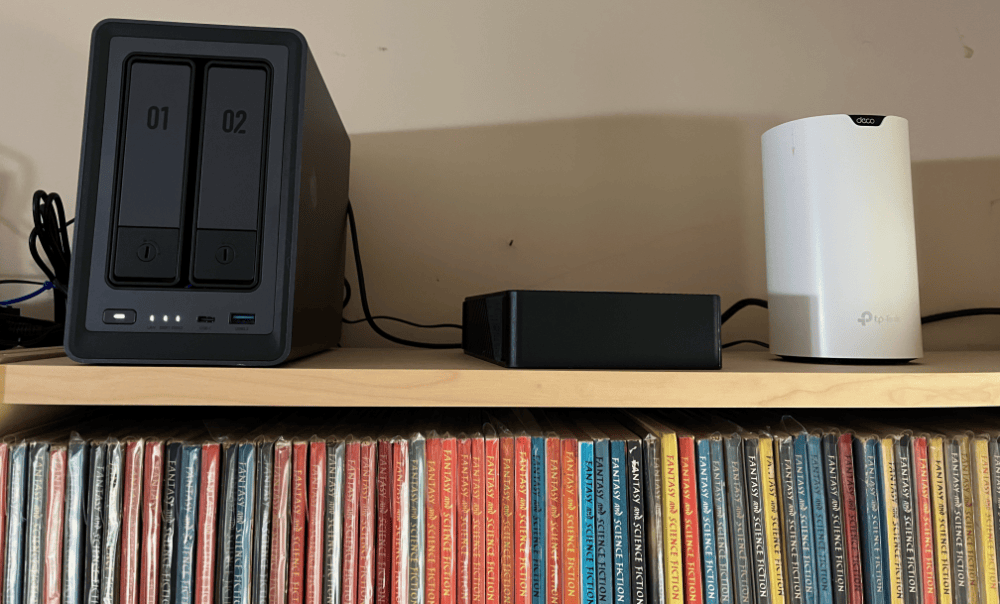
The above photo is my UGREEN NAS sitting on top of a bookcase. Beside it is a portable drive used for a backup.
DVDs vs. Streaming vs. Plex/Jellyfin

by James Wallace Harris, 1/24/26

I don’t know if you are old enough to remember videotapes, but they were a marvel for the time. Before that, the only way to see a particular movie or TV show was to wait for it to be broadcast. Sometimes, you’d wait years to catch one specific film or rerun of a TV show. After VHS tapes, you could go to the video store and buy or rent whatever you wanted to see.

Eventually, DVDs and Blu-ray discs replaced VHS tapes. Progress was always toward building personal libraries of favorite films and TV shows with higher quality playback resolution.

Then came Netflix DVD rentals. That allowed access to any film or TV show within a day or two. That was so damn convenient that owning DVDs became less popular. After that came Netflix streaming, which made access to favorite shows instant. Who needed to own anything?

Nothing stays the same. If Netflix had never gotten any competitors, I think I would have been content forever. It was like Spotify, one monthly payment for everything.

Now our favorite movies and TV shows are spread over many streaming services, but some shows are nowhere to be streamed. In some cases, I can rent what I want to see individually from Amazon, but with other shows, I have to buy them on DVD or Blu-ray. And for a few shows, they aren’t available for sale or rent.

Over the past thirty years, Susan and I have amassed quite a library of movies and television shows on DVD/BD. But for years, they have been sitting on an out-of-the-way bookshelf. Several years ago, I gave several bags of DVDs to the Friends of the Library when Marie Kondo became popular. However, I kept a couple of hundred that still sparked joy when I held them.

Last fall, I got disgusted with streaming services. We were subscribed to several. They kept raising their prices. And what I wanted to see kept jumping from one service to another. And HBO jettisoned many of its classic shows.

I bought a NAS, set up Jellyfin, and started ripping our library to MP4 and MKV. I’ve been working for weeks, and I’m only halfway through our discs.

It’s a lot of work ripping discs. And it’s frustrating because sometimes neither MakeMKV nor WinX DVD Ripper can read an old disc. I own the complete series of The Twilight Zone on Blu-ray, but MakeMKV couldn’t read one disc, and one episode from another. Nor could either program rip my copy of the theatrical release of Blade Runner from a DVD set that had four different versions of the movie. I also failed to copy one episode of MASH out of 251. That’s annoying.

Setting up Jellyfin on a NAS was not easy. A NAS with RAID drives and two external drives for backups was expensive. It’s quite a commitment to set up your own streaming service on Plex or Jellyfin.

I’m not sure it is worth it. Once the content is ripped, watching movies and TV shows on Jellyfin is much more convenient than watching them on disc. And Susan and I have started using our video library again. That does feel good.

Once ripping is done, Jellyfin is very nice. But to be perfectly honest, watching the same shows on Netflix, HBO, Apple, Hulu, Paramount+, etc. is a bit more convenient, and the picture quality is a touch better. Jellyfin is still plenty good enough.

Personally, I’d be happy to cancel all our streaming services and just watch what we own, but Susan wants to keep all her favorite streaming services. Susan loves watching all her favorite TV shows over and over again while she cross-stitches. There are about a dozen of them spread over five streaming services. I’ve bought the complete series of several of them on DVD and ripped them to my Jellyfin server.

I will subscribe to a streaming service to see a new TV series. For example, I’m subscribing to Paramount+, so my friends and I can watch Landman season 2. Before that, I subscribed to MGM+ so Annie and I could watch Earth Abides. And I resubscribed to Apple+ so Susan and I could watch Pluibus. And before that, I subscribed to Britbox to watch The House of Eliot.

Right now, Susan and I are watching The Fugitive and Mr. Novak at night on Jellyfin. Neither is available to stream. In other words, to watch shows unavailable on regular streaming, we have to buy the discs and use Jellyfin.

I roughly estimate that Jellyfin costs me $25 a month, assuming my NAS setup lasts at least five years, and includes the cost of buying DVDs occasionally. We currently spend $50-60 a month on streaming services.

Unless we cancel half of our subscriptions, Jellyfin isn’t saving us any money. It does make our 30-year investment in DVDs pay dividends again. However, many of the movies and TV shows in our library are available on streaming services. It’s hard to make a case for Jellyfin. Life would be simpler without ripping discs, maintaining a NAS server, backing up, etc. Also, our house would be less cluttered without all these discs.

Going the Plex/Jellyfin route only makes sense if you only watch what you own. And that tends to be old favorites. If you love seeing the latest films and shows, Jellyfin isn’t practical.

Knowing what I know now, I would have given all my old discs to the Friends of the Library and my DVD and Blu-ray players to Goodwill. The Fugitive and Mr. Novak have their nostalgic appeal for 1963, but there are many other worthy new shows to watch in 2026.

JWH

What I Learned After Buying a UGreen DXP2800 NAS

by James Wallace Harris, 1/7/26

Don’t bother reading this essay unless you’re considering the following:

  • Want to cancel your subscription to a cloud storage site
  • Manage terabytes of data
  • Hope to convert your old movies on discs to Jellyfin or Plex
  • Want to run Linux programs via Docker

For the past few years, I’ve been watching YouTubers promote NASes (Network Attached Storage). Last year, I just couldn’t help myself, I bought a UGreen DXP2800. I’m not sure I needed a NAS. Dropbox has been serving me well for over fifteen years.

[My DXP2800 is pictured above on top of a bookcase. It’s connected to a UPS and a mesh router. It’s a little noisy, but not bad.]

Actually, I loved Dropbox until I figured it was the reason my computers ran warm and noisy. I assume that was because it routinely checked tens of thousands of my files to keep them indexed, copied, and up-to-date on my three computers, two tablets, and an iPhone.

Lesson #1. If you desire simplicity, stay with the cloud. My old system was to use Dropbox and let it keep copies of my files locally on my Windows, Mac, and Linux machines. I figured that was three copies and an off-site backup. That was an easy-to-live-with, simple backup solution. However, I only had 2TB of files, which Dropbox charged me $137 a year to maintain.

Moving to the UGreen DXP2800 meant accessing all my files from the single NAS drive. It’s cooler and quieter on my computers. However, I had to purchase two large external drives for my Mac and Windows machines that I use to automatically back up the NAS drive daily.

Thus, my initial cost to leave Dropbox was the cost of the DXP2800 and two 16TB Seagate drives for a RAID array ($850), plus $269 (20TB external drive). I already had an old 8TB external drive for the other backup. And if I want an off-site backup, I need to physically take one of my drives to a friend’s house, or pay a backup company $100-200 a year.

And I have more to back up now. I was running Plex on my Mac using a 4TB SSD. Basically, I ripped a movie when needed. Since I got the UGreen DXP2800 and 12TB of space, I’ve been ripping all my movies and TV shows that I own on DVD and Blu-ray. I’ve ripped about half of them, and I figure I’ll use up 8-10TB of my RAID drive space.

I’ve been working for weeks ripping discs. I had no idea we had accumulated so many old movies and TV shows over the last thirty years. Susan and I had gotten tired of using a DVR/BD player, so we shelved all those discs on a neglected bookcase and subscribed to several streaming services.

When I bought the UGreen DXP2800, I thought we could cancel some of our subscriptions. We are viewing our collection via Jellyfin, but we haven’t canceled any streaming services.

I should finish the disc ripping in another couple of weeks. At least I hope. It’s a tedious process. My fantasy is having this wonderful digital library of movies and television shows we love, and we’ll rewatch them for the rest of our lives. I even fantasized about quitting all our streaming services. But I don’t think that will happen.

Looking at what TV shows Susan and I watched during 2025, none were from our library. Susan has started rewatching her old favorite movies. She especially loves to watch her favorite Christmas movies every year. And I have talked her into watching two old TV shows I bought on disc years ago, The Fugitive and Mr. Novak. Both shows premiered in 1963, and neither is on a streaming service.

Lesson #2. It would taken much less effort to just watch the shows on disc. And when I’ve converted them, I will have 10TB of data that I must protect. It’s a huge burden that hangs over my head.

Lesson #3. I tried to save money by using the free MakeMKV program. It works great, but creates large files and is somewhat slow. I eventually spent $40 for WinX DVD Ripper for Mac. It’s faster and creates smaller .mp4 files. However, it doesn’t rip BD discs. I found another Mac program that will, but it will cost another $49. I bought a $39 program for the PC to rip Blu-ray discs, but it was painfully slow. They claimed to have a 90-day money-back guarantee, yet the company ignored my request to return my money. It pisses me off that there are several appealing ripping programs I’d like to try, but they all want their money up front. Most offer a trial that will run a 2-minute test. That’s not enough. I’m happy with WinX DVD Ripper for Mac; I just wish it ripped Blu-rays.

Even then, files that are ripped from Blu-ray movies are huge and take much longer to rip. I’m not sure Blu-ray is worth it.

I tend feel movies and TV shows look better on streaming services. Most people won’t notice. My wife doesn’t see the difference between DVD and BD. For ripping, I prefer DVDs.

Lesson #4. I bought the UGreen NAS even though I wanted a Synology NAS. UGreen just had better hardware. I thought I wanted to get into Docker containers, and UGreen had the hardware for that at the price I wanted to pay. However, setting up Docker containers requires a significant amount of Linux savvy.

I kind of wish I had gotten Synology. It runs many programs natively, so you don’t have to mess with Docker. I hope UGreen will do more of that in the future. I spent days trying to get the YACReader server running. I never succeeded. That was frustrating because I really want it.

There are many services I’d like to run, but I just don’t have the Docker and Linux skills.

Final Thoughts

I’m not sure I would buy a NAS, knowing what I know now. However, if I could figure out how to run programs via Docker, I might go whole hog on NASes. In which case, I would regret getting the 2-drive DXP2800. At first, I thought I’d be good getting two 8TB drives to put into RAID. But I spent more for two 12TB drives, just in case. If I really get into having a home lab, I should have bought the 4-drive DXP4800 Plus.

There are many features I wish UGreen would offer for its software. If all the programs I wanted to run ran natively on the UGreen OS and were easy to use, I think I would love having a NAS.

Setting up file sharing was easy. I got it working on my Mac, Windows, Linux, Android, iPad, and iPhone. However, it’s hard to open files using the UGreen app on iOS and Android. I don’t know why UGreen just can’t make an all-purpose file viewer. Dropbox can open several file types on my iPhone. UGreen expects me to save the file to my iPhone and then view it with an iPhone app. However, I can’t get my iPhone apps to find where the UGreen app saved the file.

That’s why I want the YACReaderLibrary Server running on the DXP2800. I have YACReader running on every device. It can read .pdf, .cdr, .cdz, .jpg, .png, .tiff, and more. Too bad it doesn’t read Word and Excel files too. I think other Linux server apps can handle even more file types. I want my NAS to be a document server.

I’m moving forward with my NAS. If I fail, I’ll regret buying the NAS. Or, I might create a server full of useful apps that I can’t live without. That sounds fun, but it also sounds like it could become a lifelong burden.

JWH

Is the Day of the Disc Done?

The other day I bought a new Sony BDP-S5100 Blu-ray player to replace the old LG player that was having a lot of trouble playing Blu-ray discs.  Strangely, two of my friends separately asked me the same thing, “Why did you do that, isn’t Blu-ray dead?”  Then my friend Mike wondered if it was possible to give up his Netflix disc account to just live with Netflix streaming.  My wife has already given up her disc account, and so have many of my friends.

I’ve wondered about cancelling my Netflix disc subscription, but there are still plenty of movies, television shows and documentaries that aren’t available on streaming.  In fact, I recently joined ClassicFlix to get old movies Netflix doesn’t offer on disc or streaming.  And often I recommend films and TV shows to friends and they often report back they aren’t  on streaming, like Project Nim.

bd

Yet, I’ve got to wonder if the writing is on the wall, and if the disc isn’t under Hospice care.  I hardly ever play my CDs anymore, preferring to stream music.  And my DVD/BD collection sits ignored in a dark closet because I stream or rent.  Since the quality of streaming is constantly improving, I feel less and less need to buy Blu-ray discs.  I dropped my Blu-ray option on Netflix because the LG players was giving me so much trouble, but at ClassicFlix, Blu-ray discs are not extra, so I started getting them again.  They are wonderful, but some some HD streamed movies are nearly as good.  Movies like The Big Trail and The Apartment were just stunning in Blu-ray, so I want that quality if I can get it.

If I dropped Netflix discs and ClassicFlix discs, a whole world of video would be cut off from me.  I have added Warner Instant Archive streaming, which is like Turner Classic Movies.  I also get Hulu Plus and Amazon Prime.  I have years of streaming content waiting to be watched, and by the time I finished them all, years more of viewing would be added, maybe even the stuff I now get on discs.  If I was patient, everything will eventually come to streaming.

And then there’s the question:  Won’t canceling disc rentals and not buying discs speed up the move to everything being streamed?  Isn’t it a kind of protest against discs and a vote for streaming if people shun discs?

Blu-ray isn’t quite dead because if you want the best possible picture, Blu-ray is it, but streaming technology is nipping on its heels.  Netflix is even working on 4k streaming.  I probably shouldn’t have bought that Sony BDP-S5100 player, but hell, it was a good deal at $79.  It’s a marvel of technology, and about 1/3rd, or even 1/4th the size of the BD player.  Plus it plays BD discs MUCH faster, and it plays the discs the BG player wouldn’t.   And it also plays CDs and SACDs, and it has Gracenote built in, making CD playing more visual.  There’s even more, it has a host of smart TV features with many channels that I don’t even plan to use, because I own a Roku 3, but if I didn’t they would be very cool.

Yeah, I think, the writing is on the wall.  This will probably be my last disc player.

Back in the 1960s I often wondered what life would be like in the 21st century.  I never imagined living without LPs, or even conceived of the CD or DVD.  Yet, many science fiction books and movies imagined a future where we’d be less materialistic.  I guess that’s coming true.

JWH – 1/28/14