What Computer OS Do I Recommend To Friends in 2026?

by James Wallace Harris, 3/15/26

I’ve been helping friends and family with their computers for decades. I managed hundreds of computers at work. I’ve set up thousands of computers since 1978. In the old days, it was easy, just recommend Windows to the average computer user, and Mac OS to Apple fanatics. But in 2026, Windows is annoying many people, Apple computers are becoming affordable, and Linux use is spreading. Plus, there are options like Chrome OS for minimalists. It’s much harder to help someone pick a new computer today, with prices spiking, AI, and all the new chips.

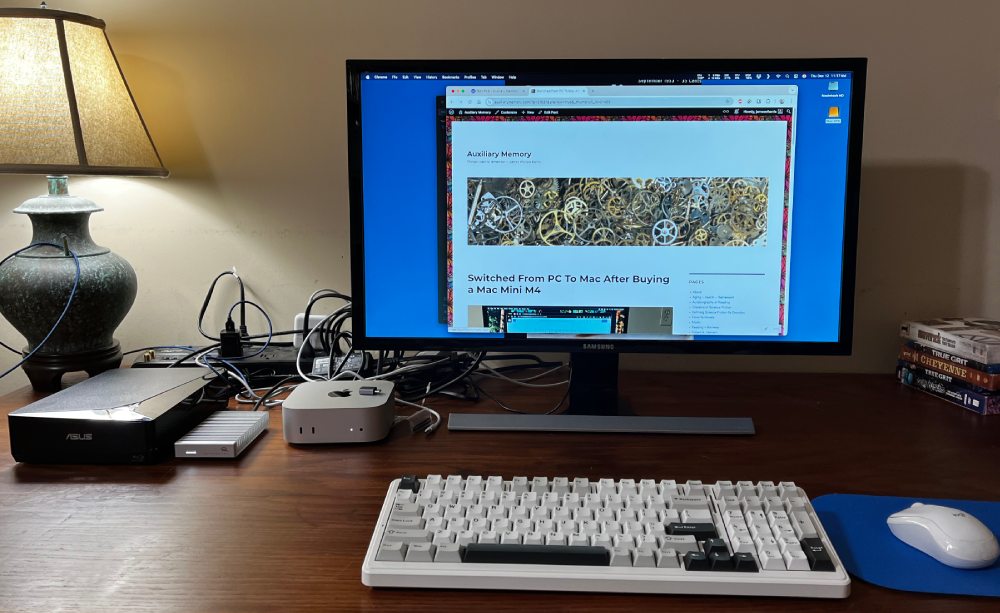
I’m not even sure what computer OS I want for myself anymore. I was a faithful Windows user for decades. Yet, I’m writing this post on a Linux machine, running the Mint distro, an operating system suitable only for the nerdiest of computer geeks. However, my main machine is a Mac Mini M4 since I packed away my Windows machines.

Since retiring, far fewer people ask me for help buying a new computer. And I have much less experience shopping online and visiting Best Buy. But a couple of my friends, whom I picked out their current laptop, are talking about needing a new computer. Their main concern is price. Both spent $600 for Windows laptops about six years ago.

Several decent laptops in the $500-650 range are currently for sale from Lenovo, HP, Dell, and Samsung. Any of these machines would be superior to what they had before. All are configured with an i5, 16GB of memory, and between 256GB and 1TB SSD drives. Each model has a 15.6-inch screen. Recommending them would cause them the least amount of transition pain for my two friends

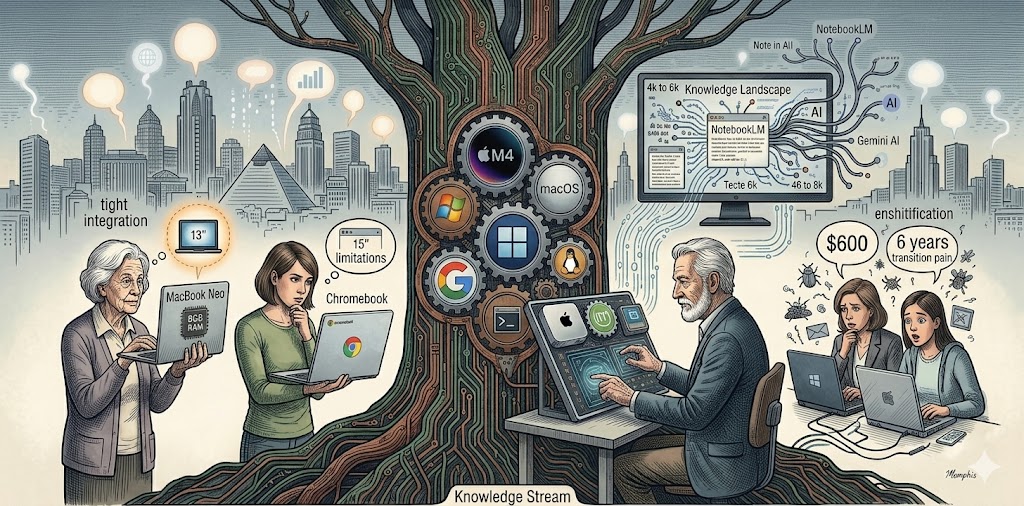
However, Apple’s new MacBook Neo for $599 is an excellent deal. The Mac Mini M4 at $599 is what got me to switch to MacOS last year. And both of my friends use iPhones and iPads. If they were willing to suffer learning MacOS, they might be happier with the MacBook Neo if they could handle a 13-inch screen.

The Neo has only 8GB of memory and a 256GB SSD. For their use, that’s no problem. However, for $100 more, they could get a 512GB drive and Touch ID. The real problem with the Neo’s small screen. I have the MacBook Air M1 with the 13-inch screen, and it’s really too small for my liking. The cheapest MacBook with a 15-inch screen is the Air, at $1,299. They won’t spend that kind of money.

There’s another factor. Windows machines typically last 5-6 years, while the latest Apple computers with the super-efficient and powerful Apple Silicon chips might last years longer. None of my other machines matches the quality of the Mac Mini and Air. It’s not even close.

The 13-inch screen on the MacBook Neo and Air has a default resolution that makes the typeface tiny. Of course, Janis and Linda are used to 6-inch and 10-inch screens on their iPhones and iPads, so they might adjust. I set my MacBook Air to a lower resolution to make the typeface bigger and easier to read. But this sometimes causes a problem when a button I’m supposed to click is off-screen. I have to change the resolution, click the button, then change the resolution back.

There are Chromebooks with 15 to 16-inch screens within my friends’ price range. And these are a possibility. But I have to explain their limitations, and I’m not sure if my friends will understand. If everything you do is within a browser window, then Chromebooks are a good solution.

Since I’ve been migrating away from Office 365 to Google Drive, I could almost switch to a Chromebook myself. Most of my computer work is writing, browsing, and emailing. It’s only when I want to scan old magazines and create PDF and CBR files that I need programs that Chromebooks can’t install.

I use my MacBook Air M1 machine only to write when I’m sitting in a recliner, and it does the job fine. And I do that in a Chrome browser window while using Google Docs. I could have bought a Chromebook and saved half of what I spent on the Air.

But there are other things to consider. There is a synergy between my iPhone, iPad, MacBook Air, and Mac Mini. And since I’m subscribed to Google Gemini, their AI, there is a reason to use Google Chrome, Google Docs, and all the other Google services, which all work with Apple hardware. It helps that Google and Apple are becoming big buddies. Having tight integration between my hardware platforms and all my software has many synergistic benefits. Yet, I must admit, those benefits require a learning curve.

I admire Linux. I root for Linux. But I’d never recommend Linux to a casual computer user. Being a Linux user is like being Sisyphus – always having to roll a rock uphill. It’s fun if you can dig it, but painful if you can’t.

The easiest solution for my friends (and me) is for them to buy something like what they had before. But that pains me. Windows is suffering tremendous enshitification. And Apple is producing stunning hardware, hardware that’s becoming affordable.

Technologically, my Mac Mini M4 is by far the most advanced computer I’ve ever owned, and it only cost me $549. The MacBook Air M1 was $749, and it’s been the nicest laptop I’ve ever owned.

The last computer I helped a friend buy was a tiny Mini PC. She had an HP laptop that was giving her trouble, but didn’t want to spend $600 for another one. She already owns an external monitor, keyboard, and mouse that she uses with the laptop. I asked her if she ever took her laptop on trips. She said no, that it always stayed on the desk. I said she could get a tiny Mini PC with an N95 chip for $190, which was more powerful than her laptop. She’s been happy with that solution.

Most people don’t need powerful computers. Only gamers and content creators need to get expensive machines. I know several people who only use their phones for functions they once used on computers. Sme other friends find that a tablet covers all their computing needs.

It’s gotten very hard to recommend computers for people. AI has the potential to shake things up even more. If people get used to talking to their computer and asking it to do the work, the whole human-computer interface might change. We could all end up talking to our watches.

Most of my friends are retired. A few still take courses that require a computer. But for the most part, without needing a computer for school or a job, the desire to own computers diminishes. Most of the fun functions that families bought home computers for have moved to smartphones, smart televisions, and smart home products.

I might tell my two friends to try buying a keyboard for their iPads and see if they can get by without laptops. MacOS and iPadOS are getting closer, so features and functions are crossing over to the other form factor.

If I gave up on digitizing old books and magazines, I could probably adapt to blogging on my MacBook Air. I’m amazed by how so many young people only have laptops. But I haven’t made that decision yet. If I only browsed the net, emailed, and needed a word processor and spreadsheet rarely, I could consider a tablet with a keyboard.

I think the trend is towards smaller computers, or even away from computers. I’m still stuck in the past. I love large high-resolution monitors. I gave up loving big tower computers years ago and switched to mini PCs. I haven’t paid close attention to what all my friends are using, but I think desktop computers are disappearing from homes.

Finally, I will say that learning to use AI might make people want a big monitor again. If you enjoy learning, researching, and writing, Google’s Gemini and Notebook LM are wonderful tools. Juggling lots of knowledge works great on 27 to 32-inch high-resolution monitors. If you think you’ll be into that, I highly recommend the latest Mac Mini with the most memory and the largest 4k to 6k monitor you can afford.

Gemini, my AI of choice, just told me it currently offers more features to Windows users, but it’s catching up quickly for Mac users. I was disappointed to discover that many Gemini and CoPilot features I enjoy on the Mac aren’t available on Linux. That’s pushing me towards the Mac and away from Linux. I wrote the first draft of this post on Linux, but moved to the Mac to finish it.

Most people will use AI on their phones for reference and chatting. AI could replace Googling. However, if you create any kind of content, AI could influence how much computer power you will want in the future. I’m not sure anyone knows how much they will use AI in the coming years. It could inspire hobbies and pursuits we can’t imagine now.

I’d say the Mac Mini ($599) with a 27″ 4K monitor ($300) offers the most bang for the buck if you want to get into content creation and play around with AI for under $1,000. It’s also good for programming. But it’s overkill if you just browse the web, do TurboTax once a year, and maybe write a few letters or create a spreadsheet of your expenses. Gamers will want to stick with Windows, although many are moving to Linux. Production content creators will want something faster.

JWH

What I Learned After Buying a UGreen DXP2800 NAS

by James Wallace Harris, 1/7/26

Don’t bother reading this essay unless you’re considering the following:

  • Want to cancel your subscription to a cloud storage site
  • Manage terabytes of data
  • Hope to convert your old movies on discs to Jellyfin or Plex
  • Want to run Linux programs via Docker

For the past few years, I’ve been watching YouTubers promote NASes (Network Attached Storage). Last year, I just couldn’t help myself, I bought a UGreen DXP2800. I’m not sure I needed a NAS. Dropbox has been serving me well for over fifteen years.

[My DXP2800 is pictured above on top of a bookcase. It’s connected to a UPS and a mesh router. It’s a little noisy, but not bad.]

Actually, I loved Dropbox until I figured it was the reason my computers ran warm and noisy. I assume that was because it routinely checked tens of thousands of my files to keep them indexed, copied, and up-to-date on my three computers, two tablets, and an iPhone.

Lesson #1. If you desire simplicity, stay with the cloud. My old system was to use Dropbox and let it keep copies of my files locally on my Windows, Mac, and Linux machines. I figured that was three copies and an off-site backup. That was an easy-to-live-with, simple backup solution. However, I only had 2TB of files, which Dropbox charged me $137 a year to maintain.

Moving to the UGreen DXP2800 meant accessing all my files from the single NAS drive. It’s cooler and quieter on my computers. However, I had to purchase two large external drives for my Mac and Windows machines that I use to automatically back up the NAS drive daily.

Thus, my initial cost to leave Dropbox was the cost of the DXP2800 and two 16TB Seagate drives for a RAID array ($850), plus $269 (20TB external drive). I already had an old 8TB external drive for the other backup. And if I want an off-site backup, I need to physically take one of my drives to a friend’s house, or pay a backup company $100-200 a year.

And I have more to back up now. I was running Plex on my Mac using a 4TB SSD. Basically, I ripped a movie when needed. Since I got the UGreen DXP2800 and 12TB of space, I’ve been ripping all my movies and TV shows that I own on DVD and Blu-ray. I’ve ripped about half of them, and I figure I’ll use up 8-10TB of my RAID drive space.

I’ve been working for weeks ripping discs. I had no idea we had accumulated so many old movies and TV shows over the last thirty years. Susan and I had gotten tired of using a DVR/BD player, so we shelved all those discs on a neglected bookcase and subscribed to several streaming services.

When I bought the UGreen DXP2800, I thought we could cancel some of our subscriptions. We are viewing our collection via Jellyfin, but we haven’t canceled any streaming services.

I should finish the disc ripping in another couple of weeks. At least I hope. It’s a tedious process. My fantasy is having this wonderful digital library of movies and television shows we love, and we’ll rewatch them for the rest of our lives. I even fantasized about quitting all our streaming services. But I don’t think that will happen.

Looking at what TV shows Susan and I watched during 2025, none were from our library. Susan has started rewatching her old favorite movies. She especially loves to watch her favorite Christmas movies every year. And I have talked her into watching two old TV shows I bought on disc years ago, The Fugitive and Mr. Novak. Both shows premiered in 1963, and neither is on a streaming service.

Lesson #2. It would taken much less effort to just watch the shows on disc. And when I’ve converted them, I will have 10TB of data that I must protect. It’s a huge burden that hangs over my head.

Lesson #3. I tried to save money by using the free MakeMKV program. It works great, but creates large files and is somewhat slow. I eventually spent $40 for WinX DVD Ripper for Mac. It’s faster and creates smaller .mp4 files. However, it doesn’t rip BD discs. I found another Mac program that will, but it will cost another $49. I bought a $39 program for the PC to rip Blu-ray discs, but it was painfully slow. They claimed to have a 90-day money-back guarantee, yet the company ignored my request to return my money. It pisses me off that there are several appealing ripping programs I’d like to try, but they all want their money up front. Most offer a trial that will run a 2-minute test. That’s not enough. I’m happy with WinX DVD Ripper for Mac; I just wish it ripped Blu-rays.

Even then, files that are ripped from Blu-ray movies are huge and take much longer to rip. I’m not sure Blu-ray is worth it.

I tend feel movies and TV shows look better on streaming services. Most people won’t notice. My wife doesn’t see the difference between DVD and BD. For ripping, I prefer DVDs.

Lesson #4. I bought the UGreen NAS even though I wanted a Synology NAS. UGreen just had better hardware. I thought I wanted to get into Docker containers, and UGreen had the hardware for that at the price I wanted to pay. However, setting up Docker containers requires a significant amount of Linux savvy.

I kind of wish I had gotten Synology. It runs many programs natively, so you don’t have to mess with Docker. I hope UGreen will do more of that in the future. I spent days trying to get the YACReader server running. I never succeeded. That was frustrating because I really want it.

There are many services I’d like to run, but I just don’t have the Docker and Linux skills.

Final Thoughts

I’m not sure I would buy a NAS, knowing what I know now. However, if I could figure out how to run programs via Docker, I might go whole hog on NASes. In which case, I would regret getting the 2-drive DXP2800. At first, I thought I’d be good getting two 8TB drives to put into RAID. But I spent more for two 12TB drives, just in case. If I really get into having a home lab, I should have bought the 4-drive DXP4800 Plus.

There are many features I wish UGreen would offer for its software. If all the programs I wanted to run ran natively on the UGreen OS and were easy to use, I think I would love having a NAS.

Setting up file sharing was easy. I got it working on my Mac, Windows, Linux, Android, iPad, and iPhone. However, it’s hard to open files using the UGreen app on iOS and Android. I don’t know why UGreen just can’t make an all-purpose file viewer. Dropbox can open several file types on my iPhone. UGreen expects me to save the file to my iPhone and then view it with an iPhone app. However, I can’t get my iPhone apps to find where the UGreen app saved the file.

That’s why I want the YACReaderLibrary Server running on the DXP2800. I have YACReader running on every device. It can read .pdf, .cdr, .cdz, .jpg, .png, .tiff, and more. Too bad it doesn’t read Word and Excel files too. I think other Linux server apps can handle even more file types. I want my NAS to be a document server.

I’m moving forward with my NAS. If I fail, I’ll regret buying the NAS. Or, I might create a server full of useful apps that I can’t live without. That sounds fun, but it also sounds like it could become a lifelong burden.

JWH

Knowing When To Give Up Dreams

by James Wallace Harris, 1/25/25

I love computers and digital devices but I have too many of them. For some reason getting old is making me anxious about owning stuff. Like the instinct that makes birds fly south for the winter, aging has triggered an instinct to simplify my life. I’m still young enough to want all the junk I have, but I’m going through an in-between aging stage, where I want to keep stuff and get rid of it at the same time. That anxiety is gnawing at me more and more.

I will give an analogy that young people might not understand. On the Ed Sullivan Show in the 1960s, Ed would have these guys who could spin plates on the top of sticks. They could keep a row of plates spinning on sticks by running between them and jiggling each stick. Being young means you have the energy and dexterity to quickly run between lots of spinning plates, but when you get older, you slow down and can only keep a few spinning.

Being 73 isn’t that old, but it’s old enough to start feeling I need to spin fewer plates. Deciding what activities I love that I need to quit is stressful. At 73, I’m already old enough to let a bunch of spinning plates fall. That’s depressing, but I don’t have the energy to keep up. I’m starting to lose the energy to even care, which is scarier. I need to decide which activities I love the most that I can manage, and psychically let go of the other ones.

I realize I’ve already been doing this for years, but I’ve been letting activities go that didn’t matter much. What hurts is realizing which activities and ambitions I still hope to pursue that I need to stop thinking about.

When I retired in 2013, I thought I’d do many things with programming and computers. I thought about getting an M.S. in Computer Science even though I would never work as a programmer again. But none of that happened. I thought I would at least learn to program Python for fun. That didn’t happen. I had many ideas for programs I wanted to write but never did. I see that I only programmed when people were paying me.

For years, I’ve kept buying computers and piddling around with them. My most productive activity was scanning old pulp magazines and science fiction fanzines to put on the Internet Archive, but I’ve stopped because of diminishing energy. However, I’ve kept all these computers, scanners, and other devices for all my dream projects that need to be thinned out.

I don’t know if my Hamlet nature keeps me from committing to one computer operating system, or if I’m a child in a toyshop who screams he wants everything. However, mining three computer systems with three different operating systems has become a pain in my psyche.

Reality tells me to give up several dreams and the equipment that went with them. Why keep a Midi keyboard after I discovered I have no musical talent? Well, I kept it thinking someday I’d see how much I could do with Garage Band on the Mac with minimal talent. I’m sure that’s a delusion.

I need to jettison everything I plan to use that is obvious that I will never use. I’ve had this insight many times before but never could pull the trigger. The present reality is my energy reserves are getting so low that too much of them are being wasted on keeping impractical hopes alive. I must commit to the operating systems and computer equipment that will do the most for my aging future self.

If Microsoft wasn’t so heavy-handed in constantly adding features and monitoring my computer, I would make everything Windows. But there isn’t a Windows phone. If I didn’t dislike MacOS so much, I could settle on buying everything from Apple, because I love my iPhone and iPad. I do love Mac hardware, I just don’t like MacOS. And if I had my druthers, I’d go Linux and use all FOSS programs because I admire the concept of open source.

The idealistic computer geek in me wants to choose Linux. And I could realistically pick Linux if I knew I’d never wanted to scan magazines again. Picking Linux also means giving up Microsoft Office. Picking Linux also means living as a computer user minority.

I love my Mac Mini M4 machine because it’s quiet. I love my Mac Air M1 laptop because the hardware is deluxe. And I can use MacOS just fine. I just prefer how Windows, or even Linux works better. However, Linux and Macs aren’t compatible with all my hardware and software.

The most universally useful computer I have is my Windows machine. My favorite phone is my iPhone. My favorite tablet is my iPad Mini. I like Android because it allows for microSD cards and is more open, but it’s nowhere near as easy to use as iOS. I wish iOS devices allowed microSD cards. Buying extra storage for iPhones and iPads is so damn expensive.

I wish I had 2TB of storage on every device I owned to fully replicate my Dropbox filesystem to every device. Dropbox is fantastic as long as I have the space to replicate everything. Selective sync could work, but it seems to have disappeared as a feature on my Mac and Linux machines. I could get an iPad Pro with 2TB of memory, but it’s $2000, and even then I’m unsure if it would sync my Dropbox drive. Maybe I should give up needing 2 terabytes of old files.

I would simplify my life by keeping my Windows computer, Mac Air M1, iPhone, and iPad Mini. But wouldn’t it be more logical to keep my Mac Mini M4 and be compatible with my other Apple devices I don’t want to give up? As Mr. Spock would say, “That is the logical solution.” But damn, I don’t know if I could walk away from Windows.

I could test the logical solution by packing away my Windows and Linux machines for several months to see how I feel.

And maybe that’s an approach I could try with other things I own. Just pack them away, and see how long I can live without them. If I can, then get rid of them.

I wrote this essay to think things through. I realize now, that I’ve written myself into a decision. I’ll let you know if I can overcome my Hamlet complex and commit.

I have decided to pack two computer systems away. I just don’t know which two.

JWH

Switched From PC To Mac After Buying a Mac Mini M4

by James Wallace Harris, 12/12/24

I’ve wanted to own a Mac since 1984, but they were always too expensive. When Apple announced the Mac Mini M4 had 16GB of memory as the base memory for $599, I preordered one from Amazon. They had it for $579.

I love Windows. But my Intel NUC has been annoying the crap out of me with its fan noise. I even went into the BIOS and set the processor to its lowest performance level so it should overheat less, but the fan still whined, but not as much. And it got less hot to touch. I don’t know why, but even when I didn’t use it background processes were always running something. I checked for viruses and malware but didn’t find any. I opened the NUC and vacuumed the dust, making sure that wasn’t a problem. I don’t know why, but that fan whine just got to me.

I never hear the Mac Mini M4. Nor does it get warm. I added a 4TB external hard drive to handle my 2TB Dropbox drive and a folder of Plex movies and TV shows. The heavy-duty OWC enclosure with metal fins gets warm sometimes, but it’s quiet.

I love the quietness of the Mac Mini, but I’m worried about the OWC external drive. The light comes on when I’m not using the machine, and it’s sometimes warm when I haven’t used the Mac for hours. I’m worried that something is running in the background that I might not like.

Modern computers run dozens of processes in the background, and this is starting to annoy me. I was hoping the Mac ran fewer. It’s a major reason why I considered switching to Linux. I never know if those processes are essential, corporate spying, or malware activity.

The trick to switching to the Mac was finding software that served the same functions as all my Windows programs. Office 365 runs on both platforms. No problem there. I use Microsoft Edge browser on Windows, Linux, iOS, Android, and Mac. Obsidian runs on PC, Mac, and Linux.

I was quite happy with Office 365 on the Mac. It even installs Microsoft Defender, which includes more than just anti-virus tools. However, I’ve taken all the Microsoft programs off the Mac Mini because Activity Monitor shows that Microsoft runs too many processes.

I’m testing to see if I want to standardize on pure Apple apps or pure Open Source programs. I mention this because switching to the Mac is like switching to Linux. You can try to make everything work like it did on Windows, or you can go native.

My first big hurdle was Adobe Photoshop Elements 2021. My copy came with a Mac version but wouldn’t load on the Mac Mini. I thought I’d switch to Gimp because it runs on PC, Mac, and Linux. But I just don’t like Gimp. I solved the problem by using the online app, Photopea. It works great on all three platforms. Photopea works like Photoshop Elements and Photoshop, so no learning curve.

Ripping disks with MKV works even better on the Mac. Plex works fine from the Mac. I took down the Intel NUC I used as a Plex server. Since I have so much space on the Mac Mini’s external drive, and because it is quiet and power-efficient enough to run all the time, I made it my Plex server. Even my favorite CBR reader, YACReader ran on the Mac (as well as Windows and Linux).

The Mac doesn’t work with my Plustek OptiBook flatbed scanner or my favorite program for scanning and mass manipulating images, IrfanView. I just can’t find a driver for the Plustek for either the Mac or Linux and no other program I’ve ever used even comes close to the utility of IrFanView.

Also, I can’t find a screenshot program that functions as well as Windows Snipping Tool, or ShareX.

I own a copy of Abbyy Fine Reader for Windows 15, but they’ve moved to a subscription program. I don’t know if I’m ready to subscribe to the Mac version, especially since I can’t use my scanner. I used to scan old science fiction magazines and fanzines to convert to CBR files and needed the Plustek, IrfanView, Abbyy Fine Reader, and Scan Tailor for the job. That task might have to stay on my Windows machine. But it might just retire from that hobby.

I’m not keen on how Mac OS does many things, but that might be because I’m used to doing it differently on Windows for decades. I’m adapting. I can go days without turning on my Windows machine.

One thing that has made migration easier is I keep all my files on Dropbox. I’ve always been annoyed when using one machine and remembering a file I created is stored locally on another machine. It’s so much easier to keep things on Dropbox and I can access the files from Windows, Linux, Mac OS, iOS, and Android.

There’s a lot I have left to learn about using a Mac, but it doesn’t seem to be too much trouble to do the Mac way of doing things. I am disappointed my PlusTek scanner doesn’t work.

I’ve wanted to switch to Linux for years, but never could because it didn’t have the programs I use to scan magazines or drivers for my scanner. So the Mac and Linux are equal in that.

Now that I’ve been using the Mac Mini M4 for a couple weeks, I love the hardware, but I still don’t like Apple’s operating system. It works, but it’s not what I’ve been using for decades. Using MacOS reveals just how much I love Windows 11. I wish Windows 11 ran on the Mac Mini M4.

I don’t like having an external SSD. The OWC housing and 4TB Crucial SSD work fine, but there’s something else on the desk. That bugs me. Knowing what I know now, I wouldn’t try switching to a Mac. I’m going to stick with it, at least for several months.

I write this in case you’re seduced by the Mac Mini M4 mania and haven’t bought one yet.

I love the high-tech of the M4 chip. I love having such a powerful machine. However, all I really needed was a new mini PC that was quiet.

JWH

The Challenge of Cross Platform Computing Life

by James Wallace Harris, 11/11/23

For the first twenty years of my life, I didn’t use computers. I started off using computers in 1971 at school, and bought my first one, an Atari 400 in 1980. Before the decade was over, I had standardized on MS-DOS computers at home, but used PCs and Macs at work. During the 1990s, Windows became the standard at work and home, although I also used a MacIntosh at work sometimes. I was a computer programmer and had to support both. I liked the Mac, but never owned one until recently when I bought a M1 Mac Air.

I bought the Mac laptop because I have back problems and can’t always sit at my desktop computer and the Air had the longest battery life. I can use the Mac Air in my La-Z-Boy when I can’t sit at my desk.

Because I use the iPhone the most daily of all my computers, and because I like to read on iPads, I should have standardized on MacOS and bought an iMac for my desktop computer. Apple is doing everything it can to make its hardware and software to synergistically work across all its devices. However, I haven’t done that. I’ve been a Windows guy for decades.

Life would be much easier if I owned a Windows computer, with a Windows tablet, a Windows smartphone, and a Windows laptop, and they all shared files from OneDrive. Windows offers the widest functionality because it supports most hardware and software. And Microsoft has done an excellent job of constantly improving Windows. However, since the early 1990s I’ve hankered after another operating system, UNIX. Back then, real computer guys used UNIX. Now real computer guys use Linux.

In the early 1990s, my friend Mike bought a copy of MINIX. It was a cheap imitation of UNIX for $89. I didn’t want to spend $89, so when I read about a free UNIX-like operating system called Linux I downloaded Slackware from USENET News messages onto several floppy disks and installed it on an extra machine. I thought it was neat, but I couldn’t run any program I was used to running. That was disappointing.

After that, I would check into Linux about once a year, always hoping it could do everything I did on my Windows machine. In recent years it’s gotten close. This week I bought a Minis Forum UM680 small form factor computer and installed LMDE (Linux Mint Debian Edition) on it. This was a complete extravagance since I don’t need any more computing power. Unfortunately, when I started seeing videos about the UM680 I just lusted after it. The thing is tiny, but super cool. It has 32GB of memory, 1TB of SSD hard disk space, 3 USB-A ports, 2 USB-C ports, and a microSD card reader. I paid $433 for it. To configure a Mac Mini or iMac like this would cost three times as much.

I decided I would finally use Linux as much as possible. I’m writing this blog on my Linux machine (see photo). I don’t hate Windows, in fact, I think it’s the best OS to use. I bought the M1 Mac Air because as a piece of hardware it was impressive and had a long battery life. However, I’m not too keen on Mac OS, and I dislike using a laptop. I love big computer screens. My Windows machine has a 34″ widescreen monitor, and the Linux box has a 27″ 4K monitor. Using the 13.3″ screen on the Air is painful to me. But I practice using it every day. During those times when my back goes out, I hate being away from my computer and figure I need a lifeboat computer, and the Mac Air will be that lifeboat.

After using the M1 Mac Air I wished I had bought a Windows laptop even though I would have had to buy a machine that had much less battery life. The Mac Air is great, and I’ve always wanted a Mac, but life would have been so much easier with one less OS to support. I should have ignored my long desires to use both Macs and Linux machines. That didn’t happen, so I’m living with three operating systems. I’ll standardize on one in the future as I get older, but for now I need to be a cross platform user.

Dealing with five operating systems (Windows, MacOS, iOS, Linux, Android) is a pain in the butt. Doing word processing is a snap on all the operating systems. So is using a spreadsheet, web browser, and email. It really doesn’t matter what OS I use for common computer activities. A cheap Chromebook would have been all I needed. However, I pursue two activities which I’m having trouble doing on the Mac and Linux.

Most of my computer use involves blogging. If I had to, I could create a blog with text, photos, and videos just from my iPhone. But it’s tedious and I can’t manipulate images the way I can in Windows. I create my photo layouts using HTML first, and then using the Windows Snipping Tool to grab the layout I want and save it to .jpg. I know that’s a silly way to avoid learning a program like Photoshop or GIMP. I’ve been using Photoshop Elements for photo manipulation for years but have never learned to use it well. Since Photoshop Elements isn’t available for Linux, I need to learn to use GIMP, the standard free photo editor that works on Windows, Mac, and Linux. Blogging on the Mac and Linux will take a little time to learn, but it shouldn’t be too hard.

Because I write about science fiction and its history, I have a large library of digital scans of science fiction magazines. In fact, I have copies of most of the science fiction magazines that were published in the 20th century. They are in the .cbr format. I can read them on devices from all five operating systems. However, I currently can only create a scan with my Windows machine. It takes several programs to create a magazine scan, and a scanner. The scanner works best under Windows. Getting it to work under MacOS or Linux is a pain. And some of the software I need to process the scan pages is only available for Windows.

For me to be truly cross platform ready, I need to get magazine scanning going on the Mac and Linux machines. That will take much longer. I will need to find drivers for my scanner, and new software on each OS that does the work of the Windows software I use now.

Like I said, I should have just stuck with Windows. Life would have been easier, cheaper, and less cluttered. But when I look into the future, I wonder if I shouldn’t become a Mac person, even though I don’t like MacOS. I love my iPhone, and doubt I’ll ever switch from it. I love the iPad far better than my Android tablet. The logical thing would be to migrate to iPhone, iPad, iMac, and Mac Air as my only computer platform.

I guess years of being a PC guy makes me shy away from becoming a Mac guy. I’ve always wanted to be a complete computer nerd and use Linux. There are Linux phones and tablets, but they are so damn clunky. Theoretically, I could go total Linux. However, I would be out of step with everyone I know.

Logic says I should pick one platform and stick to it. But I’ve never been very logical, at least with computers and technology. I’ve aways been impulsive, wanting all the different kinds of gadgets. Now that I’m getting older, that impulse is coming home to roost, and I don’t think it’s viable for the last years of life when I should be minimizing possessions.

JWH