DVDs vs. Streaming vs. Plex/Jellyfin

by James Wallace Harris, 1/24/26

I don’t know if you are old enough to remember videotapes, but they were a marvel for the time. Before that, the only way to see a particular movie or TV show was to wait for it to be broadcast. Sometimes, you’d wait years to catch one specific film or rerun of a TV show. After VHS tapes, you could go to the video store and buy or rent whatever you wanted to see.

Eventually, DVDs and Blu-ray discs replaced VHS tapes. Progress was always toward building personal libraries of favorite films and TV shows with higher quality playback resolution.

Then came Netflix DVD rentals. That allowed access to any film or TV show within a day or two. That was so damn convenient that owning DVDs became less popular. After that came Netflix streaming, which made access to favorite shows instant. Who needed to own anything?

Nothing stays the same. If Netflix had never gotten any competitors, I think I would have been content forever. It was like Spotify, one monthly payment for everything.

Now our favorite movies and TV shows are spread over many streaming services, but some shows are nowhere to be streamed. In some cases, I can rent what I want to see individually from Amazon, but with other shows, I have to buy them on DVD or Blu-ray. And for a few shows, they aren’t available for sale or rent.

Over the past thirty years, Susan and I have amassed quite a library of movies and television shows on DVD/BD. But for years, they have been sitting on an out-of-the-way bookshelf. Several years ago, I gave several bags of DVDs to the Friends of the Library when Marie Kondo became popular. However, I kept a couple of hundred that still sparked joy when I held them.

Last fall, I got disgusted with streaming services. We were subscribed to several. They kept raising their prices. And what I wanted to see kept jumping from one service to another. And HBO jettisoned many of its classic shows.

I bought a NAS, set up Jellyfin, and started ripping our library to MP4 and MKV. I’ve been working for weeks, and I’m only halfway through our discs.

It’s a lot of work ripping discs. And it’s frustrating because sometimes neither MakeMKV nor WinX DVD Ripper can read an old disc. I own the complete series of The Twilight Zone on Blu-ray, but MakeMKV couldn’t read one disc, and one episode from another. Nor could either program rip my copy of the theatrical release of Blade Runner from a DVD set that had four different versions of the movie. I also failed to copy one episode of MASH out of 251. That’s annoying.

Setting up Jellyfin on a NAS was not easy. A NAS with RAID drives and two external drives for backups was expensive. It’s quite a commitment to set up your own streaming service on Plex or Jellyfin.

I’m not sure it is worth it. Once the content is ripped, watching movies and TV shows on Jellyfin is much more convenient than watching them on disc. And Susan and I have started using our video library again. That does feel good.

Once ripping is done, Jellyfin is very nice. But to be perfectly honest, watching the same shows on Netflix, HBO, Apple, Hulu, Paramount+, etc. is a bit more convenient, and the picture quality is a touch better. Jellyfin is still plenty good enough.

Personally, I’d be happy to cancel all our streaming services and just watch what we own, but Susan wants to keep all her favorite streaming services. Susan loves watching all her favorite TV shows over and over again while she cross-stitches. There are about a dozen of them spread over five streaming services. I’ve bought the complete series of several of them on DVD and ripped them to my Jellyfin server.

I will subscribe to a streaming service to see a new TV series. For example, I’m subscribing to Paramount+, so my friends and I can watch Landman season 2. Before that, I subscribed to MGM+ so Annie and I could watch Earth Abides. And I resubscribed to Apple+ so Susan and I could watch Pluibus. And before that, I subscribed to Britbox to watch The House of Eliot.

Right now, Susan and I are watching The Fugitive and Mr. Novak at night on Jellyfin. Neither is available to stream. In other words, to watch shows unavailable on regular streaming, we have to buy the discs and use Jellyfin.

I roughly estimate that Jellyfin costs me $25 a month, assuming my NAS setup lasts at least five years, and includes the cost of buying DVDs occasionally. We currently spend $50-60 a month on streaming services.

Unless we cancel half of our subscriptions, Jellyfin isn’t saving us any money. It does make our 30-year investment in DVDs pay dividends again. However, many of the movies and TV shows in our library are available on streaming services. It’s hard to make a case for Jellyfin. Life would be simpler without ripping discs, maintaining a NAS server, backing up, etc. Also, our house would be less cluttered without all these discs.

Going the Plex/Jellyfin route only makes sense if you only watch what you own. And that tends to be old favorites. If you love seeing the latest films and shows, Jellyfin isn’t practical.

Knowing what I know now, I would have given all my old discs to the Friends of the Library and my DVD and Blu-ray players to Goodwill. The Fugitive and Mr. Novak have their nostalgic appeal for 1963, but there are many other worthy new shows to watch in 2026.

JWH

What I Learned After Buying a UGreen DXP2800 NAS

by James Wallace Harris, 1/7/26

Don’t bother reading this essay unless you’re considering the following:

  • Want to cancel your subscription to a cloud storage site
  • Manage terabytes of data
  • Hope to convert your old movies on discs to Jellyfin or Plex
  • Want to run Linux programs via Docker

For the past few years, I’ve been watching YouTubers promote NASes (Network Attached Storage). Last year, I just couldn’t help myself, I bought a UGreen DXP2800. I’m not sure I needed a NAS. Dropbox has been serving me well for over fifteen years.

[My DXP2800 is pictured above on top of a bookcase. It’s connected to a UPS and a mesh router. It’s a little noisy, but not bad.]

Actually, I loved Dropbox until I figured it was the reason my computers ran warm and noisy. I assume that was because it routinely checked tens of thousands of my files to keep them indexed, copied, and up-to-date on my three computers, two tablets, and an iPhone.

Lesson #1. If you desire simplicity, stay with the cloud. My old system was to use Dropbox and let it keep copies of my files locally on my Windows, Mac, and Linux machines. I figured that was three copies and an off-site backup. That was an easy-to-live-with, simple backup solution. However, I only had 2TB of files, which Dropbox charged me $137 a year to maintain.

Moving to the UGreen DXP2800 meant accessing all my files from the single NAS drive. It’s cooler and quieter on my computers. However, I had to purchase two large external drives for my Mac and Windows machines that I use to automatically back up the NAS drive daily.

Thus, my initial cost to leave Dropbox was the cost of the DXP2800 and two 16TB Seagate drives for a RAID array ($850), plus $269 (20TB external drive). I already had an old 8TB external drive for the other backup. And if I want an off-site backup, I need to physically take one of my drives to a friend’s house, or pay a backup company $100-200 a year.

And I have more to back up now. I was running Plex on my Mac using a 4TB SSD. Basically, I ripped a movie when needed. Since I got the UGreen DXP2800 and 12TB of space, I’ve been ripping all my movies and TV shows that I own on DVD and Blu-ray. I’ve ripped about half of them, and I figure I’ll use up 8-10TB of my RAID drive space.

I’ve been working for weeks ripping discs. I had no idea we had accumulated so many old movies and TV shows over the last thirty years. Susan and I had gotten tired of using a DVR/BD player, so we shelved all those discs on a neglected bookcase and subscribed to several streaming services.

When I bought the UGreen DXP2800, I thought we could cancel some of our subscriptions. We are viewing our collection via Jellyfin, but we haven’t canceled any streaming services.

I should finish the disc ripping in another couple of weeks. At least I hope. It’s a tedious process. My fantasy is having this wonderful digital library of movies and television shows we love, and we’ll rewatch them for the rest of our lives. I even fantasized about quitting all our streaming services. But I don’t think that will happen.

Looking at what TV shows Susan and I watched during 2025, none were from our library. Susan has started rewatching her old favorite movies. She especially loves to watch her favorite Christmas movies every year. And I have talked her into watching two old TV shows I bought on disc years ago, The Fugitive and Mr. Novak. Both shows premiered in 1963, and neither is on a streaming service.

Lesson #2. It would taken much less effort to just watch the shows on disc. And when I’ve converted them, I will have 10TB of data that I must protect. It’s a huge burden that hangs over my head.

Lesson #3. I tried to save money by using the free MakeMKV program. It works great, but creates large files and is somewhat slow. I eventually spent $40 for WinX DVD Ripper for Mac. It’s faster and creates smaller .mp4 files. However, it doesn’t rip BD discs. I found another Mac program that will, but it will cost another $49. I bought a $39 program for the PC to rip Blu-ray discs, but it was painfully slow. They claimed to have a 90-day money-back guarantee, yet the company ignored my request to return my money. It pisses me off that there are several appealing ripping programs I’d like to try, but they all want their money up front. Most offer a trial that will run a 2-minute test. That’s not enough. I’m happy with WinX DVD Ripper for Mac; I just wish it ripped Blu-rays.

Even then, files that are ripped from Blu-ray movies are huge and take much longer to rip. I’m not sure Blu-ray is worth it.

I tend feel movies and TV shows look better on streaming services. Most people won’t notice. My wife doesn’t see the difference between DVD and BD. For ripping, I prefer DVDs.

Lesson #4. I bought the UGreen NAS even though I wanted a Synology NAS. UGreen just had better hardware. I thought I wanted to get into Docker containers, and UGreen had the hardware for that at the price I wanted to pay. However, setting up Docker containers requires a significant amount of Linux savvy.

I kind of wish I had gotten Synology. It runs many programs natively, so you don’t have to mess with Docker. I hope UGreen will do more of that in the future. I spent days trying to get the YACReader server running. I never succeeded. That was frustrating because I really want it.

There are many services I’d like to run, but I just don’t have the Docker and Linux skills.

Final Thoughts

I’m not sure I would buy a NAS, knowing what I know now. However, if I could figure out how to run programs via Docker, I might go whole hog on NASes. In which case, I would regret getting the 2-drive DXP2800. At first, I thought I’d be good getting two 8TB drives to put into RAID. But I spent more for two 12TB drives, just in case. If I really get into having a home lab, I should have bought the 4-drive DXP4800 Plus.

There are many features I wish UGreen would offer for its software. If all the programs I wanted to run ran natively on the UGreen OS and were easy to use, I think I would love having a NAS.

Setting up file sharing was easy. I got it working on my Mac, Windows, Linux, Android, iPad, and iPhone. However, it’s hard to open files using the UGreen app on iOS and Android. I don’t know why UGreen just can’t make an all-purpose file viewer. Dropbox can open several file types on my iPhone. UGreen expects me to save the file to my iPhone and then view it with an iPhone app. However, I can’t get my iPhone apps to find where the UGreen app saved the file.

That’s why I want the YACReaderLibrary Server running on the DXP2800. I have YACReader running on every device. It can read .pdf, .cdr, .cdz, .jpg, .png, .tiff, and more. Too bad it doesn’t read Word and Excel files too. I think other Linux server apps can handle even more file types. I want my NAS to be a document server.

I’m moving forward with my NAS. If I fail, I’ll regret buying the NAS. Or, I might create a server full of useful apps that I can’t live without. That sounds fun, but it also sounds like it could become a lifelong burden.

JWH

Is the Day of the Disc Done?

The other day I bought a new Sony BDP-S5100 Blu-ray player to replace the old LG player that was having a lot of trouble playing Blu-ray discs.  Strangely, two of my friends separately asked me the same thing, “Why did you do that, isn’t Blu-ray dead?”  Then my friend Mike wondered if it was possible to give up his Netflix disc account to just live with Netflix streaming.  My wife has already given up her disc account, and so have many of my friends.

I’ve wondered about cancelling my Netflix disc subscription, but there are still plenty of movies, television shows and documentaries that aren’t available on streaming.  In fact, I recently joined ClassicFlix to get old movies Netflix doesn’t offer on disc or streaming.  And often I recommend films and TV shows to friends and they often report back they aren’t  on streaming, like Project Nim.

bd

Yet, I’ve got to wonder if the writing is on the wall, and if the disc isn’t under Hospice care.  I hardly ever play my CDs anymore, preferring to stream music.  And my DVD/BD collection sits ignored in a dark closet because I stream or rent.  Since the quality of streaming is constantly improving, I feel less and less need to buy Blu-ray discs.  I dropped my Blu-ray option on Netflix because the LG players was giving me so much trouble, but at ClassicFlix, Blu-ray discs are not extra, so I started getting them again.  They are wonderful, but some some HD streamed movies are nearly as good.  Movies like The Big Trail and The Apartment were just stunning in Blu-ray, so I want that quality if I can get it.

If I dropped Netflix discs and ClassicFlix discs, a whole world of video would be cut off from me.  I have added Warner Instant Archive streaming, which is like Turner Classic Movies.  I also get Hulu Plus and Amazon Prime.  I have years of streaming content waiting to be watched, and by the time I finished them all, years more of viewing would be added, maybe even the stuff I now get on discs.  If I was patient, everything will eventually come to streaming.

And then there’s the question:  Won’t canceling disc rentals and not buying discs speed up the move to everything being streamed?  Isn’t it a kind of protest against discs and a vote for streaming if people shun discs?

Blu-ray isn’t quite dead because if you want the best possible picture, Blu-ray is it, but streaming technology is nipping on its heels.  Netflix is even working on 4k streaming.  I probably shouldn’t have bought that Sony BDP-S5100 player, but hell, it was a good deal at $79.  It’s a marvel of technology, and about 1/3rd, or even 1/4th the size of the BD player.  Plus it plays BD discs MUCH faster, and it plays the discs the BG player wouldn’t.   And it also plays CDs and SACDs, and it has Gracenote built in, making CD playing more visual.  There’s even more, it has a host of smart TV features with many channels that I don’t even plan to use, because I own a Roku 3, but if I didn’t they would be very cool.

Yeah, I think, the writing is on the wall.  This will probably be my last disc player.

Back in the 1960s I often wondered what life would be like in the 21st century.  I never imagined living without LPs, or even conceived of the CD or DVD.  Yet, many science fiction books and movies imagined a future where we’d be less materialistic.  I guess that’s coming true.

JWH – 1/28/14

The Big Trail (1930)

Yesterday I got in a Blu-ray copy of The Big Trail, an early widescreen movie from 1930.  The Big Trail has quite a fascinating history behind it.  Starting in the late 1920s Hollywood began experimenting with widescreen and Technicolor, but the depression killed off interest in these technologies, especially widescreen because it required special theaters, screens and projectors.   The Big Trail was filmed from April to August in 1930 in black and white using both 70mm and 35mm cameras, creating two unique versions from different camera angles.  The whole production was also shot in five languages using different lineup of actors for each language.

Epic production doesn’t begin to describe the making of The Big Trail.  Seven different states were used for film locations, covering 4,300 miles, traveling in 123 baggage cars, with 93 principle actors, 2,000 extras at all the locations, 725 Indians from five tribes, 12 Indian guides, 22 cameramen, 1,800 cattle, 1,400 horses, 500 buffalo, 185 wagons and a production staff of 200.  And they had the wagon train do everything wagon trains did back in those pioneering days, cross rivers, get lowered down cliffs, blaze trails through timbered lands, cross deserts, climb mountains, survive snow storms.  All other wagon train movies since have been puny in scale.  The Big Trail was a very gigantic production, but it’s not as famous as Gone With the Wind from 1939.  That’s too bad, it should be better remembered.

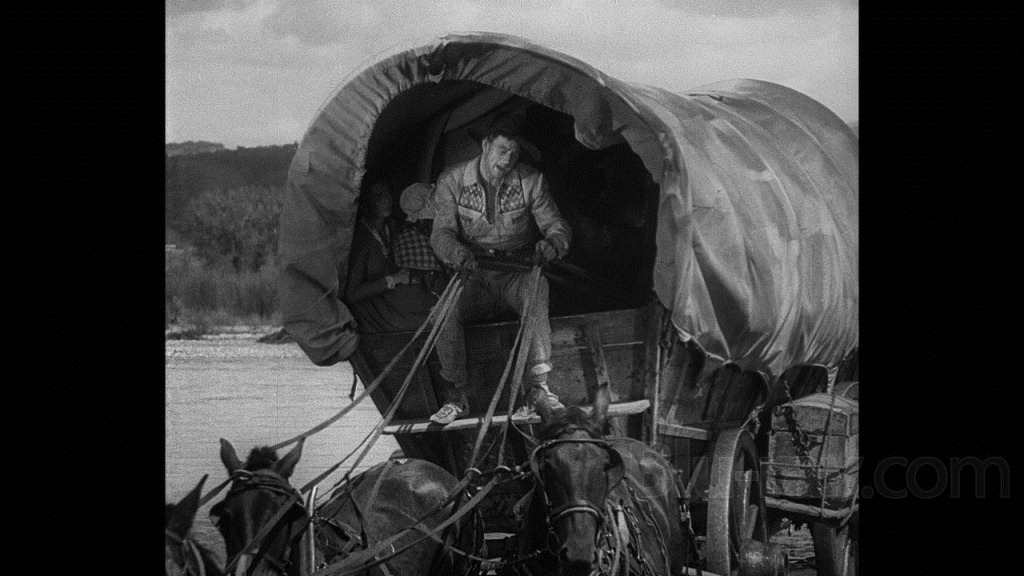
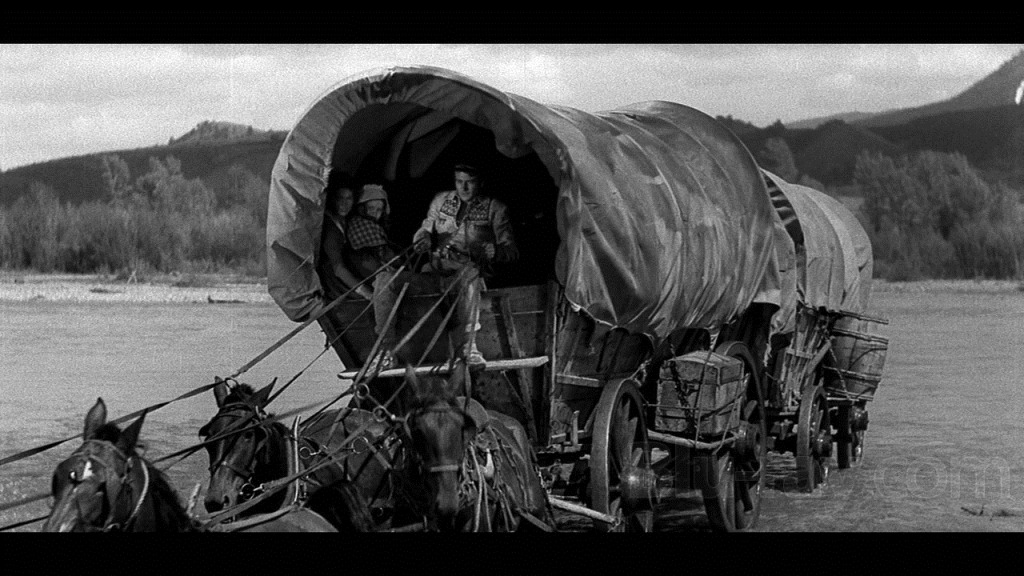
I had to watch The Big Trail alone last night because none of my movie friends like old black and white films and I couldn’t convince them to give The Big Trail a try.  What a loss for them.  It’s a shame because as soon as I started up The Big Trail I was stunned by it’s beauty.  Old movies are in a square format and seeing this movie in widescreen format on my 56” HDTV made my heart ache.  If only this 70mm widescreen format had caught on in 1930.  All my favorite old films from the 1930s and 1940s would have been so much more grandeur looking.  And that’s what Fox called their experimental format, the “Fox Grandeur” process.  What if Grand Hotel had been widescreen, or The Maltese Falcon, or The Wizard of Oz, just imagine how more magnificent they would have been.

The-Big-Trail-screenshot

[This screenshot is from Blu-ray.com – click for full size version]

Modern movie goers are used to high tech visual productions and when they see old movies, especially silent films and films from the 1930s, they think of them as primitive and crude, and often assume people of those days saw what we see today.  Their technology was older and less sophisticated, but the prints we have are old and in bad shape compared to the original pristine prints audiences viewed in their day.  Silent movie film goers didn’t see jerky prints with faded splotches and lines running through them.  They were sharp and vivid with wonderful contrast and the motion was as natural as modern films.  Sure the acting style is strange to us, but the acting style was normal to them.  It was great acting by the way they judged acting.

Old movies are being restored all the time now, especially for the Turner Classic Movie crowd and Blu-ray movie fans.  The restoration of The Big Trail is far from perfect, but I found it impressive to watch visually.  I expect someday that digital processing will clean up even more of these film defects, and created a print closer to the 1930 original.  For the most part the defects weren’t distracting.  A couple of times I thought it was raining because of the tiny scratches.

The Big Trail was an experiment in many ways, not only for the widescreen filming.  It was an early epic western about settlers crossing the country in a huge wagon train.  The Big Trail was the first starring role for John Wayne, but many of the actors were from Broadway, because it was an early talky and they needed actors that could project their voices to outdoor microphones.  Much of the dialog is stagey, and the cinematography is reminiscent of great silent films.  Yet, the sets and costumes look very realistic.  It would take another 60 years before citizens of the pioneering west looked so realistically dirty and grungy.  Plus the Indians were real.  Often the wagons were drawn by oxen and cattle rather than horses.

The-Big-Trail-normal

The-Big-Trail-wide

[Click for full size versions.  From Blu-Ray.com]

Westerns weren’t this good for a long time, not until Stagecoach, ten years later.  Most westerns of that era were B movies, shot full of action, produced from very small budgets.  As I watched The Big Trail, I wondered how many people living in 1930 had once traveled across the country in a wagon train.  The heyday of the wagon train was from the 1840 to the 1860s, when the continental railroad was built.  It was possible that some of these pioneers were still alive to verify the realism of the film.  I wonder if any of them wrote about it?

Westerns today, 80 years later, often work hard to appear realistic and historical.  It seems like every decade has a different view on how the old west looked.  Just compare the two versions of True Grit.  There’s also a difference in how violence was portrayed.  In The Big Trail, John Wayne only kills one of the bad guys, and with a knife.  And the bad guys were on the hesitant and cowardly side, only willing to kill when no one was looking.  Nobody was a great shot either.  Today’s westerns have heroes that kill as many people as a mass murderer.

The Big Trail was an innocent portrayal of pioneers.  At one point the John Wayne character was telling a bunch of boys what all he learned from living with the Indians and one of the kids asked, “Did they teach you were papooses come from?”  That’s about as risqué as this movie got.  But it was realistic enough to show a woman nursing a baby.  And I thought the love conflict was reasonably sophisticated for a movie of its time.  The plot of The Big Trail was gentile and slow.  I’m not sure people only used to modern films would like it.  Modern audiences are addicted to fast action, fast dialog, and lots of plot twists.  I’ve seen The Big Trail three times now and I’m looking forward to seeing it again.  It’s a classic western, and a classic 1930s film, my two favorite genres.

JWH – 12/29/12

Sony BDP-S570 3D Blu-ray Disc Player

I bought my wife the Sony BDP-S570 3D Blu-ray Disc Player for Christmas to keep at her apartment where she works out of town.  My wife has never been fanatical about video quality but slowly came to appreciate Blu-ray beauty from my watching 1080p shows on my LG BD390 Blu-ray player.  Last year I had bought her a Roku box so she could stream Netflix and the Sony BDP-S570 now replaces it, because not only does the Sony play BD discs, it streams Netflix, Amazon Videos on Demand, Pandora, Youtube, and many other internet video services.   Plus it supports DLNA networking to fetch photos, music and movies off our computers.

I was reading this weekend a review comparing the Roku, Apple TV and Boxee Box devices and it made me wonder if these gadgets had much a future if televisions and Blu-ray players are going to build in the same functionality?  Then today I was helping a friend who has an older MacBook find a cable that would allow her to output Netflix streaming to her television set and we discovered the cable that would handle video and audio was $99.  I told her for $79 she could get a Roku box for streaming Internet video, or spend $20-50 more and get a Blu-ray player that also streamed Internet video.

Of course, if I was helping a friend buy a new TV, I’d recommend they pick a set that had Netflix streaming built into the television.  Many sets offer various levels of Internet support.  It doesn’t take a science fiction writer to predict the future here.  If technology can eventually stream content with Blu-ray quality – why have any external boxes at all.

The El Dorado of cable subscribers is to have a la carte channels.  As the television becomes a node on the Internet it’s easy to envision this happening.  Right now you can get several paid channels this way, Netflix, Amazon on Demand, Hulu Plus, MLB, etc.  Of course TCP/IP and the Internet isn’t structured for this, but that doesn’t mean it won’t adapt.

So the question:  What to buy now?  Last year I bought my wife the Roku for $99.  A few months later the Wii started streaming Netflix.  If we had waited we could have skipped the Roku.  Then, this year, Susan wanted a Blu-ray player, which doesn’t replace the Wii.  But if the Wii played Blu-ray discs like the Playstation, we wouldn’t have needed it.  I love Blu-ray video quality, and right now Netflix HD is very nice, but not Blu-ray 1080p.

What I’d recommend is buying the cheapest device that streams Netflix at Netflix’s HD quality, and that’s the $79 Roku XD box.  However, if you really love movies and want to enjoy Blu-ray now, I’d recommend spending $20-70 more and getting a Blu-ray player that does both.  I got the BDP-S570 for $138 before Christmas on sale.  Right now it’s commonly sold for $149.  There are Ethernet wired only BD players for under a $100 that can do this.  Units with Wi-Fi built in are about $50 more. 

The BD disc players won’t have as many Internet channels as a Roku or Boxee device, but most people will be happy with Netflix.  Look for Amazon Video on Demand and Hulu Plus if you’re willing to rent movies individually, or pay for a bunch of TV shows.  The Netflix all you can eat pay model is a much better deal though.  However, when I saw True Grit at the movies recently and wanted to see the old John Wayne version, the quickest way was to pay Amazon $2.99 to stream it, which I did and it worked great.

The lesson in all of this is the television is becoming a major Internet appliance.  The trend might even kill off the cable and satellite business, and I expect eventually people will prefer to stream content rather than buy discs.  All too often I let my Netflix discs sit for days because it’s easier to stream.

The beauty of the Roku and Boxee devices is they can be upgraded to handle more Internet channels.  Blu-ray players can too, but my LG390 only added a couple of paid services.  LG did add more services to later models, which really irked me.  I hope newer Blu-ray players will be designed like the Roku and Boxee machines to be expandable.  The first time I upgraded the Sony BDP-S570 it added several channels, and it has an expanding menu, so that’s a good sign.

JWH – 1/11/11