When Will Computers Stop Transforming Our Lives?

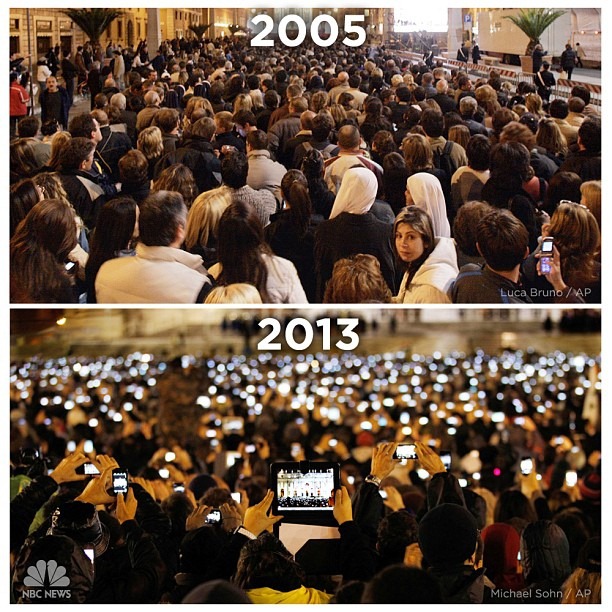
There is a before and after photo going around the Internet that beautifully illustrates how much we’ve transformed between two Popes.

2005-2013-apple

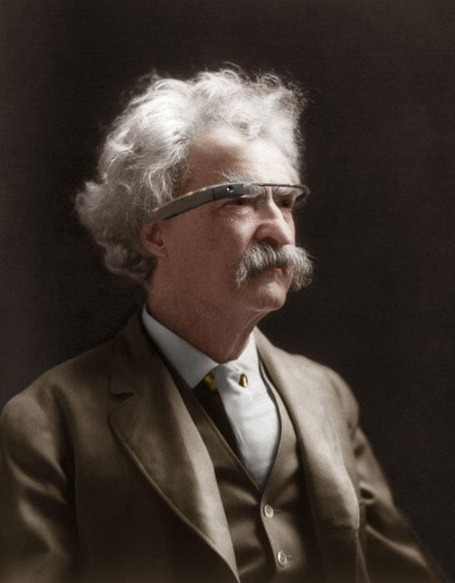
Change is inevitable, but this is getting ridiculous.  And what if Google Glass catches on?

mark-twin-with-google-glass

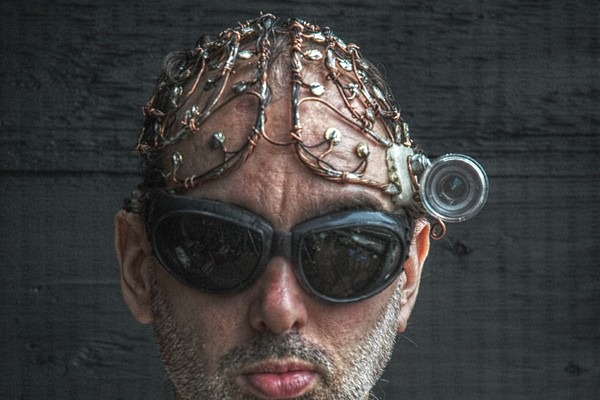
How soon until we all become Borgs?

wearablecomputing

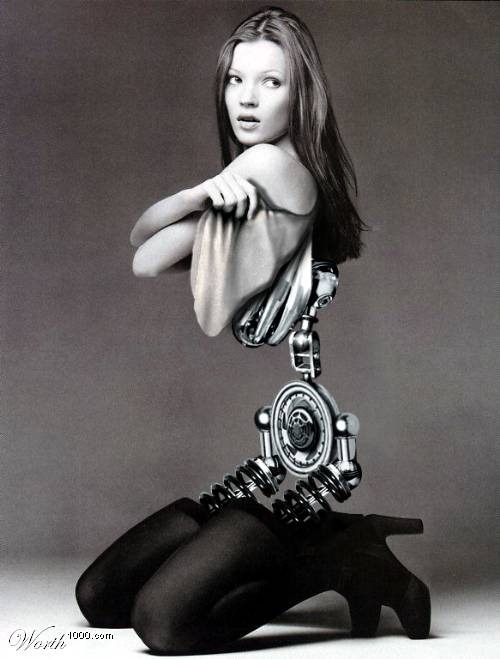
And at some point, will we become more machine than human?

kate_moss_cyborg1

JWH – 3/15/13

Dropbox and BoxCryptor: The Dangers of Encrypting Your Digital Life

In my never ending quest to get organized, I’ve been forced to explore the world of encryption.  I set up Dropbox to use as my primary drive for all my digital document filing.  Because my Dropbox files are replicated to all my machines at home and work this has caused a security problem at work.  We’re not allowed to store sensitive data on our local drives, and my own files will set off their security scanner.  So I’m being forced to encrypt my own documents.  Normally Dropbox encrypts your files for transfer over the net and at their storage site, and I’ve considered that good enough security.  However, I started thinking what would happen if someone came into my office when I just had stepped out.  Before Windows times out and locks my machine, people could see my home files in Dropbox, so I felt it was the time to study encryption programs.

We’re being forced to use TrueCrypt and BitLocker at work, so I was having to learn about this topic anyway.  It’s a scary subject because if you’re not careful you’ll lock all your critical files into an encrypted volume and you won’t be able to open it again.

At first I thought I just set up a TrueCrypt volume inside of Dropbox, but I read there were some issues with that.  Dropbox sees TrueCrypt as a single file, so if you have a gigabyte of data locked down, that’s a lot for Dropbox to handle over the internet.  Doing some Google research I discovered BoxCryptor.  BoxCryptor encrypts file by file, so the overhead for Dropbox is much lighter.

BoxCryptor

BoxCryptor is free for personal use as long as you only create one virtual drive.  BoxCryptor creates virtual drives.  Save something to its drives and it’s automatically encrypted.  It works with Dropbox, SkyDrive and other cloud drive services, as well as regular drives.   After you install BoxCryptor you mount the drive and use this access point to see the files unencrypted. If you don’t mount the drive and browse to the BoxCryptor folder within Dropbox you’ll see your files, but they won’t open.  And evidently, with the free version, you’ll see the filenames unencrypted, they just won’t open.  It appears if you buy the full version ($44.99), it will encrypt the filenames too, if you want.

Encrypting your files can be dangerous.  If you forget your password, kiss those precious documents goodbye.  Unless you’re a master NSA hacker, you’ll have no chance of ever opening them again.  Also, there’s a file listing in your BoxCryptor folder called .encfs6.xml.  Delete it and access to your files are long gone too.  Wow-wee – just thinking about all this makes me nervous.

Using encryption is not for the unfocused mind or scatterbrain user.

Here’s the thing.  We’re moving into an age where all our personal information is digital.  It’s our responsibility to back up our digital life.  Dropbox is a good way to do that, but Dropbox stores your files in the Cloud.  If you’re paranoid about who can see your files you’ll need to think about encryption.

Encryption takes extra work, extra precautions and can be a very risky endeavor if you’re careless.

Some people encrypt files because they worry that Cloud storage sites might peek at the good bits in their private files.  Other people encrypt their documents because they’re afraid their computers will be stolen and bad guys will steal their identity.  Still other people encrypt files because they don’t want people at home or at the office to mess with their stuff.  Criminals encrypt files because they don’t want the police or FBI use them as evidence.  There are many reasons to encrypt files.  You have to decide if its worth the effort.

When you encrypted a folder with BoxCryptor or TrueCrypt you’ll have to create a strong password that you must not forget, and you’ll be required to save a configuration key file that you should backup carefully.   If something happens to your machine and you want to recover your files from a backup to a new machine, you’ll need that configuration key file.

If you encrypt your life its very important how you handle the password and configuration key.  If your documents are very important you might want to put your passwords and keys into your will.  If a husband encrypts all his financial records and then dies, his wife won’t be able to see them.  If you’re an author and you last manuscript is encrypted, it won’t get published unless you’ve made provisions for your heirs to unlock it.

And it’s important how you configure BoxCryptor.  If you want to just hide your files from Dropbox, just use the defaults.  If you want to hide files from people that can access to your computers (either at home, work or at the thieves hideout), then don’t configure the mount drive to automatically remember the passwords.

JWH

Windows 8 Nightmare

My old friend Connell called me up tonight to update me on his saga of getting a new laptop with Windows 8.  From the last installment I had thought everything was great.  Connell is not a computer guy.  He’s been using Windows XP for years and never went to Vista or Windows 7.  Both Connell and my wife Susan bought a new laptop with Windows 8 the same week.  Susan wanted Windows 7, but none of the stores had a machine that came with it, and she didn’t want to custom order one from Dell or HP.  Both Susan and Connell bought their machines and set them up without my help.  I thought that was a good sign.  I did help Susan by giving her a Windows Easy Transfer cable and telling her how to use it.

Connell was quite angry when he called tonight.  Susan’s initial calls claimed Windows 8 wasn’t too bad, but since then she’s been running into some problems, mainly frustrated that some of her games aren’t Windows 8 compatible.  It’s frozen up a couple of times and she had to hold the power button down until it shut off.  But she loves her new machine anyway, especially that it doesn’t run hot like her old laptop.

Connell’s biggest frustration has been with the Charms bar.  He can’t get it to open when he wants it, and it opens when he doesn’t, driving him crazy.  Neither know how to go deep and configure their machine, or find options when they need them.

I’ve set Windows 8 up three times now on test machines at work.  I can use it, but it’s a pain in the ass, and it’s butt ugly.  I really, really, really dislike Windows 8.  Windows 7 is my all time favorite operating system, and I have OS X on an iMac at work.  I’m worried what will happen if I want to buy a new machine and my only choice for a PC is Windows 8.  I guess I’ll have to choose between Linux and OS X, and since I’m too cheap to buy a Mac, it will be Linux.  By the way, I put Ubuntu on my iMac as a dual boot and I really think Ubuntu looks great on an iMac.  But I won’t spend $1200 for that either.

Connell is planning on taking his laptop back and getting a Chromebook.  I’m curious how that will work out.  Susan is adapting to Windows 8, but she mainly plays Farmville and GameHouse games.  She’s going to give me her old laptop and I’m going to buy a SSD drive for it and put Ubuntu on it.  I wonder if she’ll want it back?

I’m also thinking about buying Android on a stick for my television and experimenting with it.

What’s happening is Windows 8 is forcing people to consider alternative OSes.  At work I’ve decided not to roll out Windows 8.  We can still get Windows 7 from Dell.  Many of our professors are now wanting Macs.  The iPhone and iPad have convinced many of our Windows users to try iMacs and MacBooks.  We were 95% PC, but that’s changing.  I still push Windows 7, but the tide might be turning.  Windows 8 will only inspire more switching.  I’ve already gotten several calls from people buying Windows 8 for their home machines.  Some have asked how can they put Windows 7 on their new machines.  Luckily I don’t have to support home machines, but I tell them they need to get used to Windows 8, because going back to Windows 7 is costly and time consuming.  Microsoft should make a Revert to 7 disc and give it away.  Connell was told he could pay $60 to have Windows 7 put on his machine from the store where he bought his new laptop, but he thought that was insulting and a ripoff.  You shouldn’t have to pay $60 to fix a new machine.

Microsoft, I think you need to pull a Coke Classic and bring back Windows 7.

JWH – 11/14/13

The Syncing Nightmare of Too Many Computers, Backups and Cloud Drives!

The Problems:

  • I have three home computers, three work computers, four external hard drives, and six cloud drive accounts, with tens of thousands of original files that are multiplied into hundreds of thousands stored on backup and cloud drives.
  • I have personal files and work files but often I want access to both kinds no matter where I’m at.
  • If I delete a file from the computer I’m working on, it’s not deleted from all the backed up copies.
  • Every time I look at a different drive I have to constantly decide again if I want to keep or delete a file.
  • Because I have 4 PCs, 1 Mac and 1 Linux machine I really don’t have a primary My Documents folder.
  • I have copied files in so many locations that I’m not sure which is the primary backup anymore.
  • I had a 1.5 TB drive fail and lost 200+ documentaries I was saving.
  • I have too many files from using personal computers for over 30 years.

thematrix

The Goals:

  • I want two perfectly organized Master Filing Systems, one personal, one work.
  • I want the easiest system possible for maintaining order and security.
  • I want to get rid of the external hard drives.
  • I want the fewest copies that equals the maximum security.
  • I want each of my Master Filing Systems to be backed up.
  • I want the files to have an organization structure that makes it obvious where everything is and belongs.
  • I want this to be my last file reorganization that will last me the rest of my life.
  • I want to clean out all the clutter and ancient files I no longer need.

Questions to Consider:

  • Can I trust a cloud drive like Dropbox or SkyDrive to be my Master Filing System?   This certainly would make using six computers and my mobile devices the easiest to use.
  • Would it be practical to use a cloud drive as my Master Filing System, and then use software to mirror the  cloud to local computers as backups?
  • Which cloud drive service is worthy of being my Master File Location?
  • How do I handle deleted files so the deleted files are removed from all the backups, but yet stored somewhere for long term recovery?
  • Do I need to worry about music files now that I have Amazon Cloud Player, Google Music, Rdio, and Rhapsody?
  • How do I keep my photos organized in my Master File Location and in-sync with gallery sites like Picasa?
  • What’s the best place to store emails?
  • Should I have a Master Deleted File System?
  • Does any cloud drive service offer a journaling file system?
  • When I create a Master Filing System, what folder structure should I use?
  • Are some file types too large to save permanently?
  • Can Dropbox or SkyDrive work like a roaming profile/home drive on a Windows Server?

Some Answers to Help Decide:

  • Dropbox offers it’s Packrat feature of unlimited undeletes for $39/yr. 
  • Using Dropbox means spending $139 a year minimum – the price of an external drive, but external drives take power, eventually, die, fill full of clutter, and take work to move from computer to computer.
  • Dropbox and SkyDrive have virtual drives making them easier to use than Amazon Cloud Drive, and allowing software like Second Copy to access them.
  • Dropbox virtual drives are available for all my my computers and devices.
  • Second Copy would let me replicate files from cloud drives to my PCs, thus making them the backups and not the cloud drives.
  • I could buy Dropbox for my personal Master File System and use SkyDrive for my work Master File System.  (I have a 25gb SkyDrive account because of work).
  • I have a 50gb Amazon Cloud Drive account that I could use as a cloud backup.
  • If I use Dropbox as my Master Filing System I could go around to all my computers, backups and other cloud drives and re-file all the files I want into it.  That might be the easiest way to create a Master Filing System.
  • For $25 a year Amazon keeps up to 250,000 songs for me in their Cloud Player and a copy in the Cloud Drive.  They also give me 50 GB of cloud space for other files.  Is this secure enough for maintaining my music library?

Are Some Files Too Big To Store Permanently?

When I lost the 1.5 TB of documentaries from my HTPC I began to wonder if some files are too large to save permanently.  At Dropbox’s rates, I’d have to spend $1500 a year to have maintained my documentary collection online.  I’m not going to do that.  Nor do I want to run a home server with backups to support such a library.  Maintaining 140 GB of music files is annoying enough, with copies on my main computer, two other computers, two external drives and at Amazon and Google.  But keeping a perfect copy of my music library in sync is a nightmare.  Then I have a large library of audiobook files scattered across several computers to worry about.  Are they even worth the worry when I spend 99.9% of time listening to books from Audible.com?

The solution here is just to live with what Netflix, Audible and Rdio provides to me, and not try to own my own library of movies, music and audiobooks.  This would certainly simplify a good deal of file management.

Conclusions:

Writing all of this helped me to think things through.  I’ve decided to make Dropbox my Master Filing System for personal files.  Currently I have 13 GB of free space, but I might have to up it to 100 GB ($99/year).  I haven’t decided if I want to spring for the $39/year Packrat feature, but it’s tempting.  It will probably take me months of going through all my file locations and filing what I want to save into my new Master Filing System.  I certainly hope that Dropbox doesn’t go out of business.

I’ve been using Dropbox for a while now, but as a test, I’ll start using it as my primary My Documents folder for all my devices to see what happens.

For a backup to my Master Filing System, I’ll use Second Copy to replicate Dropbox to a folder on my local hard drive.  I haven’t decided if I’ll replicate to two different machines or not.

I might reduce my home computers from three to two and get rid of all the external hard drives.  Since I’d run Windows Media Center on both of them, I might mirror my recorded shows to both machines, but this means maintaining 2 TB drives on both machines, and I’m not sure I like that.  I’m awful tempted to give up trying to save recorded video or even collecting DVDs.

If I succeed with using Dropbox as my Master Filing System and I get a new computer, it will be very easy to set up and start working.  Just install Dropbox client and my software.  Then create a backup folder and start replicating Dropbox files to it as the new primary backup.

Settling on Dropbox means my home files will be available at work, but also on my iPad and iPod touch or even any computer I sit down to use as long as it’s on the internet.  Let’s hope this works out.

JWH – 8/3/12

The Dangers of Building Your Own HTPC and Living Without Cable TV

As I reported earlier in FYI: DIY-FIY (Do-It-Yourself, Fix-It-Youself), my HTPC started crashing intermittently, the worse kind of electronic failure to troubleshoot.  I tried everything to fix it.  Eventually I decided it must be something wrong with the motherboard, so I bought a new motherboard and new CPU, one of those new AMD A6-3500 CPU/GPU combos.  For a few weeks it worked beautifully, much better than the old machine, but then it started acting up.  This time something different, it just wouldn’t boot.  In the rebuild I used a new, but old hard drive for the boot drive so I could save my recordings off the old boot drive, and use it as a second drive.  The only parts from the original machine was the case, 2nd power supply and the original memory.  I had two theories.  One, the used hard drive was bad, or two, the original memory was my problem all along and it had gotten worse.

Now all of this is very aggravating.  I had gotten used to having a home theater PC connected to my den television and now I’m making do with off the air broadcasts, Netflix discs and streaming, and a Roku box.  This still provides more TV than I have time to watch, but it doesn’t let me record shows.  However, this time around I have a backup DVR.

I bought a HD HomeRun Dual network TV tuner.  It was a snap to install.  Just plug in the over-the-air antenna, Ethernet cable and power cable and run a small install program on each of my PCs.  Now I can bring up Windows Media Center on any computer in my house and watch live TV, or record TV from two tuners.  Very slick.  So I can still record shows while my HTPC is broken but now I have to watch them on this computer.  This also simplifies my HTPC setup because it no longer has a TV tuner card in it.  And because I bought the new A6 with Radeon HD 6530D graphics it doesn’t have a video card either.  The new HTPC worked much better and drew less power.  Great until it started crashing.

I was so happy when I got the HTPC going again.  I thought I’d have years of worry free service, but dang, I must have jinxed myself, because the new HTPC is completely dead now.

The other day I ordered some new memory and just tried it out, but it wasn’t the fix.  I’m now hoping it’s the old hard drive, and not other bad motherboard.  So sometime in the future I’ll have to take everything apart again and start troubleshooting all over again.  Another troubling idea is the HTPC is being damaged by electrical spikes.  But this is a long shot.  However, the 2nd hard drive went out just before the machine started crashing.  I’ve bought a UPS to protect it in the future.  It already had a good APC surge protector.   

But I’m putting off fixing the HTPC off for awhile.  I want to get some other things done this weekend.

This is a real lesson in building your own computers.  Normally you buy a computer and it comes with a 1 year warranty.  You can even buy extended warranties.  If something goes wrong you take it back and someone else fixes the machine or gives you another one.  When you build your own machine and it stops working you’re the one that’s got to fix it.

More than that, this whole affair of giving up cable TV has taught me a number of things.  Comcast got me addicted to DVRs, so giving up cable means learning to live with live TV or building your own DVRs.  I’ve starting to wonder if DRVs are worth all the trouble.  I love the simplicity of only having 5 channels I care about, instead of over 200.  But even then, how much do I even care about those 5 channels?  The absolute gem is PBS. 

When my HTPC died I had 200 documentaries I had recorded from PBS that I wanted to watch.  This is very revealing.  Why hadn’t I just watched those shows when they aired?  TV documentaries are like the books I buy but don’t read.  I keep thinking I’m going to watch those shows or read those books, but my to-be-watch and to-be-read lists just get longer and longer.

Last night my friend Janis was over and we were just going through the Netflix menu on my Roku.  I’ve got 196 shows in my queue waiting to be watched, and we found dozens of foreign movies we wanted to watch in the suggestion lists.  There is no shortage of TV to watch.  Then why do I want to hoard TV shows on a DVR?   Isn’t this like going to a restaurant and buying a meal with the intention of eating sometime in the future?

I have a hang-up about controlling time.  My DVR infected me with a time control disease.  I think hoarding books is a time control disease.

I am tempted to simplify my TV watching yet again and give up the DRV and HTPC.  I’d miss playing Rdio and Rhapsody through the den stereo, but I’ve also rediscovered the greatness of just listening to a CD again.  CDs sound so much better than streaming music and MP3s.  I’ve been going retro in the last several weeks.  I’ve been buying DVDs of old westerns and watching one every night before I go to bed.  It shows I can live without cable TV, or even HTPC TV, or even broadcast TV or even Netflix.

Which makes me ask:  Does it matter what’s on TV?

JWH – 7/21/12