Living the in Cloud: Dropbox and Evernote

If you access the internet from only one device this article won’t mean much to you, so I won’t mind if you go read something more interesting.

However, if you own a computer and a tablet, or a computer, smartphone and tablet, then reading about Evernote and Dropbox might be worth a few minutes of your time.  If you’re like me and juggle a lot of devices then learning to squirrel your digital crap all over the cloud becomes more vital.  At home I have both a Windows and Linux desktop, at work I have Windows, Linux and Mac desktops, and between the two locations I have an iPod touch and iPad 2.

What a pain it is to think of something you want and realize you left it in your other computer.  Moving to the cloud is in its early stages, so 100% tried and true solutions are in the future.  As society evolves towards the day when internet access has five nines of uptime, 99.999%, then we can develop a new paradigm of trusting our files to the cloud, and that will be the difference between life before personal computers and life after them.


dropboxevernote

Although I’d like to be a cyborg and meld my brain with silicon I’m not quite there yet, but I do think of the Internet as my auxiliary brain and that presents some problems.  Before the Internet going to work meant leaving my main auxiliary brain at home – how inconvenient.   Sure, someone invented the laptop and it was a good idea at the time, but it was only a stopgap solution.  After we got smartphones and tablets it became pretty obvious trying to sync all our crap between every device we owned was a losing battle.  The solution was to put all digital kipple in one location and then let all the machines, big and small, fetch what we needed from that primary storage.

What this means is the cloud is our new auxiliary memory and the machine we use is less important.  The old fanboy battle between PC versus Mac becomes silly.  If I can read my docs, listen to my music and look at my photos from any device, does it matter how big or small it is, or who made it, or even who owns it?  Instant access is what counts.  Memories are best served fast.

When the cloud becomes our digital memory deciding how to organize memories becomes significant.  I’m playing with two tools, Dropbox and Evernote.  Both are free to use with an introductory amount of cloud space, but fill up your cloud attic, and you’ll have to pay for more space for your white elephants.  That’s cool, but I haven’t committed to either one yet because I’m still evaluating how they store my memories.  I’ll probably buy into both, but I haven’t decided.

Dropbox is like having a hard drive in the cloud.  You create folders and store whatever kind of files you want.  It’s very computer centric.   When you join you get 2gb of free space.  If you convince a friend to join they give you another 250mb of space.  If you get enough friends to join you can get up to 8gb of free space, but after that you rent larger blocks of space.  By the way, if you join from this link I’ll earn some extra space.

Evernote is different, it’s database centric.  Evernote is a free-form database where you leave notes, either ones you type, or ones you email via a smartphone, or clip from the web, or cut and paste from your own computer documents.  You can even embed PDF files.  If you spend $45 a year, upgrading to the Premium version, gets you more memory processing features and more storage space.

The neat thing about Evernote is being able to search your collection of notes.  Since I’m getting old and the access speed on my biological memory has become erratic, untrustworthy and slow, having cloud base memory with search is nifty indeed.  Because Evernote is a free-form database, throw your data in any old way, it doesn’t matter, and let search find it for you.  You can be as sloppy or neat as your personality.

Both programs install as programs on your computers, work from web apps, or install as apps on iOS and Android smartphones and tablets.

I can access Evernote and Dropbox from my PC, Mac, Linux, iPad, and iPod touch.  If I think of something I want to remember, or read something I want to remember, I can choose to remember it the old way, or I can memorize it in my auxiliary memory.

JWH – 1/24/12
Living in the Cloud: Going Google with iGoogle

I’ve been using Google for years.  Then Google gave us Gmail.  It’s not my main email client, but I use it.  Then Google gave us Picasa, Chrome, YouTube, Music, Picnik, Maps, Earth, Reader, Google+, and over time I’ve become Googlefied.

I started storing content on the net with Gopher and began developing web pages when Mosaic came out.  I’ve always kept my favorite bookmarks on a file I coded in HTML and used it as my home page in all my browsers.  I had set up iGoogle years ago but never really committed to it because I loved my own homely home page.

This morning I started playing iGoogle again and decided to make it my home page for Chrome.  Chrome is my default browser at home, but I also use IE 9, FireFox and on rare occasions Safari.

We’re all moving to the cloud.  Some people might not know it yet, but we’re all moving to the cloud.  Any device with a IP address is on the Internet.  Programs and content stored on devices you own are local.  If you store you primary copy of data off your local device you’re living in the cloud.  Most people find that scary.  I do too, although I’m willing to give it a try, so I’m moving my data to the cloud but I’m keeping backups local.  Think of me as a belt and suspenders man, at least for now.

I’m going to write a series of posts about living in the cloud and review programs and services that I find worthwhile.  My first step is exploring Google’s cloud offerings.  I’ve already put my songs in Google Music.  I can play them on my PCs, Mac and Linux boxes at work and home, and on my iPod touch and iPad.  I’ve also started uploading my photos to Picasa’s online storage.

The thing about moving to the cloud is committing to a company that hosts the servers.  The big choices now are Google, Microsoft, Apple and Amazon.  The first three also have their own browsers.  (Maybe Amazon should align itself with FireFox.)  I have content with all four companies, and moving to the cloud implies I expect these companies to stay in business for the rest of my life.  I’m not sure which company will become my primary cloud home, but I’m going to test them all.

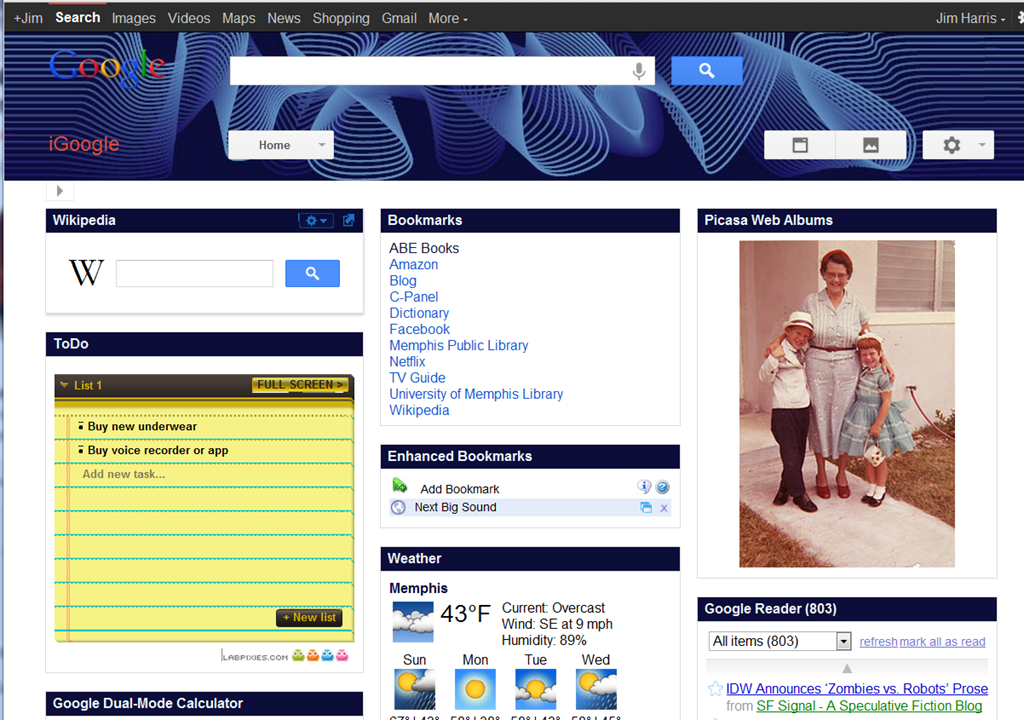
I’m starting with Google, and to show my commitment I’m setting iGoogle as my default home page.  It allows me to customize my home page extensively with a variety of widgets.  Here’s my first effort.

iGoogle

Because Google is pushing Google+, it’s revamped it’s many separate tools into a toolbar that Googlifies everything. 

From this home page I can search Google and Wikipedia, click on links to my favorite sites, see Gmail, RSS feeds, weather info, do math, get driving directions, search YouTube, and every thirty seconds be visually reminded of a different moment of the past.  Plus, I have a pull-down menu to a vast array of other Google features.  If I click on the photo it takes me to Picasa web, where I can click on a photo edit button that brings up the wonders of Picnik photo editing.   All the companies that Google has bought over the years is finally coming together in one command center. 

Oddly enough, there’s no widget for Google Music.  Google needs to add a Google Music Player widget.  If I kept my Chrome window opened to full-screen I could even use 4 columns of widgets.  iGoogle provides very flexible screen layout options and colorful themes. 

iGoogle is a cloud portal tool, a feature that Microsoft, Amazon and Apple don’t have, and puts them at a disadvantage.  This matters a lot if you’re using multiple computers, and too a lesser degree if you’re using smartphones and tablets.  I have a PC, HTPC and Linux workstation at home, and a PC, Mac and Linux workstation at work, plus I have two mobile devices, an iPod touch and iPad.  This provides a tremendous incentive to put my digital possessions  in the cloud.  My photos and music are available to all my devices at any location.

I have Microsoft Office on my PCs and Mac, and have a nice Outlook client on my iPod and iPad, and hope to have Office apps on my iPad soon.  I’m very Microsoft centric when it comes to productivity programs, and Microsoft offers various Live apps that are starting to compete with Google’s cloud tools, but it doesn’t have a portal like iGoogle.  I can store photos on SkyDrive but it’s not the same.  Microsoft has no cloud music like Amazon and Apple does.  But it is obvious that Microsoft is getting serious about the cloud.

Amazon and Apple are really lacking when it comes to furnishing a cloud home base.  They are more like mini-storage rental sites, where they will keep all my junk.  Amazon’s portal is it’s front page, and Apple’s portal is iCloud, but it’s home page is very limited compared to iGoogle.  (How did Apple let Google have the i-name?)  Apple assumes people live on their iPhone, iPad and iMac, and everything else doesn’t matter, but I’m not ready to ditch Windows, Linux and Android.

iGoogle isn’t slick like Apple products.  It’s not even as slick as Microsoft programming.  I’m hoping some of the technology they bought with Picnik might jazz up Google’s cloud apps in the future.  iGoogle is good for people who want to work over the widest range of platforms.  If you’re a Apple true believer, it won’t matter.  If you’re totally devoted to Amazon and Kindle, it might not matter.  But if you live in a world of PC, Mac, Linux, iOS and Android, then it’s well worth a look.

Not only does living in the cloud offer cross-platform sharing of data, it also backs up data.  If your house burns down, your digital belongings are in the cloud.  Eventually I want to replicate my data across two or more cloud servers to have even more protection, in case one company goes out of business or suffers a prolong outage.  Switching to iGoogle is just the start.

JWH – 1/22/12

How iBooks Author is a Game Changer Apple Didn’t Plan

Apple wants  iBooks Author to revolutionize textbooks publishing.   Let’s be disruptive and give iBook Author a different purpose.  Look at this video and read my plan.  Which goal is a more revolutionary?

iBooks Author can revolutionize education but not for textbook publishers.  iBooks Author looks so easy to use that kids could use it.  Apple got the purpose of iBooks Author back-asswards.  It’s not for creating textbooks for kids – it’s a program for kids to create textbooks.

Learn by teaching – that’s where it’s at.  Instead of requiring school kids to read textbooks, we should require school children to write their own textbooks.  And with some extra support this could be a totally new educational paradigm.

If we gave kids stock portfolios of photos, videos, illustrations, graphs and told them their assignment for the year in each subject was to create their own textbook, using their words and provided multimedia, would they learn more by doing instead of reading?  Teach them to take content from wherever as long as they rewrite it in their own words.  Teach them the same rules non-fiction writers follow to be professional, legal and ethical.   Homework is writing the textbook, not reading it.  The content is out there to find in libraries, books, magazines, on the net, or by interviews.  They just need to shape what they learn in a persuasive way, and develop their own lesson plans, activities and end of chapter questions.

Let’s say we have a class of 8th graders studying American History. Not only will they learn history, but writing, research,  grammar, punctuation, publishing, graphic design, rhetoric, lesson plans, and so on. Wouldn’t they learn more than just reading a text book on American history? Wouldn’t it be more fun?

There are problems.  We have to make sure students don’t just cut and paste from the Internet. And we have to teach them about intellectual property rights. The Internet is full of multimedia they could steal, but that’s not the message we want to teach. We should teach them the problems faced by editors and writers, like dealing with plagiarism, libel, fact checking, writing level, target audience, and more.  All they need is access to portfolios of legal stock multimedia.

Students studying literature could use Project Guttenberg to create their own anthologies and write introductions, study guides and annotations.  Wouldn’t math be more fun if you could write your own textbook that used real world examples you care about, like The Mathematics of Interplanetary Flight.  Imagine being in school and one of your assignments is to develop a textbook called Nine Decades of Popular American Music?  I always had a hard time remembering the rules of grammar – would I have done better if I had to write them into a textbook with my own favorite examples?

Try and imagine the world of 2025 where the high school graduation requirement is the authorship of 24 textbooks.  Imagine starting college having written 24 textbooks!

JWH – 1/21/12

God, An Imaginary Friend For Adults

There are no atheists in foxholes” is an assumption by the faithful who feel in times of stress all people will turn to God.  When I’m sick I want to talk to God too.  The older I get the stronger my atheism gets, the more I feel like I’m just talking.  I don’t expect a reply.  When we’re alone, fearful or in pain, we realize how powerless we are.  So it’s quite natural to think, “God, get me out of this!”

Who are we talking to?  Ourselves, of course.  But we’d like to think that someone is listening.  That’s why people believe in a personal God – to have a listener, to not be alone.  Lonely kids make up imaginary friends, well adults make up God.   We don’t like to be alone in the universe.  Nor do we like to be helpless.  The desire for an all-powerful, caring, father figure is completely understandable.  Even if he’s going to let us suffer and die, we want someone to talk to.

On the other hand, are we really alone in our heads?  We tend to think of our thoughts as ourselves, but if you observe closely, they aren’t.  Descartes, “Cogito ergo sum” or “I think therefore I am” is another illusion.  Pay close attention to your thoughts and you’ll realize the quality you feel as Me is actually listening to your thoughts.  The Me observer is so close to the thoughts that it thinks its doing the thinking.  Stare at something and not think, and then watch when a thought arises.  There is a separation.  In other words, you aren’t alone.  It’s you and your thoughts.  The observer and thinker.

Animals are observers like us, but without thoughts, or a thinker.

Now here’s the kicker.  It’s the thinker that needs to talk. It’s the thinker that needs to communicate with God.  If you just BE and turn off your thoughts you’re just an observer, there is no God, or even desire.  It’s the thinker that wants, that desires, that creates God, and all the other stuff, like mathematics, history, philosophy, justice, love, etc.  It’s the observer who is aware, who is conscious, and who dies.

So, why does the thinker want to create God?  Why does the thinker need this imaginary friend?  Before awareness in animals there was no observers of reality.  Hydrogen became stars without notice.  Animals perceive reality through an infinity of senses.  Animals can feel the warmth of the sun without knowing what it is, because they don’t have language to think.

Then we came along and started thinking.  Thoughts see things that don’t exist in reality.  Thoughts see other thoughts.

Why? 

Our thinking minds are quite creative.  It’s my thinking mind writing this now.  And my Me-ness observes that.

Children create imaginary beings to have someone to talk to.  We create God to have someone to talk to. 

What we really want is another thinker to talk to.

thoughts

JWH – 1/21/12

Questions About Spinal Stenosis

Back in 2008 I was having a lot of hip, back and leg pains and I had a MRI.  I thought I was going to need a hip replacement but the hip doctor said no, and sent me to another back specialist, one who specialized in pain management.  He told me I had arthritis in my L5 vertebra and physical therapy exercises would help.  They did.  I had to stop walking for exercise because it flared up my back and made my legs numb, but if I did my PT I could keep the pain under control.  In 2010 I went back to the doctor to ask if there was anything I could do to fix me so I could go back to walking for exercise.  He said no.  He then told me I had spinal stenosis and I should be prepared for a slow decline.  He said when things got very bad he could do nerve block shots, but I should put off thinking about surgery as long as possible.

Having the label “spinal stenosis” gave me something to research on the Internet, and generally I found the same recommendations to hold on off surgery for as long as possible – but with reasons why.  Many people ended up worse after surgery.  I even watched videos of surgical techniques for spinal stenosis.  Mucking around so close to the spine scares me.  By the way, how do surgeons know what they seeing, body parts aren’t color coded like in books and the old Illustrated Man model.

I decided to bide my time and see if new surgical techniques would be developed.  A few months ago I started seeing sites on the Internet advertising laparoscopic surgery that promised miracles for spinal stenosis sufferers, so I set up another appoint with my doctor.  I was hoping he’d have good news.  He said microsurgery was still surgery and warned me that a lot of places made a business off of selling procedures and they might not work for me.

The time I can spend standing and walking has greatly diminished.  I’m now down to 15-30 minutes.  My doctor said before I thought about surgery I needed to try a nerve block shot, but also said I was controlling my pain so well with PT that I could still put that off too.  I asked him if I could go back to walking after a shot, and he seemed iffy.  He thought a shot would extend my standing and walking time but it would wear off in months.  I asked him how they worked, and he said they reduced the inflammation in the nerves near the stenosis sites.

My doctor and internet sites warned not to do surgery until I was facing a quality of life issue.  That’s sort of vague.  I can go to work, but I can’t walk between buildings.  I can’t do much shopping.  I don’t want to go on vacations.  However, I’m a bookworm and TV watcher, so I’m reasonably comfortable for that.  I’m surviving without pain by walking a razor’s edge with physical therapy and not aggravating my back by standing or walking too long.  I could risk the surgery, but what if it causes permanent pain of another type?  Right now my feet and legs go numb and I have other weird sensations, and sometimes my back tightens, but I’m not suffering real pain.  I’ve been there, so I know.

If I had surgery how many holes, passages and paths would have to be widen?  And how long will it be before they fill in again?  I’m really fighting arthritis.  Are there ways to fight arthritis in general?

I also got to thinking about inflammation.  If steroids shots would reduce inflammation why wouldn’t other things do the same thing?

My doctor did tell me something that I totally wasn’t expecting but I should have.   He said arthritis was now affecting my L4 and L1 vertebras too.  So things were getting worse.  I didn’t ask, but did that mean I’d need multiple surgeries?

That’s the thing about this condition.  I have a hard time picturing it.  I haven’t seen the MRI or X-rays.  I have seen photos on the net but they aren’t me and they aren’t specific.  I would like to visualize how arthritis degenerates the spine.  I did find this at AAOS.org.  The caption said, “When we are young, disks have a high water content (left). As disks age and dry out, they may lose height or collapse (right). This puts pressure on the facet joints and may result in arthritis.”

This explanation doesn’t explain why steroid nerve blocks would help, but it makes me wonder if inversion tables would?  It also makes me wonder if there are diets to help stop the degeneration, or foods that make it worse.  I am overweight, so I also wonder if losing weight would help, I can’t imagine that it wouldn’t, but two doctors have said it wouldn’t.  The trouble is I’ve been trying to lose weight for half my life and haven’t succeeded.

I also wondered if chiropractic techniques would help.  Physical therapy exercises have saved me from years of pain.  I can limit the pain to almost nothing with daily exercises, and that might be the same as what a chiropractor could do.  The trouble is the arthritis is also building up deposits that squeeze the spine, and squeezes the nerves branching from the spine to my legs, which I don’t think would be reduced by manipulation or exercise, unless exercise reduces inflammation, or causes the nerves to rub against the arthritic growths and kept it from expanding.  But that’s just me wondering, I have no evidence of that.

But I do have a lot of questions, especially for people who have this condition.  I’d like to hear from people who have had surgery, of any type, and people who used chiropractors or other alternative medical techniques.  Do inversion tables help?  Got any diet tips?

I know I need to lose some weight to see if that can help.  I wish I could be as disciplined with my weight loss as I’ve been with my PT exercises.  I need a diet that is non-inflammatory in general, causes weight loss, and is anti-arthritic.  I bought a Bow-Flex to see if more exercise and stronger exercises would help.  All my life I ran or walked for exercise and I can do neither now.  I should swim, but that ain’t in the cards.

I’ve known since I was a kid that getting old means breaking down physically, but I always pictured it happening fast.  I never pictured not being able to walk – I always pictured dying of a heart attack.  When I was at the Campbell Clinic I saw lots of people that looked much worse than me, some were in wheel chairs.  In recent years I’ve noticed old people having trouble walking, the ones with canes, or wheelchairs, or those little scooters.  I’ve seen a lot of people struggle just to go out to eat or or see a movie.  I suppose there are even more that stay at home.  There are millions of people worse off than me, and the thing is I need to pay attention to them, because they are my role models and trail blazers.

Unless I find a miracle cure, and I will try, I’m starting to see my future much differently than I ever imagined it.

JWH – 1/18/12