Sony BDP-S570 3D Blu-ray Disc Player

I bought my wife the Sony BDP-S570 3D Blu-ray Disc Player for Christmas to keep at her apartment where she works out of town.  My wife has never been fanatical about video quality but slowly came to appreciate Blu-ray beauty from my watching 1080p shows on my LG BD390 Blu-ray player.  Last year I had bought her a Roku box so she could stream Netflix and the Sony BDP-S570 now replaces it, because not only does the Sony play BD discs, it streams Netflix, Amazon Videos on Demand, Pandora, Youtube, and many other internet video services.   Plus it supports DLNA networking to fetch photos, music and movies off our computers.

I was reading this weekend a review comparing the Roku, Apple TV and Boxee Box devices and it made me wonder if these gadgets had much a future if televisions and Blu-ray players are going to build in the same functionality?  Then today I was helping a friend who has an older MacBook find a cable that would allow her to output Netflix streaming to her television set and we discovered the cable that would handle video and audio was $99.  I told her for $79 she could get a Roku box for streaming Internet video, or spend $20-50 more and get a Blu-ray player that also streamed Internet video.

Of course, if I was helping a friend buy a new TV, I’d recommend they pick a set that had Netflix streaming built into the television.  Many sets offer various levels of Internet support.  It doesn’t take a science fiction writer to predict the future here.  If technology can eventually stream content with Blu-ray quality – why have any external boxes at all.

The El Dorado of cable subscribers is to have a la carte channels.  As the television becomes a node on the Internet it’s easy to envision this happening.  Right now you can get several paid channels this way, Netflix, Amazon on Demand, Hulu Plus, MLB, etc.  Of course TCP/IP and the Internet isn’t structured for this, but that doesn’t mean it won’t adapt.

So the question:  What to buy now?  Last year I bought my wife the Roku for $99.  A few months later the Wii started streaming Netflix.  If we had waited we could have skipped the Roku.  Then, this year, Susan wanted a Blu-ray player, which doesn’t replace the Wii.  But if the Wii played Blu-ray discs like the Playstation, we wouldn’t have needed it.  I love Blu-ray video quality, and right now Netflix HD is very nice, but not Blu-ray 1080p.

What I’d recommend is buying the cheapest device that streams Netflix at Netflix’s HD quality, and that’s the $79 Roku XD box.  However, if you really love movies and want to enjoy Blu-ray now, I’d recommend spending $20-70 more and getting a Blu-ray player that does both.  I got the BDP-S570 for $138 before Christmas on sale.  Right now it’s commonly sold for $149.  There are Ethernet wired only BD players for under a $100 that can do this.  Units with Wi-Fi built in are about $50 more. 

The BD disc players won’t have as many Internet channels as a Roku or Boxee device, but most people will be happy with Netflix.  Look for Amazon Video on Demand and Hulu Plus if you’re willing to rent movies individually, or pay for a bunch of TV shows.  The Netflix all you can eat pay model is a much better deal though.  However, when I saw True Grit at the movies recently and wanted to see the old John Wayne version, the quickest way was to pay Amazon $2.99 to stream it, which I did and it worked great.

The lesson in all of this is the television is becoming a major Internet appliance.  The trend might even kill off the cable and satellite business, and I expect eventually people will prefer to stream content rather than buy discs.  All too often I let my Netflix discs sit for days because it’s easier to stream.

The beauty of the Roku and Boxee devices is they can be upgraded to handle more Internet channels.  Blu-ray players can too, but my LG390 only added a couple of paid services.  LG did add more services to later models, which really irked me.  I hope newer Blu-ray players will be designed like the Roku and Boxee machines to be expandable.  The first time I upgraded the Sony BDP-S570 it added several channels, and it has an expanding menu, so that’s a good sign.

JWH – 1/11/11

Will Internet TV Make Cable and Satellite TV Extinct?

There are two kinds of TV, live and recorded.  Internet TV sites like Hulu have already proven how well they can handle recorded TV shows.  Internet TV even does away with the need for a digital video recorder (DVR).  Think of a show, find it, watch it.  Internet TV like Hulu is even better than broadcast, cable or satellite for sponsors because viewers are required to watch the commercials.  And as long as they have such limited commercials as they do now, I don’t mind watching them.  Otherwise I’ll pay for streaming services like Netflix to be commercial free.

Where Internet TV is weak is for live broadcasts, like for sports and 24/7 news.  The infrastructure of cable and satellite systems have far more bandwidth for handling live television.  That won’t always be so, because I’m sure some kind of broadcast Internet technology will emerge to solve that problem and people will be watching live TV on their iPhones, iPads, netbooks, notebooks, desktops, HTPCs and Internet TV sets.

Digital technology ate the music industry, and is about to eat the book, newspaper, magazine and television industries.  I gave up cable TV months ago and for recorded shows I’m in hog heaven by using the Internet TV, which includes streaming Netflix.  I also supplement by viewing diet with snail-mail Netflix discs, but I see where that habit could be phased out too.  The only reason to get a disc now is for the picture quality of Bluray.  Future bandwidth will wipe out that technology too.

Owning music CDs and video DVDs seem so pointless now.  I wonder how that’s going to impact the economy and effect the entertainment business.  It also makes me wonder about my efforts of building an easy to use HTPC.  I’m struggling to get perfect Bluray playback through my HTPC computer, wondering if I should spend $80 for better software, knowing full well in the not too distance future I’ll phase out Bluray too.  The HTPC has phased out the LG BD390 Bluray player I bought just last year, and an Internet TV set could phase out my HTPC.

biggerthanlife

Last night my friend Janis had us watch Bigger Than Life on Bluray because NPR had praised this old James Mason movie so highly.  The flick wasn’t very entertaining, but it was fascinating.  The Bluray presentation of this 1956 CinemaScope production was stunning in 1080p high definition, showing intricate shadows and vivid colors.  Internet TV and streaming Netflix can’t provide that kind of resolution right now, but I imagine it will before 2015.

Technology is moving so fast that we buy devices we want to throw away in a year or two.  Growing up my folks wanted appliances and TVs that would last 15 years.  I remember Ma Bell phones lasting over twenty years.  I’ve had my 52” inch high definition TV for only three years and I’m already lusting for a new set.  Will technology ever settle down again so we can buy something that will last a generation?  I think it might.  Of course it will be terrible for the economy, but I can imagine TV technology that would satisfy me and take the ants out of my pants to have something better.

My perfect TV will still be a 1080p HDTV like we have today.  I’m pretty sure we can go decades without changing the broadcast standards again.  It will have a digital tuner to handle over-the-air broadcasts (in case the net goes down) and an Ethernet jack and WiFi for Internet TV.  It will have two removable bays.  One for a computer brain that can be upgraded, and another for a SSD hard drive.  As Internet TV is perfected the need for a local DVR will be diminished.  That will also be true for an upgradable CPU.  There will be no cable or satellite TV.  Everything will come to us by TCP/IP.  Broadcast will remain for the poor and for when the Internet fails.  Cable and satellite TV will go the way of the record store.  I also assume all Internet access will be wireless, but it will take 5-10 years to phase out wires.  Now that doesn’t mean cable and satellite companies will go under.  I expect them to buy into the Internet TV revolution.  I do get my internet access from Comcast.

Most people will think I’m crazy by predicting the extinction of cable and satellite TV.  They can’t picture living without all that choice.  That’s because of the channel switching mindset.  We have always thought of what’s on TV by flipping through the channels, even though very little TV is live.  Most of TV is recorded, and we fake immediate diversity by offering 200 concurrent channels to watch.  Eventually the only channels to watch will be live, because other technology makes it easier to find recorded shows ourselves.

Live TV will go through a renaissance.  Cable and satellite TV systems are still the best technology for live TV, and they will hang on to their audiences for another ten or twenty years as Internet broadcast TV is perfected.  However, guerrilla TV is emerging on the net, and micro audiences are evolving.  For the big networks, how many Today like morning shows will we need for live TV?  How many channels to promote sports?  How many to 24/7 talking head news and reality shows do we need?  How many live PBS networks will we need?  Will audience gather around central networks or seek out specialized Internet broadcasters catering to their personal interests?

Ultimately, how much TV really needs to be live?  Even 24/7 news shows spend a lot of time repeating themselves.  Live TV is leisurely.   The hours of the Today show are filled with just minutes of quality content, most of the time is fluff and commercials.  And if an opera is filmed live for PBS does it really need to be seen live?  Survivor and Amazing Race would be tedious if live.

When the flipping the channels metaphor dies out, and library checkout metaphor gains popularity, TV viewing will change.  People love football, war and car chases live, but will even that change too?  If you were sitting with you iPad killing some time, will you think, “Hey let’s watch the game in Miami,” or will you want to play a game or watch something recorded?   I can easily imagine sites of “WHAT’S HAPPENING NOW!” start showing up, listing thousands of events going on around the world.  TCP/IP technology will work better to provide that kind of service than cable or satellite.

Until you play with Internet TV you won’t understand what I’m saying.  You’ve got to sleep with the pods or drink the Kool-Aid to buy in.  Start with streaming Netflix and Hulu.

And if people love cell phones, Facebook and Twitter to stay in constant contact won’t they love live TV from their friends.  Instead of watching the crew of the Today show have fun, why not video link all your friends and create your own morning show?  And the emergence of spy networks will also change viewing habits.  If every daycare and classroom had web cams, wouldn’t parents spend more time watching them?  Won’t all the web cams in the world grabbing eyeballs destroy the audiences of the 200 channels of national networks?

We can’t predict the future.  Growing up in the 1960s I never imagined anything like the Internet.  All I can predict is change and more of it.  But I’m also going to predict that once the Internet and digital upheaval is over, we might settle down to a slower pace of change.  Well, until artificial intelligence arrives or we make SETI contact with distant civilizations.

Recommended Reading:

JWH – 4/10/10

Building A HTPC

One thing I’ve wanted to do for decades is build my own PC.  But whenever I needed a new PC I’d price one in the Sunday ads and always discovered that a PC on sale is cheaper then building one.  For the last year I’ve been dreaming of building a home theater PC (HTPC) and I finally did.  Best Buy had a much better PC, with an Intel i3 chip with 6gb of memory for sale for $549.  So far, my home built HTPC with an AMD Athlon X2 Rigor 240 and 4gb of memory has been about $650, and that’s even using an existing TV tuner card, and I still need to buy some more stuff, like a remote and maybe better Blu-ray software.  Even the $549 price would have been a base, because I had to buy a wireless keyboard and mouse.

I based my buying decision on Guide to Building a HD HTPC March 2010 edition.

What finally pushed me over the edge was I really wanted the dang thing to look like a piece of stereo equipment and not a PC, and that meant building it myself.  Oh sure, I could have ordered a ready made HTPC, but it would have been hundreds more.  I spend a lot of time browsing NewEgg and reading the customer reviews and figured I could build a HTPC too.  So a couple weeks ago I started ordering the parts.
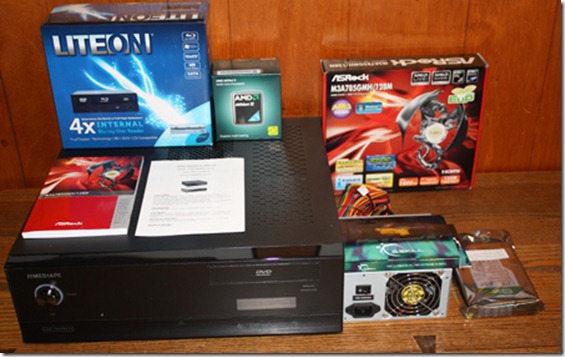
HTPC1

The last thing I ordered was the memory (after reading the motherboard instructions very carefully) and I got lucky with free shipping from NewEgg.  However, I wasn’t so lucky.  The memory shipped from Memphis, and I live in Memphis, so when I saw the tracking info I thought I’d get it the next day.  The following day my RAM was in Georgia.  I wonder if DHL has a hub there.  The lesson here and from Amazon is free shipping means delayed shipping, both from NewEgg and Amazon, and slow travel times.  But it all worked out.  I had a bad spell with my back and it wasn’t until yesterday that I felt like putting everything together.

A word of warning though to people who are thinking about building their own PC.  As the parts starting coming in and piling up on my table it occurred to me that if any of them were defective or incompatible I’d have a hard time knowing.  When you buy a PC it comes assembled and tested with a warranty.  When you build one, there is no warranty for the whole, and it’s very easy to damage these sensitive parts, so troubleshooting can be nasty, especially if a part is defective from the start.  This got me worried about the whole plan.

Yesterday morning, after a good night’s sleep, a shower and breakfast, I jumped into the project.  I reread the various instructions and started work.  I was very lucky, everything went smoothly.  I carefully tested where I was going to install things before I actually installed anything.  When I first tried to install the power supply none of the screw holes lined up.  Finally I turned it upside-down and they did.  Go figure.

I was afraid of two things before I started.  Installing the motherboard and installing the heat sink.  Both were a snap.  The stand-offs were already installed in the enclosure and all I had to do was line them up with the holes in the motherboard.  I got a whole bag of various screws and only the smallest fit.  None of my instructions explained which exact screws to use at any point.  I had to guess.  The heat sink had a pad of pre-installed thermal paste and it snapped right on.  That’s why I bought the retail box for the AMD chip.  I didn’t want to worry about matching a heat sink and applying thermal paste myself.

The worst trouble I had was figuring out where all the wires from the HTPC case went to the motherboard connectors, like power, reset, USB, Firewire, media card readers, etc.  The power SW and reset SW gave me the worst time because the pins had a ground pin and I didn’t know which wire was the ground.  I got on Google and found out the black or white wire was the ground.  And everything was teeny tiny and I have fat clumsy fingers.

When I finally had everything assembled and flicked on the power supply switch nothing happen. I had a sinking feeling that, oh no, I did something wrong.  But I didn’t panic.  I thought for a second and remembered there was a power button on the front of the unit and I pressed it.  All four fans started spinning, but totally quiet.  The boot up screens appeared and then the Windows install disc booted.  Damn, I was happy.

HTPC3

Here’s my messy table at that point.  I used little glass bowls to keep the screws sorted.  After Windows 7 easily installed, I threw on the PowerDVD 8 that came with the Lite-On Blu-ray player.  I was worried it wouldn’t work with Windows 7 and wouldn’t play Blu-ray discs.  It ran just fine and played a Weeds BD disc I had.  PowerDVD is now at version 10, and I thought the version 8 wouldn’t be good enough.   So far it has.

After I ran all the OS updates I moved the unit over to my TV stand.  I have an old Samsung 52” DLP HDTV.  That’s when I discovered I really needed a wireless keyboard.  I had to use the wired keyboard and mouse about 1 foot in front of my TV and it’s hard to see the 1920×1080 screen that close.  So a quick trip to Office Depot got me a cheap Logitech wireless keyboard and mouse.  It only promised 10 feet of range, but so far it’s been good enough.

I was able to sit in my chair and configure Windows Media Center, Hulu, Netflix, Lala and Boxee.  For some reason Rhapsody wouldn’t install.  I’m worried its not compatible with Windows 7 64bit version.  [It installed smoothly on my second attempt and everything is cool.]  I also configured the Home Network under Windows 7 so my Jim-TV could see my Jim-PC and access my MP3 files.

It’s weird using a mouse instead of a remote, so I need to research remotes that will work with all my programs.  Hulu and Windows Media Center have wonderful interfaces that are usable across the den.  So does Boxee, but Boxee is giving me trouble – it can’t seem to play Hulu shows.  Is there a remote that works with all of these programs and even IE 8?  I wished that Lala had a local client.  I can play Rhapsody through the web client, but I want to try the local client on the big TV.  Boxee is a wonderful concept, having one central location to play all the media types offered on the web, but it hasn’t worked out perfectly.  But that requires more testing, and it’s still in beta.

Windows Media Center reports I have room for 1086.5 hours of recorded TV shows.  I bought a 1.5TB drive.  I figure I might make my HTPC my home server too.  I need to research if Windows Home Server wouldn’t have been a better OS instead of Professional 64 bit.  I just don’t know.  I also programmed a week’s worth of TV shows from the Windows Media Center Guide.

My goal was to build a machine that replaces my Blu-Ray player, my Toshiba DVD recorder, my Pioneer CD/SACD player, and my SoundBridge M1001, and several functions I could only do from my regular PC.  Since I gave up cable TV I’ve had no problem living with just five local channels (ABC, CBS, NBC, PBS1, PBS2) but I missed my DVR and onscreen guide.  Windows Media Center gives me a DVR and guide.  What’s still missing is an easy to use remote.  I need a remote that can power up the Samsung TV and Yamaha receiver – I’ll leave the HTPC running at all times.  (Jim-TV goes into a very low powered sleep mode that it can wake from to record shows).

This brings up another issue.  When it wakes up my HTPC wants me to log in.  That means using the keyboard.  I’d like to skip the log in but is that wise when it comes to security?  I don’t’ know.  Another thing to research.  But it would be nice if I could get a remote that turned on everything and the computer would just start working.  I want to only use the keyboard if I want to use the Internet at the TV, otherwise do everything from the remote or mouse.

The mouse works fine from a chair arm or side of the couch if I’m lying down, but not everything can be controlled from a mouse pointer.  I just got a wild idea.  I wonder if I could make the TV voice activated?  Now that would be cool!

Ultimately I want to make the entire system extremely easy to use.  My wife has been very grumpy since I gave up cable and the DVR.  (She works and lives out of town and has her own cable TV – so I don’t feel guilty about depriving her.)  She hates not being able to pause the TV.  Windows Media Center now gives her that ability, but by using the wireless mouse instead of a standard remote.  That’s a weird shift. 

I have a remote that came with the Hauppauge TV turner card, and I have an older Logitech Harmony universal programmable remote.  I’m going to try to make one of those work before buying anything else.  However, that’s a lot to make work together.  Sound comes from the receiver, which has its own remote.  Windows Media Center works with WMC remotes, but I’m not sure they work with Hulu or Netflix or IE.  I can play Netflix through Windows Media Center, so that solves one issue, maybe. 

And it’s a shame that Windows Media Center doesn’t have the same ambitions at Boxee.  If Windows Media Center did everything I could have the machine auto load it and just stay in that program.  It would be wonderful if Windows Media Center made a special browser for viewing the Internet and accessing programs and files on the PC.  Seeing the Windows desktop at 1920×1080 makes everything tiny and hard to see across the room even when blown up to a 52” monitor.  I had to boost the visibility by telling Windows to magnify the desktop by 150%.  That helps, but is not perfect.  The TV screen mode for Windows Media Center, Hulu desktop and Boxee is the answer.  Their interfaces are design to be viewed from ten feet away.

There is a wealth of TV shows that weren’t available to me before that comes over the Internet.  I’m not sure I like that.  I love the simplicity of local stations, but I am enjoying Caprica.  Sometimes I think I would be happiest with only watching Netflix discs that come in the mail.  Except for news and the latest documentaries about contemporary events, I’d be perfectly OK with watching TV from Netflix discs.  For example I love the new show Parenthood.  But I hear it doesn’t have good ratings.  If they kill the show I’ll be mad.  I’m getting to the point that I rather only watch a TV series if I know the season is complete, or if its a one season wonder that was cut short but wrapped up nicely, like with Freaks and Geeks.

In other words, having a HTPC might be overkill for my simplified lifestyle.  However, I have accomplished something on my bucket list and that was fun.  I do prefer watching DVR recorded shows to watching them live.  And it’s nice to know I have a machine recording my favorite shows when I’m not home to watch them.

JWH – 4/4/10

Update 8/27/10:  Overall I’m satisfied with my project except for the Blu-ray player.  First off, it turned out to only be a BD/CD/DVD player.  I was expecting it to also be a CD/DVD burner, but it wasn’t.  So watch out.  But more importantly, the PC Blu-ray software is unusable in my opinion.  I pulled the Blu-ray player out of my system and installed a CD/DVD burner, and went back to using my LG Blu-ray player.  If Microsoft added support for Blu-ray in Windows Media Center I would try again, but playing Blu-ray discs on a PC is clunky with existing software.

I think for a HTPC to succeed it needs one media center type program that does everything.  It’s even annoying to switch between WMC, Hulu and Boxee.  I don’t want a dozen competing programs offering me television.  What’s happened is I use WMC for watching recorded over the air TV shows, and Netflix for everything else.

There’s No Such Thing As Free TV

In the early days of television it appeared the shows were free, just put up an antenna and watch your favorite programs for nothing.  But as we all know, we paid for our viewing by watching commercials.  Then came cable TV.  We paid a small fee to avoid the hassle of messing with antennas, but we still watched a lot of commercials.  However, this started the upward cost of watching television.  Cable providers slowly added more channels and raised their fees.  They even offered commercial free networks like HBO and Showtime, but at an even greater cost.  It’s not uncommon today to pay over $100 a month for cable or satellite access.  Then they charged even more for DVR boxes and services so we could skip over the commercials.

Now people are abandoning their cable/satellite services to save money and going retro by using antennas again, and getting over-the-air (OTA) HD television.  They supplement their viewing variety with Netflix, HTPCs and now DLNA compliant devices.  Getting TV from the Internet gives the illusion that we’ve finally found a way to get free TV.  Don’t count on it.  We still pay $25-50 a month for broadband Internet access, and we still watch a lot of commercials.  And if the movie and television industry has their way, they’ll find new ways to charge us for watching our favorite shows over the Internet.

Netflix, at $8.99 for 1 disc service and streaming video via a Roku box is probably the cheapest way to get the most TV watching bang for the buck.  Now Netflix is under attack by the Hollywood Studios.  As the Business Week article points out, studios don’t like the all-you-can-eat streaming pricing.  They want a cut of the action for each movie you watch, because they consider streaming equal to cable/satellite pay-per-view movies, that cost viewers $4 a pop.  And the studios, like Warner Brothers, want to slow the access to movies that Netflix rents because Netflix is cutting into sales of DVD/BD discs.  I know I don’t buy discs anymore, so I can understand this.  And if you haven’t noticed lately, a lot of streaming content on Netflix started showing expiration dates.  Bummer.

Generations of television viewers who grew up after the Baby Boomers don’t remember “free” TV.  Every house had an antenna sprouting from the roof and you didn’t have to pay a monthly bill to watch your shows.  Of course, we didn’t have the power to skip commercials, and we only had 3-4 channels in our nightly lineup.  We had NBC’s Saturday Night at the Movies showing new to broadcast films, and each station had a library of old films they could show at odd hours of the day, usually in the middle of the night.  Life was simple then.  Of course, so were the shows.

Decades later, television shows and movies cost untold millions to make, far more than what broadcast commercials and movie tickets can finance.  Movie makers want to maximize their profits by selling their films several times, in a standard tiered released system where they get the maximum revenue at each stage:

  • Theatrical releases
  • DVD/BD sales
  • Pay-per-view
  • Premium cable (HBO, Showtime, etc)
  • Basic cable
  • Broadcast networks
  • [Netflix streaming?]

So where in the hierarchy do they release titles to Internet streaming?  And if DVD/BD sales are hurt by rentals, when do you release titles to Netflix?  Right now, I pay the most for movies because I watch a lot of flicks on the big screen.  I could probably save $500 a year by waiting for movies to come to Netflix.  This is one reason why I don’t care about getting cable TV anymore, or when movies get to Netflix.  But if you aren’t big on going to the movies, this does matter.

The trouble for movie makers is Netflix is so damn efficient and cheap.  Even without streaming, for $8.99 a month you can watch about a 100 movies a year, and with streaming, your selection is overwhelming.  Who needs to watch more?  And if you count that Netflix rents/streams TV shows and documentaries, that makes $8.99 a month the cheapest form of TV watching other than OTA viewing.  Sports is the main thing missing, and probably why more people don’t give up cable/satellite.

Now Digital Living Network Alliance (DLNA) is catching on, allowing you to stream video content off the Internet directly to your TV, without using a computer.  Geeks have been hooking up their computers to their TV for years, but it’s not an elegant consumer oriented solution.  All the major TV manufacturers are starting to build DLNA technology directly into their TVs, meaning you won’t need a Roku box to stream Netflix and Amazon videos.  Each manufacturer can choose which streaming system to support, or in some cases, they can support PC servers like PlayOnTv that will talk to your TV directly, or via your Wii, PS3 or Xbox 360, so you can watch Hulu and other emerging Internet TV networks.

Essentially, online TV networks like Hulu.com, CastTV and TV.com are ways to get broadcast and cable network shows free off the Internet, or free if you ignore your ISP bill.  But when content providers realize that these services will undercut services higher up the economic viewing ladder, will they continue to offer their content for free?  Will there be more commercials, or even subscriptions required?

I installed PlayOnTV on our Wii and played around with Hulu.  The Wii remote made a decent TV remote and worked well with the Hulu menu system.  This bit of testing provided an epiphany for me.  Internet TV is like cable TV – too many channels and too much to see!  Since I’ve given up cable TV and lived for a few months with just ABC, CBS, NBC, PBS and Netflix, I’ve learned to love simplicity.  I thought I wanted more documentaries which Internet TV might offer me, but it’s not worth the hassle of finding them. 

I like the higher quality of watching Blu-ray discs, or even DVD quality, over watching Internet TV quality.  Broadcast HD seems better than cable HD, and Blu-ray 1080p is even better yet.  I’ve gotten used to pristine picture quality, and for me at least, visual quality is better than viewing quantity.  I don’t mind waiting for BD discs to come in the mail.  I know my viewing habits aren’t typical.  My wife is a channel surfer and loves to see what’s on by flipping through hundreds of channels.  If you’re like her, then you’ll need to pay for cable/satellite, or spend the money for Internet TV options.

I pay $16.99/month to Netflix for 2 discs out at a time with Blu-ray.  That’s as cheap as I can get while getting the most TV watching for my dough.  If the movie studios force Netflix to charge more for streaming, I’ll live without streaming.  I’m a little annoyed that Blu-ray discs cost more to buy and rent than DVDs when they look physically identical, but the extra visual quality is worth it to me.  I don’t mind watching Big Love or Weeds months after their HBO and Showtime broadcasts.

TV isn’t free, but it doesn’t have to be expensive either.  How much you pay for TV depends on how impatient you are to see new shows and films.  As I get older I’ll probably stop going to the theater as much, because paying $10 to see a movie the first week it’s out won’t be as important.  I know a lot of old guys who stopped going to the movies altogether.  If you’re young, restless, twitchy and impatient, then you’ll probably love flipping through 300 cable channels and won’t mind paying $100 a month for that pleasure.

When I heard Warner Brothers wanted Netflix to wait a whole month before renting movies that had just gone on sale, I laughed.  At 58, a month is nothing.  To a teenager or twenty-something, waiting a month is probably unbearable.  I’m still finding new movies from the 1930s to watch, and I’ve seen thousands of them already.  I’d much prefer Netflix maintaining it’s low rates than getting movies sooner.  Let the young finance the movie and television industry – if you’re patient you can save your money for retirement.

JWH – 1/17/10

Roku HD – The Future of TV

I bought my wife a Roku HD for Christmas.  She works out of town and wanted Netflix streaming for her little apartment.  Before the Roku HD left the house forever, I thought I’d play with it and see how it compared to my Netflix streaming on my LG BD390 Blu-Ray player.  In a way, I wished I hadn’t, because now I hate my LG BD390 Netflix streaming.

If I knew then what I know now, I wouldn’t have bought the LG BD390.  I spent $100 over my budget to get the highly rated LG BD390 because it had wireless-N built in and Netflix.  The BD390 is great for playing Blu-Ray discs, but has been less than spectacular for Netflix and wireless.  I would have been better off buying a basic Blu-Ray player and the Roku HD, spending the same as I had on the LG BD390.  But I might not even agree with this decision by next Christmas.

I hooked up both the Roku HD and BD390 to the same wired Ethernet.  The BD390 has never liked my Linksys WRT160N version 1 router – but that’s Cisco’s fault.  Cisco won’t update the original model of this router and it needs it.  I mention these annoying tribulations because anyone buying network devices to add to their TV need to be prepared for pitfalls and aggravations.  However, even after I hardwired my den, the BD390 would not consistently work well with Netflix.  My internet reception was usually one half of the gauge or a little over.  On rare occasions I got HD reception and things looked fantastic.  I keep waiting for a BD390 update that would tweak its Netflix feature, but so far I’ve been living with average quality Netflix streaming.

I set up the Roku HD, which was a complete snap.  It’s a tiny device, weighing just ounces.  (Here’s a peak inside the older model.)  I’ve been watching an episode of Farscape every night, streamed via Netflix through my BD390, so I decided to look at the next episode on the Roku HD.  I got 4 dot reception, that’s Roku talk for their streaming quality meter, the highest level of streaming.  I was overwhelmed by how much better the image was over the LG.  On the BD390 I assumed the show was old and the visuals were crude.  But no!  On the Roku HD the make-up, costumes, and sets are gorgeous.   And my wife leaves this weekend taking the Roku HD with her!  Bummer.

This morning I got up and played with the Roku Channel Store and found all kinds of extra content (Mediafly, Twit.tv, Revision3, etc.)  Techie shows I love that drives my wife from the room.  I was amazed by how good Internet TV content looked on my 52” HDTV.  Since I’m already planning on building a HTPC that would replace my BD390, I’m now worried that anything I build won’t be equal to the elegant little Roku box.

Now take all of my enthusiasm for the Roku HD with a grain of salt.  Go to the Roku Forums to read about other people’s experiences.  Not everyone is getting 4 dot reception.  Many fight with bad network connections, rebooting Roku boxes, bad updates, etc.  Also, remember, generally only users with a problem come to the forums to begin with, so we don’t know how many people have fantastic out-of-the-box luck like I did.

But I am in trouble.  I don’t want to watch Netflix streaming on my LG BD390 anymore.  It’s a shame that Farscape isn’t on Blu-Ray, but for now I just put the DVDs into my queue and I’ll be networking the show via USPS mail.  I would jump over to Amazon and order another Roku HD, but I want to wait and see if I can build a HTPC that does a better job instead.  The Roku HD box has a very tiny chip to process the Internet video stream, so I’m wondering if a powerful CPU and GPU can do a better job.  Watching the same episode streamed through my computer looks way better than the BD390, but not as good as the Roku HD, but that might be because I’m sitting twenty inches away from the LCD monitor and I’m sitting ten feet from my HDTV.  Like I said, everything is very iffy with Internet TV watching.  Twit.tv looked fantastic blown up to a 52” HDTV via the Roku HD box, but it looks just as great on my computer.

Actually, I’m struck with the overwhelming impression that the Roku HD box foretells the future of TV.  We watched a HD movie over the Roku box and maybe it wasn’t Blu-Ray 1080p quality, but the illusion was damn close.  I gave up Comcast cable to live with over-the-air broadcasts and Netflix and I’ve been very happy.  If I could get all my TV from a little box like the Roku I would.  I’d give up DVDs and Blu-Ray discs too.  In my post about building an HTPC I wanted to reduce my entertainment center from 5 electronic devices connected to my Samsung HD to one. 

If that one device could be something the size of the Roku box that would be even more elegant, but obviously, the solution is to put the little Roku circuit board inside of the TV and have just a TV and sound bar, and even then, why can’t they build a great sound bar into the TV too?  You can see where this is going.  A flat panel on the wall with a power cord and an Ethernet cable.  No HD antenna, cable or satellite cable, and if wireless improved, the future TV wouldn’t even need an Ethernet cable.  While I’m wishing, if they could also take the small circuit board from my Roku SoundBridge M1001 that streams music, and put it inside the TV too, we’d really be living in the future.

In other words, maybe I should hold off on building my HTPC.  By Christmas 2010 or 2011 such a simple elegant TV solution might show up on the market.  There are already TVs out with built-in Internet access, but they are limited.  Obviously, such an Internet TV will bring about a tremendous paradigm change in the TV business.  The Netflix model, of one monthly fee to watch exactly what you want to watch, and only that, is too powerful to ignore.  Why pay big bucks to cable and satellite providers for 250 channels you don’t watch?  Why hassle with HD antennas if the Internet provides better reception.  Why buy DVDs and Blu-Ray discs and mess with storing them when Netflix will do all the work for you?

The Netflix model for video and the Rhapsody model for music should be the standard for the future, but will the content providers allow so many revenue streams to be dammed up?  Will the Roku box change the TV world?  If on-demand streaming content can approach the visual quality of Blu-Ray, why not?

JWH – 12/30/9