Could Different Actors Make a Mediocre Film Great?

by James Wallace Harris, 11/28/23

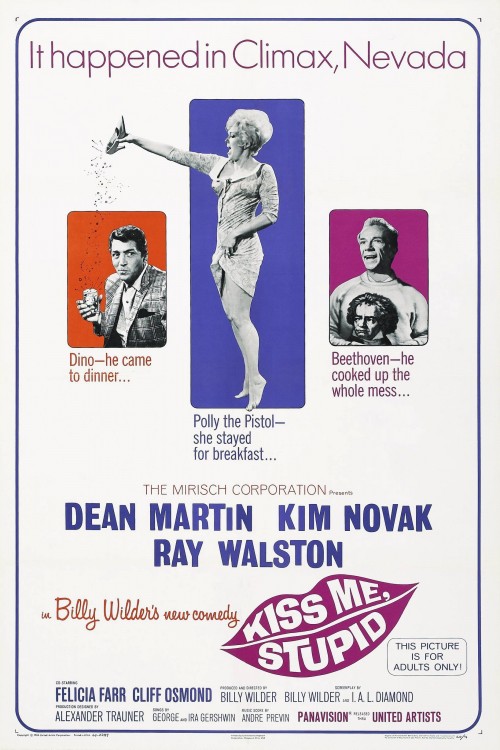
Billy Wilder has made many great movies, including seven films on the National Film Registry. So last night, when Susan and I started watching Kiss Me, Stupid (1964) we expected another hit. The show wasn’t a total dud, but it was one of the weirdest major motion pictures I’ve ever seen. It’s a sex comedy, and Wilder has a great reputation from two previous classic sex comedies, The Seven Year Itch (1955) and Some Like it Hot (1959). And if you think about it, Some Like It Hot is a very weird picture, but it worked despite its weirdness, and it gets more famous every year. Why hasn’t Kiss Me, Stupid? (Although, it might work with younger people for reasons I can’t fathom.)

There are many parallels between the careers of Billy Wilder and Alfred Hitchcock. One is young people are getting into the films of both directors today. And two, both directors fizzled out in the 1960s after a long career. There are other parallels, but for now I feel disappointed for Kiss Me, Stupid in a similar way I felt let down by Hitchcock’s Marnie, another 1964 film. Both films had many elements I liked, but they weren’t easy to watch. Both were too long.

To me, Wilder was obviously trying to have another sex comedy hit like Some Like It Hot because he originally hoped it would star Jack Lemmon and Marilyn Monroe. Both starred in that movie. Instead, he got Ray Walston and Kim Novak.

The story is about a piano teacher named Orville Spooner (Ray Walton) and gas station attendant Barney Millsap (Cliff Osmond) who dream of selling hit songs. They’ve composed 62 so far. So when Dino (Dean Martin) shows up at Barney’s gas station Barney quickly concocts a wild idea to get Dino to hear their songs. Barney sabotages Dino’s car and tells him he’ll have to stay over night. Dino asks where some action could be had, meaning where he could get laid. He tells both Barney and Orville that he gets terrible headaches if he doesn’t get sex once a day. Barney tells him to go to a dive called The Belly Button.

Dino then asks where’s a good place to stay and Barney says there isn’t any, but he should stay with Orville and his wife. When Barney gets the chance he tells Orville his plan. He wants Orville to get his wife out of the house, and they’d get a prostitute from The Belly Button to play Orville’s wife and seduce Dino. He’ll be so grateful for all their efforts he will sing one of their songs on his TV show.

Orville’s wife, Zelda, is played by Felicia Farr, who was Jack Lemmon’s wife at the time. The prostitute, Polly the Pistol is played by Kim Novak. And here’s one of the major problems of Kiss Me, Stupid. Even though Ray Walston does a good job playing Orville, the loser piano teacher, who is easily sent into rages of jealousy over his pretty wife, there’s no chemistry between him and Farr, or him and Novak. And Walston plays the role just how I imagined Jack Lemmon would have played it, he just doesn’t have the physical presence of Lemmon. Lemmon really would have been the perfect choice for the role or Orville.

Farr plays Zelda okay, but she doesn’t really charm us. I wondered if Zelda had been played by Shirley MacLaine, who had tremendous screen charm back then, could Kiss Me, Stupid have been another Billy Wilder classic. It makes you think about just how important the actor is in a hit, especially two actors in a romantic comedy. Lemmon and MacLaine had proven themselves in two other Wilder pictures, The Apartment (1960) and Irma la Douce (1963), although the second picture is no where near as good as the first. That shows that story counts for a lot too.

And since Kiss Me, Stupid becomes a three-way love story, the role of Polly the Pistol is also important. If Marilyn Monroe had lived, I don’t think she would have been right for the part. I thought Novak did a great job, and I think if she had the right onscreen chemistry with Jack Lemmon, it would have been perfect. Poor Ray Walston just wasn’t a romantic comedy lead. And even though he’s the main character, he only got third billing.

Dean Martin was fine playing himself, and his public persona that he uses in his acts fits the part, however, I always thought Martin was nicer than than the boozie character he created. And Martin never comes across as a horndog that the role needs. I wonder if Frank Sinatra or Bobby Darin wouldn’t have been better at acting the sex maniac. The part needed a big name singer who could act sleazy.

And last, I thought Barney should have been played by Jonathan Winters.

How much does on screen chemistry play in creating a hit movie? Watching Kiss Me, Stupid, it proves that it’s a great deal.

Kiss Me, Stupid was both stupid and boring in many places, but also oddly touching sometimes, and even funny in other places. We have to listen to a bunch of bad songs that are parodies of famous songs. They were funny sometimes, and painful at other times. The songs were written by Ira Gershwin pattern on George Gershwin’s melodies. They almost sound good, even the words, but it’s obvious they’re suppose to be bad too, even though they almost sound good.

Kiss Me, Stupid is available to watch for free on YouTube.

JWH
Are Computers Making It Too Easy for Us?

by James Wallace Harris, 11/24/23

Last night I watched two videos on YouTube that reviewed the Seestar S50 “smart telescope.” It’s an amazing $499 go-to telescope that does astrophotography automatically. It works in conjunction with your smartphone. You take the telescope outside and set it up level, then use your smartphone to tell it what astronomical object to photograph, and it does everything else. You can go back inside and monitor the Seestar S50 by smartphone.

But does it make astrophotography too easy? The reviewer mentions that question and says no. But I know if I bought the Seestar S50 I would play with it a couple of time and then leave it in a closet. (Unless I felt challenged to find ways to push the device to its limits.)

A couple of decades ago I wanted to get into digital astrophotography. I even bought a $60 how-to book. At the time, it was both too expensive and too difficult for me. The learning curve was extremely high. I had a 120mm cheap refractor that was fun to look through, but a bitch to carry around and set up. And it didn’t have the mount to handle photography. And except for the Moon, Venus, Mars, Jupiter, and Saturn, I needed to drive an hour out of town to the astronomy club’s viewing site to see deep sky stuff. I eventually gave my telescope to a lady who wanted to get into astronomy. I lost interest in what I could see with just by eyes. The next step was photography, and it was too big to take at the time.

After I retired and have gotten older, I’ve thought about getting another telescope, but a smaller one. After having hernia surgery, I don’t want to risk picking up heavy stuff. The Seestar S50 would be light enough, and cheap enough. And it takes better photographs than what I fantasized about doing twenty years ago.

Astronomy is a deceptive hobby. You see the great astrophotography in Sky & Telescope and think that’s what you’ll see when you look through a telescope. It’s not. Even with expensive scopes, deep sky objects are just patches of fuzzy gray blobs of lights in the eyepiece. Cameras, both film and digital gather greater amounts of light by making time exposures, sometimes hours long. What the Seestar S50 does is take a series of ten second exposures that build up the image over time. The longer you spend photographing an object the better it looks. Watch both videos to see what I mean.

What you see on your smartphone using the Seestar S50 is way more than what you see looking through an eyepiece. And real astronomers seldom look through eyepieces. However, is looking at your iPhone really what you want?

In this second film, we see how traditional digital astrophotography is done. It involves a lot of equipment and software. It’s a skill that takes time to master but look at the results. (Watch the entire video here but the results in the video below are stunning.)

The 80mm APO looks so good I can’t help but think the guy is fooling us with a photo from the Hubble telescope.

What is the goal here? To have a photograph of something in the sky you claim to have taken? The Seestar S50 will do that. But what did you do? Paid $499. Isn’t the real goal to learn how to take an astrophotograph by learning how it’s done? Doesn’t it also involve the desire to know how to find objects in the night sky? Isn’t what we really want is knowing how to do something, and do it well?

Computers are starting to do everything for us. And by adding AI, it will soon be possible to do a lot of complex tasks by just asking a computer. People now create beautiful digital art by assembling keywords into a prompt.

I know it’s impossible to turn back progress. I wouldn’t want to give up computers, but I’m not sure I want computers to do everything for me. Of course, everyone is different. Some people will be happy to have a computer do the entire job, while other people will take pleasure in doing something entirely by themselves. I don’t mind using a computer with word processing to write an essay, but I wouldn’t want the computer to write the essay for me.

I’m already seeing people give up their smartphones for dumb phones. I know people who have taken up drawing, painting, or water coloring by hand rather than use a computer art program.

I wonder if society will eventually reject computers. AI might push us over the limit. We could draw the limit at AI. Or we could draw the limit at an earlier stage of computer development. What if we gave up the internet too? Or set the clock back to 1983 before the Macintosh made graphical interfaces what everyone wanted. What if we limited computer technology to IBM AT personal computers, IBM 370 mainframes, and VAX 11 minicomputers? Humans had to work harder and know more to use that level of technology. But wasn’t using those old machines a lot more fun?

I don’t think we would turn off technological progress. I expect a Seestar S80 that does everything that guy could do with his $5000 computer for $399 in a few years and be even easier to use. And in ten years people will have robots with eyes like telescopes, and if you want a photography of M31, you’d just say to your robot, “Robbie, go take a picture of M31 for me.”

JWH

Do You Plan to Bequeath Any of Your Computer Files in Your Will?

by James Wallace Harris, 11/20/23

I currently have 71,882 files in Dropbox. Will anyone want any of those digital documents after I die?

Let’s say I go on a Döstädning rampage (Swedish death cleaning) of my digital possessions, would there be anything left that I’d want anyone to have?

Most people consider their photographs to be among their most cherished digital possessions. I have 5,368 of those — some of those photos go back to four generations in our families. Susan and I have no children. We made copies of those photos for our relatives one Christmas, although I’m not sure if any of those relatives wanted them. I imagine them groaning at their pile of digital junk growing larger.

Would a genealogical database want old photographs? I know people interested in their ancestry spend a lot of time looking for old documents online. I wonder if I have any photos, letters, or documents that would be of interest to people in the future researching their past?

I have 28,811 digital scans of old science fiction and pulp magazines that took me years to collect. Most of them are easily found online, so I doubt they will be wanted. But what if the Internet Archive servers were shut down for lack of funding? Will there be kids in the future wishing they had a complete run of Astounding Science Fiction? Or will that desire die with the generation that grew up reading the stories that were first published in that magazine?

There are certain documents relating to money that my wife will want, but she will prefer printed copies. When my mother died, and Susan’s folks died, I scanned a bunch of family documents. I haven’t looked at them in years, and Susan has never asked about them. Still, would they be of value to anyone? What will future historians want to know about ordinary people?

I wonder how long my blogs will exist after I die. I’ve known bloggers who have died, and I can still read their blog posts, but some of writers were published at online companies that went under. I know I used a couple of those sites, and I can’t even remember the names of the companies.

I have over a thousand Kindle books, and over a thousand Audible audiobooks in Amazon’s cloud. Is there any way for me to leave those libraries to other people?

And if no one in the future will want my digital files, do I need to hang onto them now? Why do I keep them? Why do I give Dropbox $119 a year? When I retired, I made copies of all the computer programs I wrote. I put them on several drives just to be sure. I put those drives in the closet. Several years later I went to check on them and every one of those hard drives was dead. I have a friend whose computer hard drive died recently. She had always backed everything up with Apple’s Time Machine. However, when she restored her files, many were corrupted. It’s hard to preserve digital files for a long time. Backup programs and online backup services aren’t 100% reliable.

When humanity stored our past on paper, some of it got saved. Not much, but some. I get the feeling that since we switched to storing stuff digitally, even less will survive. I have a handful of paper photographs that my great grandparents, grandparents, and parents took. So does Susan. I wonder who we should give them to?

Every day I spend a few minutes going around the house looking for things to throw away or give away. I need to start doing that with my computer files. I spent a lifetime gathering stuff, both physical stuff, and digital stuff. It’s funny now that I’m trying to reverse that progression of acquisitions.

I wonder when I was young if I had somehow known for sure that my older self would be getting rid of all the stuff I was buying back then, would I have bought so much stuff in the first place? How much stuff have I bought or saved because of FOMO (fear of missing out)? And how much did I really miss out?

JWH

Linux Diary 0000

by James Wallace Harris, 11/17/23

You may think this diary is about technology, but deep down it’s about being old and fighting to learn new things. My life would be far easier if I weren’t pushing myself to learn Linux. I spent hours yesterday trying to get Linux Mint Debian Edition working with my scanner and printer. So far, I’ve mostly failed. Both work with my Windows and Mac OS machines, so I know both devices work and the cables work. Both took just minutes to set up on those OSes.

Failing is frustrating. But failing is how we learn. Technology is getting so easy to use that we learn less and less by using it. Technology is getting so good that the technologically challenged can fumble around and make their phones, TVs, and computers work by themselves. We used to believe every kid should study STEM courses, but recently the big tech companies laid off a quarter million computer careerists. We weren’t smart enough to foresee technology getting smarter.

Of Arthur C. Clarke’s Three Laws, the third says, “Any sufficiently advanced technology is indistinguishable from magic.” Most technology is approaching magic in use by most people today. As it does, we’ll need fewer magicians. This is becoming even more true as we rely on artificial intelligence.

At seventy-two I doubt I’ll have time to become a Linux Wizard, but I might become a wizard’s apprentice. Linux isn’t made for Dummies, although the Wizards of Linux are working hard to spread Linux to everyone. Linux is already hidden away everywhere. You use it but don’t know it. All I’m doing is trying to consciously get to know it before it turns completely magical.

I got LMDE (Linux Mint Debian Edition) running on my new Minis Forum EM680. It looked great and worked in the way I wanted — until I tried hooking up my printer and scanner. In both cases, Linux said it saw the device, even giving me their names, but said there was an error communicating with them. I started with the built-in drivers and utilities that come with LMDE. I then downloaded drivers and utilities from HP and Epson. Same results. They recognized their own hardware by name but said there were problems.

I wondered if the problem was the new AMD computer or LMDE? I got out my old NUC 5 with Linux Mint based on Ubuntu. This time the drivers that came with Mint worked with the HP Officejet. I got the printer working with a USB cable and with a Wi-Fi connection. But I wanted to use HP’s utility hoping I’d get more functionality out my all-in-one printer/scanner/copier. No matter what I did I couldn’t get any further with the HP driver and utility. I didn’t bother testing the Epson Perfection V370 and Plustek 3800L scanners. I figure I’ll work on the HP Officejet all-in-one first. Get the printer going, and then see if I can get its scanner working.

I then started Googling and found people having the same problem with HP and Mint. One Reddit thread suggested that the latest Linux Mint and the HP software had a timing problem. One guy even said if he turned everything off and on, then waited thirty minutes, the HP device manager would work with the printer one time. This is why most people don’t use Linux. This is why I should give up. But I won’t.

I also posted a message to a group of people who scan books and magazines asking if any of them used Linux. Three said they did. Two used Ubuntu Linux and one Fedora. Ubuntu and Fedora use the Gnome desktop manager, a graphical user interface. Mint uses Cinnamon for its desktop manager but is based on the Ubuntu distribution. I picked Mint because I like the way Cinnamon looks and feels. I dislike the Gnome desktop. But the Mint version I used also switched from the Ubuntu Linux distribution to the Debian Linux distribution. To make matters even more confusing and amusing, the Ubuntu distribution is based on Debian.

In other words, the Debian people build a version of Linux, and then the Ubuntu people customize it the way they like it, and then the Mint people take that and customize it again to their tastes. LMDE tried to simplify things by putting Cinnamon directly on Debian.

My problem might be a configuration problem. Maybe it’s a dependency problem. Maybe it’s caused by new hardware. Or its old drivers. Or conflicting drivers. Who knows?

I don’t know if my major problem lies with software configuration or the new hardware on my new computer. That’s why I started testing things on an old computer. The new machine has an AMD CPU while the old one has an Intel CPU. And they each have different GPUs.

This is further complicated by the fact that HP and Epson try to make drivers and utilities that work with all flavors of Linux and hardware. But the configuration combinations are endless, and that’s where problems arise. Even Vuescan that works with a wide variety of scanners didn’t work. It recognized the scanner was an Epson Perfection V370 but couldn’t talk to it.

Now this brings me to the point where I need to decide what to do. My friend Mike sent me a text this morning that said Nvidia updated its driver for Linux, and it fixed a bug that the last version caused him. The fix he made for that bug was to downgrade to an earlier edition of the driver. Waiting is sometimes a solution, so now Mike’s back to using the latest Nvidia driver. I could wait and see if Mint LMDE sends out a fix in the future. I’m in no hurry because I can print and scan from my Windows machine.

However, the goal is having a Linux machine that does everything I want to do. Luckily, I have two Linux machines. I can keep Mint on one and continue to learn to use that distribution. I can then use the second machine to test different Linux distributions.

Then what distribution will I try next? Linux has countless distributions. They vary by what graphical desktop they use. But they also vary by how often they update to the latest version of Linux itself, all its support programs, and all the various application programs, and which programs they prefer. They fall along the spectrum from old and stable to new and bleeding edge.

There’s a big advantage to sticking with the tried and true. But new CPU, GPUs, and other technologies need the latest version of Linux to recognize the new hardware, but the latest versions of applications often break things, and it takes a while for the bugs to be discovered and fixed. So, you want the latest hardware support and the shiniest new software, but not if it breaks something. It also helps to pick a distribution that is so popular that it gets supported first.

For my test machine I need to try Ubuntu, which is popular and widely supported, and Debian which is old and conservative. That tried-and-true nature is why Ubuntu starts with Debian and adds newer hardware support and mostly new applications. However, Debian changed recently to speed up hardware/software adoption yet stay reliable. It also comes with a plain version of Gnome, the desktop manager. However, Ubuntu is what two of the guys use that said they scan with Linux. And when you go to software web sites that support Linux, usually it’s Ubuntu.

I’ve just talked myself into getting a copy of the last version of Ubuntu that offered long term support and test it with my HP Officejet, Epson Perfection V370 scanner, and my Plustek 3800L scanner.

I wrote this to help me decide what to do. Hope it wasn’t too boring to read. But if you use Linux and have any tips to help me out, let me know.

JWH

The Challenge of Cross Platform Computing Life

by James Wallace Harris, 11/11/23

For the first twenty years of my life, I didn’t use computers. I started off using computers in 1971 at school, and bought my first one, an Atari 400 in 1980. Before the decade was over, I had standardized on MS-DOS computers at home, but used PCs and Macs at work. During the 1990s, Windows became the standard at work and home, although I also used a MacIntosh at work sometimes. I was a computer programmer and had to support both. I liked the Mac, but never owned one until recently when I bought a M1 Mac Air.

I bought the Mac laptop because I have back problems and can’t always sit at my desktop computer and the Air had the longest battery life. I can use the Mac Air in my La-Z-Boy when I can’t sit at my desk.

Because I use the iPhone the most daily of all my computers, and because I like to read on iPads, I should have standardized on MacOS and bought an iMac for my desktop computer. Apple is doing everything it can to make its hardware and software to synergistically work across all its devices. However, I haven’t done that. I’ve been a Windows guy for decades.

Life would be much easier if I owned a Windows computer, with a Windows tablet, a Windows smartphone, and a Windows laptop, and they all shared files from OneDrive. Windows offers the widest functionality because it supports most hardware and software. And Microsoft has done an excellent job of constantly improving Windows. However, since the early 1990s I’ve hankered after another operating system, UNIX. Back then, real computer guys used UNIX. Now real computer guys use Linux.

In the early 1990s, my friend Mike bought a copy of MINIX. It was a cheap imitation of UNIX for $89. I didn’t want to spend $89, so when I read about a free UNIX-like operating system called Linux I downloaded Slackware from USENET News messages onto several floppy disks and installed it on an extra machine. I thought it was neat, but I couldn’t run any program I was used to running. That was disappointing.

After that, I would check into Linux about once a year, always hoping it could do everything I did on my Windows machine. In recent years it’s gotten close. This week I bought a Minis Forum UM680 small form factor computer and installed LMDE (Linux Mint Debian Edition) on it. This was a complete extravagance since I don’t need any more computing power. Unfortunately, when I started seeing videos about the UM680 I just lusted after it. The thing is tiny, but super cool. It has 32GB of memory, 1TB of SSD hard disk space, 3 USB-A ports, 2 USB-C ports, and a microSD card reader. I paid $433 for it. To configure a Mac Mini or iMac like this would cost three times as much.

I decided I would finally use Linux as much as possible. I’m writing this blog on my Linux machine (see photo). I don’t hate Windows, in fact, I think it’s the best OS to use. I bought the M1 Mac Air because as a piece of hardware it was impressive and had a long battery life. However, I’m not too keen on Mac OS, and I dislike using a laptop. I love big computer screens. My Windows machine has a 34″ widescreen monitor, and the Linux box has a 27″ 4K monitor. Using the 13.3″ screen on the Air is painful to me. But I practice using it every day. During those times when my back goes out, I hate being away from my computer and figure I need a lifeboat computer, and the Mac Air will be that lifeboat.

After using the M1 Mac Air I wished I had bought a Windows laptop even though I would have had to buy a machine that had much less battery life. The Mac Air is great, and I’ve always wanted a Mac, but life would have been so much easier with one less OS to support. I should have ignored my long desires to use both Macs and Linux machines. That didn’t happen, so I’m living with three operating systems. I’ll standardize on one in the future as I get older, but for now I need to be a cross platform user.

Dealing with five operating systems (Windows, MacOS, iOS, Linux, Android) is a pain in the butt. Doing word processing is a snap on all the operating systems. So is using a spreadsheet, web browser, and email. It really doesn’t matter what OS I use for common computer activities. A cheap Chromebook would have been all I needed. However, I pursue two activities which I’m having trouble doing on the Mac and Linux.

Most of my computer use involves blogging. If I had to, I could create a blog with text, photos, and videos just from my iPhone. But it’s tedious and I can’t manipulate images the way I can in Windows. I create my photo layouts using HTML first, and then using the Windows Snipping Tool to grab the layout I want and save it to .jpg. I know that’s a silly way to avoid learning a program like Photoshop or GIMP. I’ve been using Photoshop Elements for photo manipulation for years but have never learned to use it well. Since Photoshop Elements isn’t available for Linux, I need to learn to use GIMP, the standard free photo editor that works on Windows, Mac, and Linux. Blogging on the Mac and Linux will take a little time to learn, but it shouldn’t be too hard.

Because I write about science fiction and its history, I have a large library of digital scans of science fiction magazines. In fact, I have copies of most of the science fiction magazines that were published in the 20th century. They are in the .cbr format. I can read them on devices from all five operating systems. However, I currently can only create a scan with my Windows machine. It takes several programs to create a magazine scan, and a scanner. The scanner works best under Windows. Getting it to work under MacOS or Linux is a pain. And some of the software I need to process the scan pages is only available for Windows.

For me to be truly cross platform ready, I need to get magazine scanning going on the Mac and Linux machines. That will take much longer. I will need to find drivers for my scanner, and new software on each OS that does the work of the Windows software I use now.

Like I said, I should have just stuck with Windows. Life would have been easier, cheaper, and less cluttered. But when I look into the future, I wonder if I shouldn’t become a Mac person, even though I don’t like MacOS. I love my iPhone, and doubt I’ll ever switch from it. I love the iPad far better than my Android tablet. The logical thing would be to migrate to iPhone, iPad, iMac, and Mac Air as my only computer platform.

I guess years of being a PC guy makes me shy away from becoming a Mac guy. I’ve always wanted to be a complete computer nerd and use Linux. There are Linux phones and tablets, but they are so damn clunky. Theoretically, I could go total Linux. However, I would be out of step with everyone I know.

Logic says I should pick one platform and stick to it. But I’ve never been very logical, at least with computers and technology. I’ve aways been impulsive, wanting all the different kinds of gadgets. Now that I’m getting older, that impulse is coming home to roost, and I don’t think it’s viable for the last years of life when I should be minimizing possessions.

JWH