Roku HD – The Future of TV

I bought my wife a Roku HD for Christmas.  She works out of town and wanted Netflix streaming for her little apartment.  Before the Roku HD left the house forever, I thought I’d play with it and see how it compared to my Netflix streaming on my LG BD390 Blu-Ray player.  In a way, I wished I hadn’t, because now I hate my LG BD390 Netflix streaming.

If I knew then what I know now, I wouldn’t have bought the LG BD390.  I spent $100 over my budget to get the highly rated LG BD390 because it had wireless-N built in and Netflix.  The BD390 is great for playing Blu-Ray discs, but has been less than spectacular for Netflix and wireless.  I would have been better off buying a basic Blu-Ray player and the Roku HD, spending the same as I had on the LG BD390.  But I might not even agree with this decision by next Christmas.

I hooked up both the Roku HD and BD390 to the same wired Ethernet.  The BD390 has never liked my Linksys WRT160N version 1 router – but that’s Cisco’s fault.  Cisco won’t update the original model of this router and it needs it.  I mention these annoying tribulations because anyone buying network devices to add to their TV need to be prepared for pitfalls and aggravations.  However, even after I hardwired my den, the BD390 would not consistently work well with Netflix.  My internet reception was usually one half of the gauge or a little over.  On rare occasions I got HD reception and things looked fantastic.  I keep waiting for a BD390 update that would tweak its Netflix feature, but so far I’ve been living with average quality Netflix streaming.

I set up the Roku HD, which was a complete snap.  It’s a tiny device, weighing just ounces.  (Here’s a peak inside the older model.)  I’ve been watching an episode of Farscape every night, streamed via Netflix through my BD390, so I decided to look at the next episode on the Roku HD.  I got 4 dot reception, that’s Roku talk for their streaming quality meter, the highest level of streaming.  I was overwhelmed by how much better the image was over the LG.  On the BD390 I assumed the show was old and the visuals were crude.  But no!  On the Roku HD the make-up, costumes, and sets are gorgeous.   And my wife leaves this weekend taking the Roku HD with her!  Bummer.

This morning I got up and played with the Roku Channel Store and found all kinds of extra content (Mediafly, Twit.tv, Revision3, etc.)  Techie shows I love that drives my wife from the room.  I was amazed by how good Internet TV content looked on my 52” HDTV.  Since I’m already planning on building a HTPC that would replace my BD390, I’m now worried that anything I build won’t be equal to the elegant little Roku box.

Now take all of my enthusiasm for the Roku HD with a grain of salt.  Go to the Roku Forums to read about other people’s experiences.  Not everyone is getting 4 dot reception.  Many fight with bad network connections, rebooting Roku boxes, bad updates, etc.  Also, remember, generally only users with a problem come to the forums to begin with, so we don’t know how many people have fantastic out-of-the-box luck like I did.

But I am in trouble.  I don’t want to watch Netflix streaming on my LG BD390 anymore.  It’s a shame that Farscape isn’t on Blu-Ray, but for now I just put the DVDs into my queue and I’ll be networking the show via USPS mail.  I would jump over to Amazon and order another Roku HD, but I want to wait and see if I can build a HTPC that does a better job instead.  The Roku HD box has a very tiny chip to process the Internet video stream, so I’m wondering if a powerful CPU and GPU can do a better job.  Watching the same episode streamed through my computer looks way better than the BD390, but not as good as the Roku HD, but that might be because I’m sitting twenty inches away from the LCD monitor and I’m sitting ten feet from my HDTV.  Like I said, everything is very iffy with Internet TV watching.  Twit.tv looked fantastic blown up to a 52” HDTV via the Roku HD box, but it looks just as great on my computer.

Actually, I’m struck with the overwhelming impression that the Roku HD box foretells the future of TV.  We watched a HD movie over the Roku box and maybe it wasn’t Blu-Ray 1080p quality, but the illusion was damn close.  I gave up Comcast cable to live with over-the-air broadcasts and Netflix and I’ve been very happy.  If I could get all my TV from a little box like the Roku I would.  I’d give up DVDs and Blu-Ray discs too.  In my post about building an HTPC I wanted to reduce my entertainment center from 5 electronic devices connected to my Samsung HD to one. 

If that one device could be something the size of the Roku box that would be even more elegant, but obviously, the solution is to put the little Roku circuit board inside of the TV and have just a TV and sound bar, and even then, why can’t they build a great sound bar into the TV too?  You can see where this is going.  A flat panel on the wall with a power cord and an Ethernet cable.  No HD antenna, cable or satellite cable, and if wireless improved, the future TV wouldn’t even need an Ethernet cable.  While I’m wishing, if they could also take the small circuit board from my Roku SoundBridge M1001 that streams music, and put it inside the TV too, we’d really be living in the future.

In other words, maybe I should hold off on building my HTPC.  By Christmas 2010 or 2011 such a simple elegant TV solution might show up on the market.  There are already TVs out with built-in Internet access, but they are limited.  Obviously, such an Internet TV will bring about a tremendous paradigm change in the TV business.  The Netflix model, of one monthly fee to watch exactly what you want to watch, and only that, is too powerful to ignore.  Why pay big bucks to cable and satellite providers for 250 channels you don’t watch?  Why hassle with HD antennas if the Internet provides better reception.  Why buy DVDs and Blu-Ray discs and mess with storing them when Netflix will do all the work for you?

The Netflix model for video and the Rhapsody model for music should be the standard for the future, but will the content providers allow so many revenue streams to be dammed up?  Will the Roku box change the TV world?  If on-demand streaming content can approach the visual quality of Blu-Ray, why not?

JWH – 12/30/9

Designing an Energy Efficient Green PC

If President Obama wants to reduce 2005 level greenhouse gas emissions by 17 percent by 2020, and 83 percent by 2050 then we have to make some significant changes – and one major area to do that is with computers.  Concurrent with the President’s news announcement is one at Computerworld that reported “Harvard study: Computers don’t save hospitals money.”  If you combine the idea that IT isn’t paying its way, along with the need to use less resources, with the fact that all over the world IT budgets are being cut, forcing IT folks to look for far better ROIs, it’s really time to rethink the value of the computer.

If the President wants us to reduce our energy use by 83 percent before 2050, that means computers running at 200 watts today need to run at 34 watts by mid-century.  It also means for every 100 watts used in manufacturing a computer now, should only take 17 watts in 2050.  Or for every 100 pounds of building materials that go into making computers today, Dell and others will need to build the same number of machines with 17 pounds of materials.

One way to maximize the efficiency of manufacturing is by designing a machine that will last longer.  If a machine with a lifetime of 5 years, lasts for 10, then you’ve created a 50% reduction in resources required to build the machine without changing the design.

There is no reason why computers can’t be designed to reach the 2050 goal well before 2020.  Green computers that have come out since 2005 already save 50% or more over earlier designs.  What’s needed is a tight focus on the problem by everyone, so when a home or office buyer is comparing computers to purchase they should see something like the EPA Mileage sticker numbers we see when buying a car. 

The President and EPA should mandate that all energy using products come with a label stating how much energy the products uses and what percentage that use is from the industry average back in 2005.  For example, on a computer system it might say Idle: 65 watts, Load: 95 watts,  Percent 2005 Average:  47%.   The figures I list are roughly possible from my general reading, so I’m pretty sure we could get to the magic 17% number far sooner than 2050.  (I hope my math is correct, 83% reduction should mean we’re still using 17%.) With newly designed computers, the target could be achieved sometime between 2012-2020. 

However, the energy a computer uses isn’t its only burden on the environment.  The physical resources and energy that go into manufacturing a computer is a huge factor too, as is the resources it takes to manage and maintain the machine over it’s lifetime.  Then there is the impact IT systems make on a business, the cost in dollars to buy and maintain equipment.  IT costs should improve the bottom line, not bloat the budget and staffing, or burden the workforce with extra time consuming duties that don’t improve their overall productivity.

In designing a computer for the future we should consider all of this and more.  For instance, how much manpower, time and carbon is wasted on viruses and other malware?  Maybe the whole concept of an upgradable computer OS should be examined?  Like televisions of old, which often had lifetimes of 10-20 years, they were sold intending to work the same, day in, and day out.  They didn’t slow down over time, or quit working because TV shows had dangerous video elements.  Our future energy efficient computer could have the operating system burned into motherboard and be instant on with the tiniest vampire electrical drain on the power grid.  If machines were instant on, people are more likely to turn them off.  If the main portion of the operating system is set in silicon, it shouldn’t be corruptible by malware.

Life Expectancy

Most PCs last 3-5 years before they are replaced, although some people push their machines to 6-7 years.  We need to quickly expand the life expectancy of a PC to 10 years, and then work towards making them last to 15-20 years.  Once they become a solid-state brick of a brain, that shouldn’t be hard to do.  And today’s quad processing CPUs have the power to be useful for a very long time.  Will an typical American worker ever need more then an Intel i5?

Size Matters

The average physical dimension and weight of computers have been shrinking for years because of laptops, but the average mini-tower desktop has not.  Even though more than half of personal computers used now are laptops, office workers and some home users prefer a desktop.  Designing a CPU box 1/5th the size of a standard mini-tower means reducing the resources needed to make it by 4/5ths.  Our goal should be to jettison the optical drive and expansion slots, and design a desktop that is basically a CPU/GPU/memory circuit board with a few ports.  Think of it as a silicon brain.

Dell-Zino

Laptops are quickly moving to slimmer designs, but they still can be improved.  Laptops need to be design to last longer and withstand more wear so they can thoroughly enjoyed for 10 plus years.

LCD/LED screens need to stay large though, because large screens often mean more productivity, but future displays can be designed to use less power, need less resources to build and last longer.  Like the powerful CPU, we want to maximize the benefit of the computer while reducing its environmental impact. 

Components

We need to get rid of all moving parts, and any unneeded feature that  requires physical resources, like ports, wires and cables.  Of course we need to do studies to see which is more efficient: wires or wireless.  The optical drive needs to go for sure, and so does the mechanical hard drive.  And most users don’t need powerful discrete graphic cards.  And how many people still use modems?  The evolution towards single chip computers is moving ahead nicely.  Today’s computers take far fewer chip sets then their ancestors.  CPUs are getting smaller and smarter, requiring fewer watts to run, running cooler, and do more motherboard jobs.

CPU

There are lots of CPU designs out there that use less than 20 watts, but they aren’t powerful enough for the average user.  The more we use computers the more we find for them to do, and this won’t change in the future.  The minimum computer CPU should at least be 2 cores, but probably 4 if we want the device to last 10-20 years.  If fact, I’d recommend getting 4 cores now because if you get a machine with just 2 cores today, you’ll probably want to replace it within the next 5 years.  The key is to buy the most efficient 4 core chip, like the Intel i5.  AMD needs to follow suit with an even more energy efficient chip to challenge Intel.

Operating System

All operating systems have been evolving towards better energy use, but there are other factors to consider.  As computers become smaller and more energy efficient they also become cheaper and much better deals for businesses, but operating systems like Windows and Max OS have not come down in price proportional to the price of machines.  Should Windows 7 cost the same $125 for a machine that’s $1200, $600 or $400?  What if we could build an energy efficient CPU brain for for $300?  It hurts to shell out so much for the OS.  That’s why many system builders switch to Linux, which is free.

What about the cost of support?  Apple brags they provide a better deal in their I’m a Mac commercials, but buying from an OS vender who wants to maintain a monopoly on computer hardware is silly.  Microsoft is more democratic, willing to sell to any hardware vender and has become the worldwide standard, but Microsoft still has a stranglehold over the industry that’s not efficient.  If this current recession had been a long one, I bet many businesses would have eventually switched to Linux because free is hard to beat.

Linux has already proved that it can be widely distributed without packaging and install disks, although most users burn an .iso image to a CD to install it, but new techniques of copying install files to flash drives is eliminating that wasteful practice too.  Think of all the packaging that goes into marketing Windows 7 and Snow Leopard, as well as the burden of shipping it around the world.

However, the best solution would be for operating systems to come on the motherboard where it can’t be altered by viruses and malware.  The operating system needs to become invisible to the user, and not a religion.  It doesn’t matter who’s a PC or Mac.  Because like the Harvard study about computers in hospitals, if you can’t reduce IT costs and make everything cheaper, then computers are not a solution, but a problem. A truly Green PC should be a tool to eliminate waste in all areas of life. 

Cloud Computing

As more computer applications move to the cloud it reduces the need for proprietary operating systems and hardware, which should reduce the overall cost of buying a machine.  Cloud computing saves resources in other ways.  Buyers no longer have to purchased boxed programs with DVDs and manuals, IT support staff don’t have to go around and install programs on client machines, and cloud computing apps are usually easier to use.

With cloud computing we should be able to hide the CPU brain inside the monitor and the user shouldn’t even have to worry about what OS runs it, or who makes it.  The more IT hardware melts away from the desks of the users, the more energy efficient it will be, and the more cost effective IT will become.

Paradigm Shifts

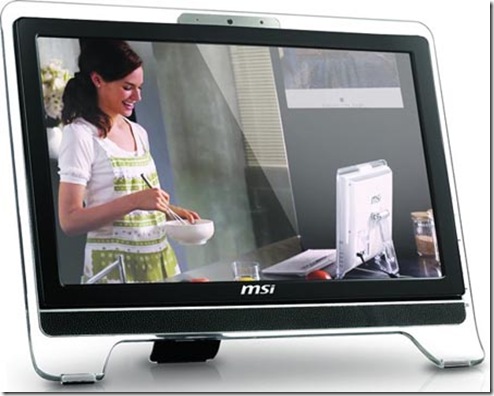
What does all this mean?  Well, computer sales should tank as computers become more energy efficient and we manage to make them IT efficient too.  A 22” inch LED screen with high-powered but energy efficient quad processer hidden away inside running a rock solid stable OS at 20 watts of power using a near universal interface, and costs just $500 while lasting 12 years will have a tremendous impact on society, business and computer sales.  The iMac is an elegant design showing the future of desktop computers, so when a competing product running a firmware version of Linux comes out built around cloud computing concepts then you might should pay attention.  Ponder where Google Chrome OS going?
new-all-in-one-1

Take for instance my desire to buy a new computer.  I’m looking at getting a 1-2 terabyte drive because of all the digital music and photos I have.  I have 18,000 ripped songs from my CDs to maintain, but if I knew I could always play them from the cloud, through Rhapsody or Lala, I could think about getting a smaller drive.  In fact, if I knew online storage was more reliable than hard disks I might even settle for a smallish solid-state disk drive.  Since I hardly ever buy shrink wrap software anymore, I’m thinking of doing without a CD/DVD drive.  Streaming Netflix and online video content also suggest a future without optical drives.

Once I get all my old photographs digitized I’m not sure if I’ll need my scanner anymore.  And I print so seldom that I worry that the print-heads on my Canon inkjet are going to die.  So if the CPU box and my all-in-one printer-copier-scanner disappear from my desk I’ll be overjoyed.

The Winning Design

The all-in-one desktop/monitor like the iMac, without an optical drive but with a SSD drive is the winning design for an energy efficient PC.  It does away with the whole CPU box, a major savings in resources and energy, plus it gets rid of so many wires, which is another area of savings.  And it has just one power supply.  Finally, its a design without moving parts.  This is a very elegant solution, and it’s a shame that Steve Jobs doesn’t allow other hardware makers to license the Mac OS – but the world economy can’t accept a system from a hardware monopoly.  Besides, it’s really time to get serious about Linux on the desktop – since it has become a world OS.

Here’s a review of four all-in-one machines that use 66-75% less now.   I don’t think it would take too much innovation to design machines with a 23″ 1920×1020 LED screen and have the power of today’s quad processors and reach 90% less power.  The machines reviewed are on the wimpy side for power users, so my point is I think its possible to design muscle machines for power users that are 2050 green too.

By the Year 2050

With the regard to computers, I’m not sure if the President even needs to mandate that they use 83 percent less energy by 2050 because computers are already evolving in that direction anyway.  Laptops are getting lighter, and to make them last longer on a batter charge, they have to be designed to use far less power.  Desktop all-in-one monitor/CPU designs also use less power and take less resources to make, and they take up far less desk space.  I’d be surprise if the average computer doesn’t use 83% less power by 2015.

At the beginning of the essay I said if the average machine today used 200 watts we’d have to design machines to run on 34 watts by the year 2050 to meet the President’s goal.  Well, here’s a machine reviewed at Tom’s Hardware that runs at 35 watts.  It uses a powerful E8600 Intel chip, and for 37 watts, you can get a motherboard with GeForce 9300 graphics.  How hard will it be for engineers to get such a system down to 15 watts?

If only we could change everything else so fast.  And maybe we can.  It might be a far less scary job than we think.  I got a new energy efficient HVAC last year and my utility bills are 30-50% less.  If I remodeled my house with better insulation I’d save even more.  The next time I have to buy a car I’ll probably cut my gas usage by 50%.  I think we’ll see change far faster in all areas before 2050.

Sites that review CPU Power Consumption

JWH – 12/5/9
Readability

Most people hate reading on a computer screen, but many of those people also spend hours reading online, so what’s the solution?  Try Readability.  I was reading an interview with John Joseph Adams, an editor for The Magazine of Fantasy and Science Fiction, a guy who has to do A LOT of reading, and he mentioned he liked to read submissions on his Mac with a utility called Tofu.  I immediately jumped over to the Tofu site to discover there wasn’t a Windows version.  Bummer!  I even jumped over to the Apple Store to price a Mac, but quickly abandoned that bright idea when I was slapped hard by sticker shock.  Necessity being the mother of Googling, I made several attempts to find the right search phrase until I found Readability.  [Note to Tofu people – naming your product with the same name as common food is a poor marketing decision.]

I have no idea how Readability works, but it’s magic.  Go to their site, play around with the controls to find a reading style you like, and then right-click the Readability button and select add to Favorites.  (I’m using IE, so it will be slightly different for other browsers.)  Then go to a web page you want to read that’s not very eye friendly readable, select Readability from your Favorites, and Presto-Chango the page is Harry Potterly reformatted for easy reading.

Readability doesn’t work with every web page, nor does it retain all the page features you may want to see – it will filter out videos, but it gets the feature photos while somehow filtering out the ad graphics.  So if you visit a web page that looks like a hood of a racing car covered with ads, this little gem of a utility will clean up your view.

Readability works best on pages with long articles and not pages with lots of reading snippets.  Readability makes most web pages into large print book reading.  Most web designers must be 19 year old kids with better than 20-20 vision who work on giant Macintosh monitors who never imagine people will come to their web pages wanting to read that bland annoying text stuff that clutters up their beautiful graphical layouts.

Often when reading web essays with tiny text, where the layout locks out my browser’s ability to enlarge the font, I’ll cut and paste the text into Word just so I could read it.  Readability automatically does that now.  Readability is like having a Kindle for blog pages where you can easily set up your default reading style so everything you buy to read is formatted for your personal reading pleasure.

Web browser programmers should program this concept into every browser, rather than replying on the Text size feature, which is often disappointing to use.

Very cool.  So cool I added Readability to my Favorites Bar in IE.  Now when I’m on a web page which I want to spend some time reading, I click the Readability button and Shazam, the page becomes easy to read.  Unfortunately, Readability doesn’t work like Tofu with computer documents, so I still want to find an app for Windows that does that.  If you know of one, let me know.

JWH – 12/5/9

Inventions Wanted: Universal Photo Database

I often wish I had photographs of certain people or places from my past.  I constantly damn myself for not chronicling my life better.  I’ve even wondered if anyone else might have photographed those people and places.  This gave me an idea for a great invention, the Universal Photo Database (UPDB).

I have lots of old photos of my mother and father, and some of my grandparents, with a few of my aunts and uncles and my cousins.  If there was a UPDB, I could submit my pictures to it, along with the names of the people in the photos.  Then if anyone in the world put in a search, for example “George Delany Harris,” my father, they’d find the photos I uploaded.  It’s not likely people would be searching for him, but he was in the Air Force for twenty-four years and maybe old service buddies wondering what happened to their old pal would.  On the other hand, other people might have photos of my dad that I’d like to see.

Jimmy-Patty-Becky-Jody-Christmas-1958

[Jim Harris (me), Patty Piquet (spelling?), Becky Harris (my sister) and Jody in front of house in Lake Forest subdivision, Hollywood, Florida, Christmas, 1958.]

When I was growing up, we’d often go outside to take the photos to have good light.  Us kids would stand on the sidewalk in front of the house, often grouped in gangs of friends.  Photos for the UPDB could also be tagged by location, such as Maine Avenue, Homestead Air Force Base.  My sister and I had a bunch of friends on that street but no photos, so maybe Arthur or Alice, or Gary and Gerry, if such a UPDB existed could post their family photos, and if I searched on “Maine Avenue” and “Homestead Air Force Base” and (1961 or 1962) I’d find them.

Or I could search for “Lake Forest” “Hollywood, Florida” 1958-1963 and I could find photos of the old subdivision where I grew up.  Facebook has accidently created a beginning of a UPDB for the Lake Forest (Hollywood, FL) Historical Appreciation Society.  The group has 90 photographs, some of which seem to come from the era when I lived there, so obviously, this idea of mine might have widespread appeal because there are other people feeling nostalgic for that neighborhood too.  Multiply that desire by millions and billions of people and you’ll see the potential.

Patty---Mike---Becky-April-1959

[Patty Piquet (spelling?), Michael Kevin Ralph and Becky Harris (my sister) in front our house in Lake Forest subdivision in Hollywood Florida, April, 1959.  Patty and Mike, are y’all out there?] 

The tremendous popularity of Facebook is due to nostalgia I think, but so far its technology is based on simple groupings allowing people to reconnect with old acquaintances.  A UPDB with key fields based on names, locations and dates would redefine our interest in the past, and it could be used for other purposes other than wistful remembering.  Think what it would mean to biographers, writers and reporters?

My favorite science fiction writer is Robert A. Heinlein.  What if every fan photo, interview photo, magazine photo, fanzine photo, convention photo ever taken of Heinlein was uploaded into the UPDB along with information, memoirs, interviews, etc. linked to the photos, wouldn’t that create a wonderful library of information for researchers and fans to study?

Also, how often do you find old family photos where you don’t know all the folks in the shot?  Uploaded those photos to the UPDB and someone might identify the mystery faces.  Or how often do you clean out old closets and drawers and throw away ancient photos?  That’s history buried in the landfill – ain’t that a crying shame?  Every photo is a snapshot of reality from a unique time and space location, and who knows what value it might contain.

Most libraries have a special collections department that collects local photos, but they are impossible to use without visiting each collection in person.  Imagine if all the special collection photos where uploaded to the UPDB?  Or old archive photos from newspapers and magazines?  Or all the school photo annuals?

Imagine if Google Maps was cross-referenced to the UPDB where you could zoom in and see photos based on location and time period?  What a fantastic mash-up that would make.  Now that we live with pocket telephones that have built-in cameras, wouldn’t it be easy to create photo diaries of our lives?  Especially ones with GPS tech built in that could date/time/location stamp each photo?

When I was growing up, buying a roll of film for the Kodak Brownie was a rare event.  For most years of my life I doubt there were no more than 2-3 photos taken of myself, and some years none.  There is a small chance I’m in other people’s photos.  During the decades of my parents life, they probably went years without being photographed.  And their parents and grandparents were probably only photographed a handful of times during their whole lifetime.  If we don’t make an effort now, those photographs will soon disappear.

On the other hand, the current digital generation will have hundreds, if not thousands of photographs of themselves, so they will overwhelm the UPDB and techniques will be needed to weed out the photos worth saving.  One of my favorite blogs, Times Goes By written by Ronni Bennett has a top masthead of 10 photos of Ronni taken across her life that makes a wonderful timeline image.  I wish that everyone I meet on the web had a linked page with a similar timeline photo of themselves.  At minimum, each person should have a photo for each year of their life.  Go look at Ronni’s photos – doesn’t that time dimensional aspect add so much to your immediate impression of her?

Everyone is amazed by what the Internet does now – I’m waiting to be blown away by what it will do in five years, or ten years.  Imagine and contemplate what Facebook could be in 2015?  or 2025?  Picture me singing and smiling like Al Jolson, “You ain’t seen nothing yet!”

JWH – 11/25/9 (My birthday – age 58)  

Mind Mapping

Mind mapping is a concept that I recently stumbled upon on the web that I wished I had learned during my K-12 imprisonment.  I have a wandering mind, with a poor memory, that finds it hard to hold the big picture on any subject, so it was exciting to come across this concept.  Because a video is worth a thousand words each 1/25th of a second, I think I’ll let one do the explaining for me:

Tony Buzan is a modern prophet for mind mapping and promotes the concept around the world.  In recent years mind mapping software tools have emerged hoping to become a new category of productivity software after the word processor, spreadsheet and presentation package.  There’s definitely a lot of information on the web, and plenty of software to try for free, but I’ve yet to meet anyone personally that extols the virtue of mind mapping.  And there’s plenty of companies selling products in the $99-$349 range, all touting that their tools are used in thousands of businesses and schools around the world.  I wonder how I’ve missed this – maybe because I graduated from high school forty years ago.

I have a life-long desire to write fiction, but I have a devil of a time plotting and shaping a story, so I hope mind mapping might help me.  I figure the concept will also be good for my programming projects, and even working out blog ideas ahead of time.  Hell, it might lead to essays that don’t meander about so much.

For a software category that’s been invisible to me, there’s an amazing array of products to use, see the mind map of mind mapping software packages from Mind Mapping Software Blog.  And here’s a Mind Map Search site listing 200 websites devoted to mind mapping.  And if you want to regularly read about mind mapping, try Mind Mapping Blog.

Mind mapping is considered one of many techniques at Mind Tools for business users to expand their career skills, but mind maps are also great for students studying any subject, or for creative people wanting to brainstorm.  If I succeed with short story writing I’ll chronicle how mind mapping helped in a future blog.  There’s a fair learning curve to mind mapping, and it might be an art in itself.  I need to practice a bit before I judge the concept.

After installing a couple free programs, and looking at many commercial sales videos I’ve settled on trying Xmind, available for Windows, Mac or Linux users.  (FYI: if you’re using IE8 be sure to turn on compatibility mode while visiting their site.)  Most of the free cross-platform packages use Java, and I hate Java applications, but Xmind is much better looking than most Java applications I have used, so I picked it for that reason over Freemind.  Xmind was once a commercial product, but now there’s a free version and a Pro version.  The Pro version is a $49 a year subscription service with more professional output options. 

Most commercial mind mapping programs have 30-day trials, but I’ll wait to see how successful I become at mind mapping before considering them.  If you want to give the concept a spin without installing anything on your computer, visit Mind42.com or mindmeister for a web versions of mind mapping.

Another appealing feature of Xmind is their share site, which features uploaded mind maps from around the world to study.  Xmind also uses the concept of workbook with pages to create multi-dimensional mind maps.  I figure I’ll play with Xmind and research mind mapping for a few weeks or months, and then write a post that chronicles my effort.  For now, I’m just curious if anyone I know actually mind maps.

JWH – 8/26/9