My Music DNA: The FM Years

Until I wrote My Music DNA:  The AM Era I never thought about how my life has been one long experiment with technology.  We like to think personal technology started with personal computers, or for some people, the iPod, iPhone or iPad, but now that I contemplate the topic, I realize The Gadget Age started in the 19th century with photography, then the phonograph, movie camera and radio.  Before gadgets if you wanted to hear music you had to go where the musicians were performing.  If you wanted to see Paris you had to go to France.

Gadgets bring the world to us, whether it’s voice, music, images or movies.  To a degree, books and paintings are proto-gadgets, they bring distant words and images to us created by people, but gadgets bring snapshots of reality, whether it’s images (photography), voice and music  (phonograph, radio) or movies (film and television).  A personal computer or iPad are dazzling devices because not only can they bring us voice, music, images and movies, they can process these media like a word processer processes words.

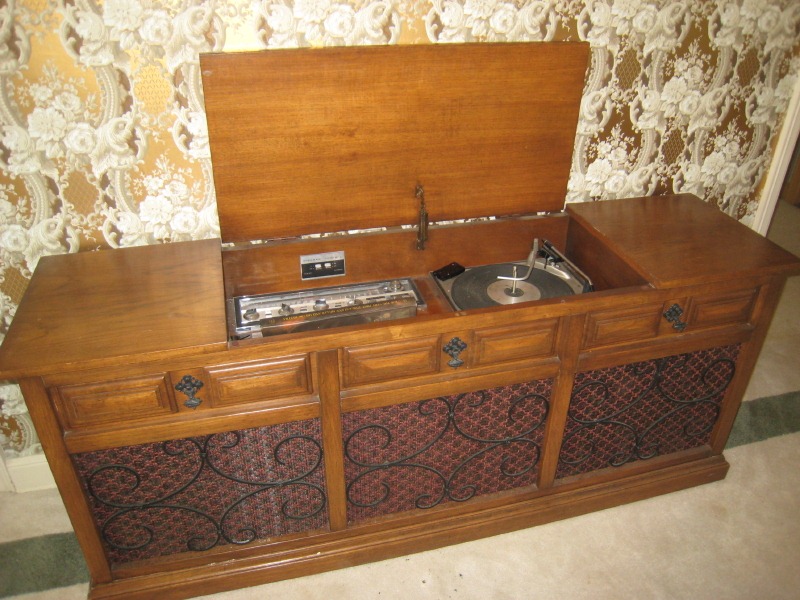
Although FM radio was patented in 1933, first broadcasts weren’t made until 1939, and stereo not added until the late 1950s, I didn’t get my first FM radio until 1968.  FM radio took a long time to catch on.  If you look at the Fidelity Potential Index Table you will see how sound recordings have evolved since the invention of the wax cylinder.  FM music has more fidelity than the 78 and 45, but not as much as the LP.  I had already started buying 45s and LPs before I got my first FM radio.  My first FM radio came in a small console stereo I bought in 1968 from the Columbia Record Club, when I was 16.  It was my first installment plan purchase.  I don’t have a photo of my first console stereo, but it looked something like this.
console-stereo2

Working as paperboy, cutting lawns, babysitting, and eventually as a bagboy didn’t not pay enough to buy all the music I wanted to hear, so my FM radio was a magical piece of technology.  AM radio was all about hit singles, whereas FM was about albums.  FM radio took me out of the teeny-bopper tunes and introduced me to a more mature level of album oriented music.

Among the albums I discovered back in 1968 on my FM radio was Truth by Jeff Beck, which I immediately bought.  I was transitioning from AM radio to FM and I discovered new groups like Cream,  Quicksilver Messenger Service, Moby Grape, Steve Miller, Grateful Dead, etc.  I also got into the albums of artists I had discovered on the AM airwaves like The Byrds, Bob Dylan, Jefferson Airplane, Buffalo Springfield, The Beatles, The Rolling Stones, The Doors, Jimi Hendrix, The Mamas and The Pappas.

I remember friends coming over in 1968 to hear the FM radio for the first time and being blown away – it was that different from AM.

My FM years didn’t last long, from 1968-1972.  It was transitional technology.  FM brought me a wide range of music from around the world, but it was a broadcast technology.  I started buying LPs in the AM era, and by 1970 I had about 300 albums, but they were never enough.  FM radio was my music news and how I discovered new music until I couldn’t handle the disc jockeys.  At first, back in the 1960s, FM was considered underground music, but FM took over the hit parade as more people got FM receivers.  At a certain point disc jockeys became so annoying I gave up FM and AM radio.

In 1969 I started getting my music news from The Rolling Stone magazine.  For a brief while in the late 70s and early 80s I returned to FM to listen to WEVL, a volunteer radio station where music fans hosted music shows rather than professional disc jockeys.  But for the most part I gave up radio listening in the 1970s.  I became a album buying addict, buying over a thousand LPs before I switched to buying CDs in the 1980s, and I went on to buy 1,500 CDs before I phased into streaming music in recent years.

AM radio showcased top hits that were played frequently.  AM hits of the 1960s provide the core music that Baby Boomers share.  On any given day you could hear about 40-60 different songs.

FM radio offered a far larger range of music and styles until it was hijacked by the Top 40 format and became zany entertainment for automobile drivers.  In the early days of FM if you tried hard enough you could hear 100-200 different songs in a day.

Buying LPs offered the choice of thousands of albums at better stores.  And LPs allowed fans to own music, another kind of enabling technology.

With Internet shopping, collectors could buy a million CDs if they could afford it – then the MP3 revolution hit, and collectors could steal those million albums if they had the time, bandwidth and lack of ethics.  Now with steaming music anyone can have easy access to over a million albums, or about 15-20 million songs for $9.99 a month.

iTunes and iPod reinvented the hit singles and almost killed the album.  Streaming music is like combining FM and owning LPs with renting music, and it promotes the album.

FM radio still exists, as does AM radio and even LPs, but they are waning technologies that have been supplanted by the Internet.  FM radio was a stepping stone technology that expanded the world of music over AM.  FM radio is now a trailing technology – it fits a niche market, and has many competitors like Sirius Radio, a paid service, or Pandora Radio, free and paid, that offers music from a very wide selection of albums, and is a far superior to broadcast technology.  Broadcast radio itself is a waning technology, even with HD Radio.

Streaming music offers the greatest selection and control – with instant access to most of the albums in print.

Strangely enough, it’s very hard for me to remember FM songs that I loved because of listening to the radio, versus songs from the same time period that I bought on LPs.  The way I’ve discovered how to tell the difference is to listen to Play Cofi Jukebox at tropicalglen.com by the years below.  The songs I loved but never bought are songs I can give thanks to FM radio technology.  What’s surprising is just how many of those songs there were.  Just click on a link and listen.  How many of the songs did you buy, and how many are part of your memories because you listened to FM radio?

19681969197019711972

It’s strange to think that young people today may never have listened to an AM or FM radio, or bought a LP or CD.  But I wonder, just what kind of technologies will supplant streaming music?  Combining streaming music with a smartphone is about as close to thinking of a song and hearing it instantly telepathically as one can get.  Will they ever invent brain transceivers that stimulate the neurons directly, and just bypass the ears?  It’s just amazing to think of all the technological change in one lifetime.

But you know what?  There’s one constant that doesn’t change.  That’s listening to music.

JWH – 2/21/12
Living in the Cloud: A File Structure for Life

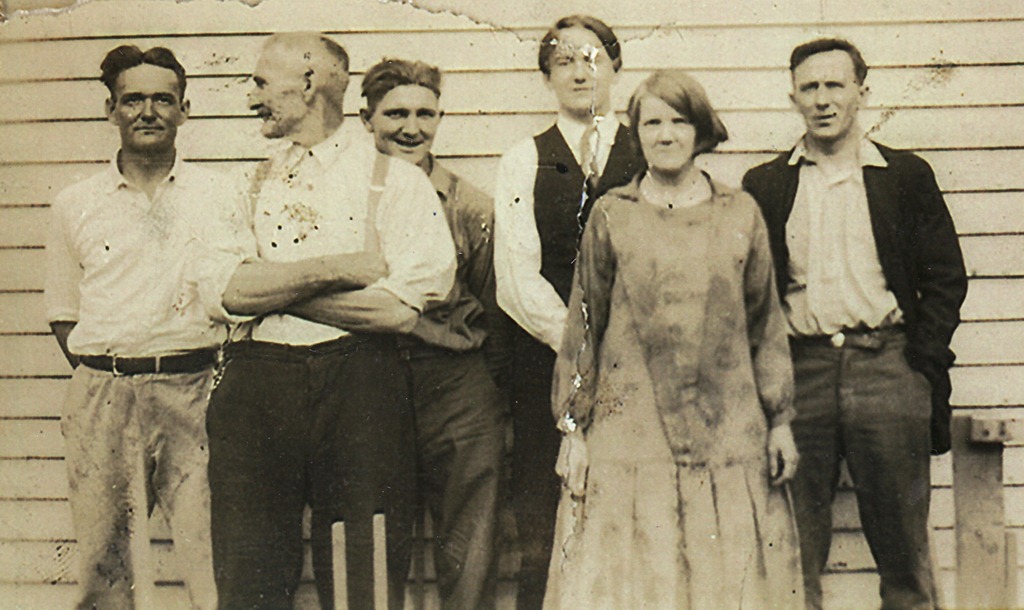
I’ve been messing with microcomputers since 1979, but it wasn’t until the mid-90s that I realized I was creating data I didn’t ever want to lose.  By the mid-00s with digital music, video and photography it’s obvious to everyone that we had invisible possessions we’d want to keep for life.  This presents a number of problems.  How long can I preserve photos like this of my great grandparents?

1920s - Dad's father on right - with parents and brothers - cropped

File Formats

My first efforts of writing fiction was on a Commodore 64 – and even if I had any of its floppies, I couldn’t read the discs, nor would I have a word processing program to read the files.  When I got a PC I bought Word Perfect, but that was many PCs ago, and I’ve since converted those files to Word.  If I live to be 100 (1951) will I still be able to read those files?  If by a miracle I do live a century I’m pretty sure I’ll be a sentimental old slob who cries over his ancient snapshots.  Will I be able to find the ones I want and still view them?  Is it .jpg forever?  I’ve been buying audiobooks from Audible.com since 2002, will I still have my audiobook library to play in 2051?  Or all the Kindle books I’m buying now?

Standard file formats are critical to long-term preservation of data.  How long will Amazon maintain the DRM copy protection on my Kindle books and Audible audiobooks?

Data Migration

I’ve lost count how many computers I’ve own after eleven.  Every time I get a new computer I need to move all my files over and that’s a pain.  I’m always making a new folder and throwing stuff in it, so the number of files I’m saving constantly grows, and every few years I try to clean things out and it’s a big job.  Usually when I get a new computer I just copy everything in My Documents to the new My Documents folder.  But what if I got a Mac?  Or what if in 2022 they come out with some far out new computer system?

File Organization

If you start with one folder, and organize your digital life into sub-folders, what is the best structure?  I sure wished that iTunes hadn’t put ripped audio books into My Music years ago, because that’s causing problems moving my music to the cloud.   Is there a way to plan for future snafus?

Is there an optimal structure that will stand the test of time.  By structure, I mean folder organization.

\Jim Harris

\Audio Books

\Data

\Ebooks

\Mind Maps

\Music

\Numbers

\PDF

\Photos

\Words

\Essays

\Fiction

\Videos

Let’s imagine a future where we have federally regulated data banks like we have money banks and we can trust them implicitly.  In this future, data bank replicates our data in layers of backups, that for anything short of Armageddon, will be completely secure.  Should we put all our data in one place?  In the above chart I could remove \Music because I have my music stored at Google, Amazon and Apple.  I could also remove \Photos because of Picasaweb.  I could also remove \Audio Books and \Ebooks because of Amazon.

Because we don’t have data banks and because my cloud storage is limited at Dropbox and SkyDrive, I will let those other companies maintain my media files.  But if we did have trustworthy data banks, I’d probably want all my content in one location, which means precise organization is important if I’m collecting files for life.

Data Inheritance

There is another thing to consider – what happens when we die?  When our parents die we inherit their papers, books, records, photos and so on.  Won’t we do the same things with digital files?  When I die I want my file structure copied over to my wife’s data bank, and if I wanted, I’d like to give copies to all interested relatives and friends too.  Having a well organize file structure would make it easier for people to go through my digital processions.

Cloud of the Future

Someday we will have data banks.  We might even have laws that require our data to be saved for historians.  Can you imagine scholars from 2782 AD trying to research our times?  I saw a wonderful show on Nova last night, “Mysteries of a Masterpiece” about art historians working to validate a work of art as Leonardo da Vinci.  The scientists had lots of physical artifacts to examine.  If our world goes digital, what will future researchers have to figure out how we lived?

Moving to the cloud is the first step towards this future where we have data banks and preserving digital data for all time.

JWH – 1/26/12

Living the in Cloud: Dropbox and Evernote

If you access the internet from only one device this article won’t mean much to you, so I won’t mind if you go read something more interesting.

However, if you own a computer and a tablet, or a computer, smartphone and tablet, then reading about Evernote and Dropbox might be worth a few minutes of your time.  If you’re like me and juggle a lot of devices then learning to squirrel your digital crap all over the cloud becomes more vital.  At home I have both a Windows and Linux desktop, at work I have Windows, Linux and Mac desktops, and between the two locations I have an iPod touch and iPad 2.

What a pain it is to think of something you want and realize you left it in your other computer.  Moving to the cloud is in its early stages, so 100% tried and true solutions are in the future.  As society evolves towards the day when internet access has five nines of uptime, 99.999%, then we can develop a new paradigm of trusting our files to the cloud, and that will be the difference between life before personal computers and life after them.

dropboxevernote

Although I’d like to be a cyborg and meld my brain with silicon I’m not quite there yet, but I do think of the Internet as my auxiliary brain and that presents some problems.  Before the Internet going to work meant leaving my main auxiliary brain at home – how inconvenient.   Sure, someone invented the laptop and it was a good idea at the time, but it was only a stopgap solution.  After we got smartphones and tablets it became pretty obvious trying to sync all our crap between every device we owned was a losing battle.  The solution was to put all digital kipple in one location and then let all the machines, big and small, fetch what we needed from that primary storage.

What this means is the cloud is our new auxiliary memory and the machine we use is less important.  The old fanboy battle between PC versus Mac becomes silly.  If I can read my docs, listen to my music and look at my photos from any device, does it matter how big or small it is, or who made it, or even who owns it?  Instant access is what counts.  Memories are best served fast.

When the cloud becomes our digital memory deciding how to organize memories becomes significant.  I’m playing with two tools, Dropbox and Evernote.  Both are free to use with an introductory amount of cloud space, but fill up your cloud attic, and you’ll have to pay for more space for your white elephants.  That’s cool, but I haven’t committed to either one yet because I’m still evaluating how they store my memories.  I’ll probably buy into both, but I haven’t decided.

Dropbox is like having a hard drive in the cloud.  You create folders and store whatever kind of files you want.  It’s very computer centric.   When you join you get 2gb of free space.  If you convince a friend to join they give you another 250mb of space.  If you get enough friends to join you can get up to 8gb of free space, but after that you rent larger blocks of space.  By the way, if you join from this link I’ll earn some extra space.

Evernote is different, it’s database centric.  Evernote is a free-form database where you leave notes, either ones you type, or ones you email via a smartphone, or clip from the web, or cut and paste from your own computer documents.  You can even embed PDF files.  If you spend $45 a year, upgrading to the Premium version, gets you more memory processing features and more storage space.

The neat thing about Evernote is being able to search your collection of notes.  Since I’m getting old and the access speed on my biological memory has become erratic, untrustworthy and slow, having cloud base memory with search is nifty indeed.  Because Evernote is a free-form database, throw your data in any old way, it doesn’t matter, and let search find it for you.  You can be as sloppy or neat as your personality.

Both programs install as programs on your computers, work from web apps, or install as apps on iOS and Android smartphones and tablets.

I can access Evernote and Dropbox from my PC, Mac, Linux, iPad, and iPod touch.  If I think of something I want to remember, or read something I want to remember, I can choose to remember it the old way, or I can memorize it in my auxiliary memory.

JWH – 1/24/12

Living in the Cloud: Going Google with iGoogle

I’ve been using Google for years.  Then Google gave us Gmail.  It’s not my main email client, but I use it.  Then Google gave us Picasa, Chrome, YouTube, Music, Picnik, Maps, Earth, Reader, Google+, and over time I’ve become Googlefied.

I started storing content on the net with Gopher and began developing web pages when Mosaic came out.  I’ve always kept my favorite bookmarks on a file I coded in HTML and used it as my home page in all my browsers.  I had set up iGoogle years ago but never really committed to it because I loved my own homely home page.

This morning I started playing iGoogle again and decided to make it my home page for Chrome.  Chrome is my default browser at home, but I also use IE 9, FireFox and on rare occasions Safari.

We’re all moving to the cloud.  Some people might not know it yet, but we’re all moving to the cloud.  Any device with a IP address is on the Internet.  Programs and content stored on devices you own are local.  If you store you primary copy of data off your local device you’re living in the cloud.  Most people find that scary.  I do too, although I’m willing to give it a try, so I’m moving my data to the cloud but I’m keeping backups local.  Think of me as a belt and suspenders man, at least for now.

I’m going to write a series of posts about living in the cloud and review programs and services that I find worthwhile.  My first step is exploring Google’s cloud offerings.  I’ve already put my songs in Google Music.  I can play them on my PCs, Mac and Linux boxes at work and home, and on my iPod touch and iPad.  I’ve also started uploading my photos to Picasa’s online storage.

The thing about moving to the cloud is committing to a company that hosts the servers.  The big choices now are Google, Microsoft, Apple and Amazon.  The first three also have their own browsers.  (Maybe Amazon should align itself with FireFox.)  I have content with all four companies, and moving to the cloud implies I expect these companies to stay in business for the rest of my life.  I’m not sure which company will become my primary cloud home, but I’m going to test them all.

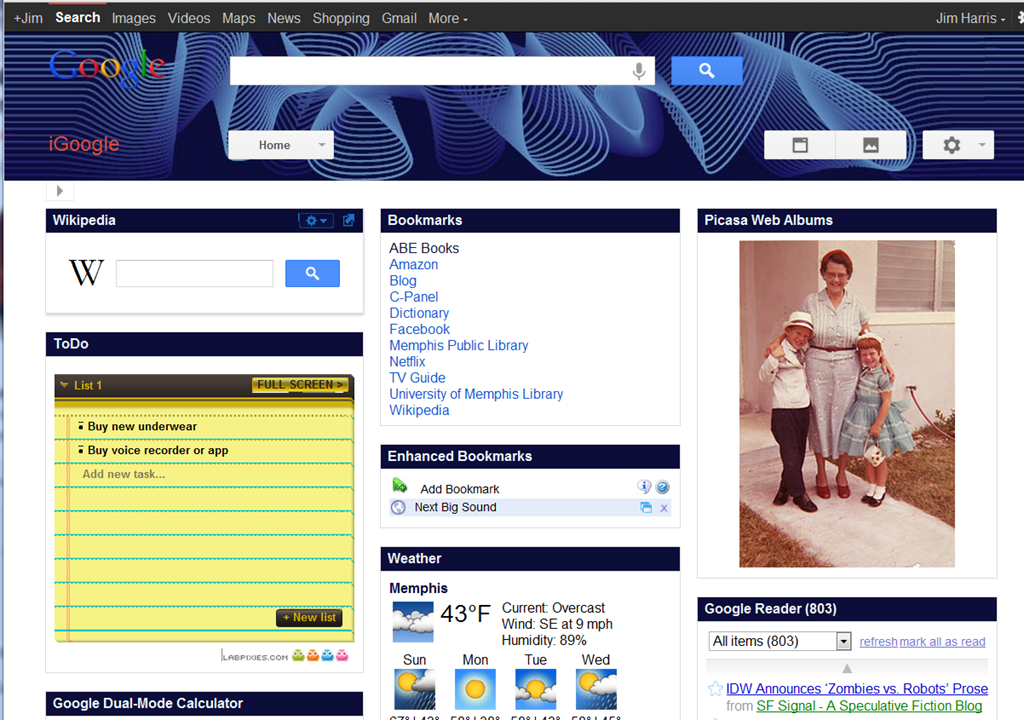
I’m starting with Google, and to show my commitment I’m setting iGoogle as my default home page.  It allows me to customize my home page extensively with a variety of widgets.  Here’s my first effort.

iGoogle

Because Google is pushing Google+, it’s revamped it’s many separate tools into a toolbar that Googlifies everything. 

From this home page I can search Google and Wikipedia, click on links to my favorite sites, see Gmail, RSS feeds, weather info, do math, get driving directions, search YouTube, and every thirty seconds be visually reminded of a different moment of the past.  Plus, I have a pull-down menu to a vast array of other Google features.  If I click on the photo it takes me to Picasa web, where I can click on a photo edit button that brings up the wonders of Picnik photo editing.   All the companies that Google has bought over the years is finally coming together in one command center. 

Oddly enough, there’s no widget for Google Music.  Google needs to add a Google Music Player widget.  If I kept my Chrome window opened to full-screen I could even use 4 columns of widgets.  iGoogle provides very flexible screen layout options and colorful themes. 

iGoogle is a cloud portal tool, a feature that Microsoft, Amazon and Apple don’t have, and puts them at a disadvantage.  This matters a lot if you’re using multiple computers, and too a lesser degree if you’re using smartphones and tablets.  I have a PC, HTPC and Linux workstation at home, and a PC, Mac and Linux workstation at work, plus I have two mobile devices, an iPod touch and iPad.  This provides a tremendous incentive to put my digital possessions  in the cloud.  My photos and music are available to all my devices at any location.

I have Microsoft Office on my PCs and Mac, and have a nice Outlook client on my iPod and iPad, and hope to have Office apps on my iPad soon.  I’m very Microsoft centric when it comes to productivity programs, and Microsoft offers various Live apps that are starting to compete with Google’s cloud tools, but it doesn’t have a portal like iGoogle.  I can store photos on SkyDrive but it’s not the same.  Microsoft has no cloud music like Amazon and Apple does.  But it is obvious that Microsoft is getting serious about the cloud.

Amazon and Apple are really lacking when it comes to furnishing a cloud home base.  They are more like mini-storage rental sites, where they will keep all my junk.  Amazon’s portal is it’s front page, and Apple’s portal is iCloud, but it’s home page is very limited compared to iGoogle.  (How did Apple let Google have the i-name?)  Apple assumes people live on their iPhone, iPad and iMac, and everything else doesn’t matter, but I’m not ready to ditch Windows, Linux and Android.

iGoogle isn’t slick like Apple products.  It’s not even as slick as Microsoft programming.  I’m hoping some of the technology they bought with Picnik might jazz up Google’s cloud apps in the future.  iGoogle is good for people who want to work over the widest range of platforms.  If you’re a Apple true believer, it won’t matter.  If you’re totally devoted to Amazon and Kindle, it might not matter.  But if you live in a world of PC, Mac, Linux, iOS and Android, then it’s well worth a look.

Not only does living in the cloud offer cross-platform sharing of data, it also backs up data.  If your house burns down, your digital belongings are in the cloud.  Eventually I want to replicate my data across two or more cloud servers to have even more protection, in case one company goes out of business or suffers a prolong outage.  Switching to iGoogle is just the start.

JWH – 1/22/12

Google+ versus Facebook

Having two competing social networks is a problem.  Logically, you’d like everyone to be at one location for convenience.  Until recently, it looked liked Facebook was going to be the universal social network.  I’m not much of a Facebook user, but I can’t quit it either.  Too many friends, old acquaintances and relatives are on Facebook, so it’s easy to keep an eye on everybody.  Facebook is actually much better than snail-mail letters, postcards and Christmas cards at keeping track of people.  In fact I often wish all my relatives would use Facebook.  Facebook actually makes me feel closer to people.  Then came Google+.

google-plus-logo

Google+ has a few nifty new features, some a touch better than Facebook, but to make Google+ practical I’d need all my Facebook friends to move over to Google+ and that would be rude to ask.  Many people I know on Facebook are computer phobic, and it took them a long time to learn Facebook.  Getting them to switch would be cruel.

What to do?  What if Google+ is a superior tool?  What if we all move over to Google+ and Apple or Microsoft came out with an even better product?  Do hundreds of millions of people then move again to another new system?  Given time wouldn’t Facebook add the features we all want anyway?

Mike Elgan is fanatically campaigning for Google+  and currently 374,958 people have him in one of their circles.  Google+ definitely has more geek cred than Facebook, which makes me think I should use Facebook for people I know in real life and use Google+ as a geeky hangout for people I met over the Ethernet.

There are many things to consider.  Is social networking a fad?  Many pundits and friends have already abandon Facebook.  On the other hand, I can only imagine Facebook becoming better and more valuable over time.  Does that mean we should all stick with Facebook because of its initial momentum?  Are we already stuck with Facebook forever?

Mike Elgan claims Google+ can replace our email systems too and that Google+ can become a central hub for all kinds of communications Facebook doesn’t do and the average user doesn’t understand yet.  At least I don’t.

Which is more secure?  Which is more natural at organizing levels of relationships?  Which offers the most features I’d actually use?  Which is easier to use?  Which can be customized more?  And most important, which has fewer ads?  I hate ads.  I don’t have the answers, but I’m trying to find out.

And one last interesting tidbit.  Facebook isn’t indexed on search engines, whereas Google+ is indexed on Google, Bing and others.  Facebook is a closed system, and that’s appealing, I think.  Then again, should you ever put anything private and personal on any computer system?

JWH – 1/10/12