This tale is for people who are thinking about building their own PC. I’ve built my last three PCs, so this is the story of the first one I’ve had to fix.
My HTPC is crashing intermittently. As anyone who fixes electronic doodads knows, intermittent problems are the most annoying.
I use my Home Theater PC to record TV shows from over the air broadcasts because I gave up cable TV a couple years ago. Basically, a HTPC is a computer customized with a TV tuner card that acts like a DVR, but runs under Windows 7, so it can serve many useful functions while connected to a high definition TV. Think of it as a desktop with a 56” screen.
If I was a Comcast or U-verse subscriber and my DVR went wonky, I’d just have them replace it. As it is, I’m the repairman. And since I also built the computer myself from component parts, there’s no warranty but me. That’s the thing about a Do-It-Yourselfer, you have to be a Fix-It-Yourselfer.
The first time the HTPC crashed I thought the power supply had just gone out, so I replaced it. $39.95 plus shipping. Even with a new power supply I discovered my machine was just as dead. That indicated one of the essential components was keeping the machine from booting up. I reseated the memory, pulled the TV tuner, audio card and video card and the machine started working again. I added back the TV tuner and video card and it still worked. The sound card was a recent purchase so I thought maybe it had flaked out. I reconnected everything back to the TV and it worked for a day.
Next I pulled the add-on video card and it worked for two weeks.
I let it sit a week turned off. I didn’t feel like messing with it. But going a week without a DVR is annoying. But it’s also instructional. I can go a week without recording TV, without watching the 5:30 NBC Nightly News delayed to 7:12pm (or 9:32pm, or 8:05pm) while eating dinner. If I miss the news the world seems to go on just as fine, or poorly, without my conscious observation.
Today I pulled the HTPC from my entertainment center and reorganized my remaining components. I brought the HTPC and antenna back to my man cave. It’s now running again without me doing anything other than switching from HDMI cable to TV, to DVI cable to computer monitor. But I don’t trust it. However, I’m going to keep it back in my room until I can figure out what’s the actual problem. And while I do that, I’ll see what life is like without a DVR in the den.
A home built computer is merely a computer assembled from component parts:
CPU
heat sink
motherboard
memory
power supply
hard drive
TV tuner
optical drive
add-on video card
The first seven are required, the last two optional because I have on-board video. The computer crashes by freezing up, with the power light still on, but with a screen dark, and the TV saying no video signal. Those are my clues. Some possible failure points:
CPU glitch
heat sink is failing and computer overheats
something is flaking out on mother board
memory failure
TV tuner failure
Now the normal electronic detective work requires swapping each of those components with a known working replacement and test until I found the part that’s failing. That however, would require having working extras of each, and I don’t. I have two other computers, but not with matching parts.
Because a HTPC is powered on 24×7, I have wondered if power fluctuation could be causing the problem, but my system has been running for two years without failure, so that sounds iffy. Since I’ve moved my machine to another room, I’ve changed a couple of factors. I’m using a different power outlet, and I’m not using the HDMI port. I now have to wait until it fails again. When or if it does, I’ll move the TV tuner card to my regular desktop. If TV tuner card fails in the other machine, then I need to buy a new TV tuner card. If it doesn’t, I’ve got to come up with the next theory. It could take weeks to track down this problem.
However, the next stage might get expensive. At work I have a pretty good intuition for efficiently solving computer crashes, but 95% of the time, the snafus are obvious, or within a few guesses. To solve problems in a timely manner requires guessing the right choice quickly. My problem with the HTPC has been the exception. With an intermittent failure, detecting the problem can take a very long time. And I’m not even sure there’s not more than one problem. Pulling the add-on video card might have solved the original problem and I’m now seeing another problem. Or it could have been a minor glitch in one system causing a bigger glitch in a second.
For many people, this kind of fix-it-yourself sleuthing is aggravating. I’m calm about it because I’ve learned to be calm with this kind of work. I’ve got my HTPC in my room, and I’ve been playing back recorded shows, recording shows with the DVR and everything has been working fine. I just have to wait for another crash to tell me something. By the way, watching TV close up is very enjoyable. I see a lot more details. I’ve got the HTPC monitor next to my desktop monitor so I’m just an arm’s length in front of the screen.
Dealing with the problem is teaching me something else. I’m wondering if I need so many computers in my life. I’ve got over 200 shows recorded on my DVR, mostly PBS documentaries. I record far more than I watch – maybe that’s telling me something: Do I watch enough TV to need a DVR? When I gave up cable I missed the onscreen guide and the DVR. I just hate missing something I want to see. If I have a DVR recorder, I record everything I want to see, but probably only watch as much as I would if I didn’t have a DVR. We think we’re addicted to convenience and our gadgets, but are we?
In terms of actually watching TV I actually enjoy streaming Netflix the most. I love having a compelling series like Breaking Bad or Survivors (1975) to look forward to watching each evening after I’m too tired to do anything else. I use live TV for news and PBS documentaries. If I had other sources for those shows I wouldn’t need a DVR. (I also use the HTPC to play streaming music on my big stereo in the den – but that’s another story.)
I could solve my current problem by just putting my TV tuner into my desktop computer. But I won’t make that decision until after I fix the HTPC. I don’t want to give up solving this puzzle.
This is how my desktop of the moment looks (click on all images for 1920×1080 versions):
This is a painting by Richard M. Powers for a 1974 paperback book, The Mountains of the Sun by Christian Leourier from Berkley Medallion Books. Powers’ art visually defined science fiction for many fans in the 1950s and 1960s because of his book covers for Ballantine Books.
Now I don’t know if this is legal by copyright standards, but I like to find images from science fiction book and magazine covers, and format them for my computer desktop background. I’m going to provide some basic instructions on how to do this, but they’re specific for Windows 7. Max OS X and Linux users can also have desktop backgrounds, but you’ll need to know your system to customize these instructions.
All computers, tablets and smartphones come with a method of changing the desktop background. Most devices have built-in programs for cycling these images. And you can install programs with various levels of sophistication that take folders of photos and cycle your desktop images and use the photos for a screensaver.
Finding the Photos
When I discover a book cover I like I go to Google and click Images and search on the book title. Usually somebody has already scanned it for the web. Google will show you an array of images. Here’s what a Google Images search looks like for “Richard Powers Art.”
Look for the highest resolution with the sharpest scan. I right-click on potential images and select “Open link in a new window” and then click on “Full-Size Image.” That gives me the image in a browser page by itself. You want the largest possible version you can get, because unless the image is the same size as your desktop it will be blown up to fit your screen and small images can become very blurry. When you find one you like, right click and select, “Save image as” and save it into a folder for collecting your desktop SF art.
[FYI, IE will shrink an image to fit within the browser window. If it does, you’ll see a little magnifier with a + in it. Click the image and you’ll see the full size version. It will be bigger than the browser window sometimes. Sometimes much bigger. Right click and save that version to get the absolute best results.]
Repeat this procedure until you have a little collection of art.
Formatting for the Desktop
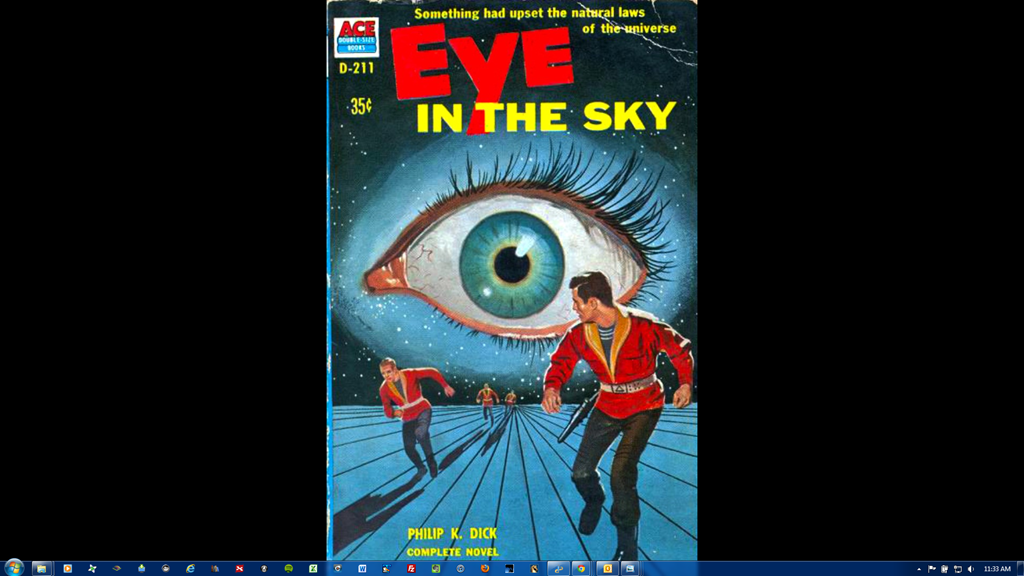
Most pictures you collect won’t have the same aspect ratio as your screen. If you want to preserve the original image do nothing. This is especially true if you are collecting book and magazine covers. However, your screen will end up looking like this:
But sometimes it’s fun to crop part of the art to fit the screen to really show off the art. Like this:
If you click on this image to look at the full size image you’ll see that my blow-up looks a bit fuzzy. However, it’s within my acceptance range, but I’d prefer a sharper image. If I see a better scan someday I’ll grab it.
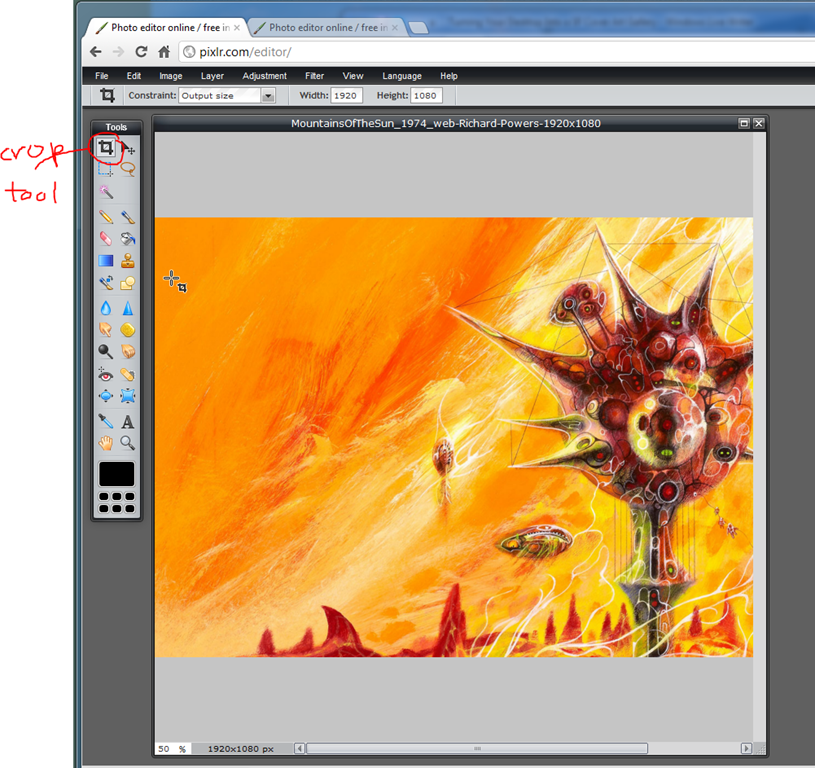
Cropping for the exact desktop size is a bit tricky. It helps to have Photoshop or some other program that let’s you crop by pixel height and width. Luckily, there’s a free online Photoshop clone you can use at http://pixlr.com. Go to that link and click on –> Open photo editor <-. Then click on “Open image from computer.” Browse to your art folder and select an image to edit.
Then click on the crop tool, under Constraint at the top, a small pull-down menu, select “Output size” and in the Width and Height text boxes put in the dimensions of your monitor. Mine are 1920×1080. Then click on the upper-left corner of the area you want to crop and drag down the mouse to the bottom right. Let go. You’ll see a frame outline that you can reposition. Double click on the crop to finalize. Anything you crop will be in the exact dimensions of your monitor. Then in the Pixlr File menu, select Save and put the picture back on your computer. I usually renamed crops so they have the dimensions as part of the name. For example, eye-in-the-sky-1920×1080.png.
You can also use pixlr to punch up the color, brightness, contrast, and other image variables, and even fix bad spots.
Basic Manual Setup
Now that you have some images ready, we can turn them into backgrounds. If you aren’t running a background changer, meaning the image on your desktop never changes, we’ll install one of your new images manually. Go to your SF Cover Art folder and find an image you want to use. Right click on the image filename and select “Set as desktop background.” Your image should now be the desktop background. Minimize all windows and admire. [There is a button at the far right of the Windows 7 Taskbar that will close all windows on the desktop so you can see your art unhindered. Clicking it again brings back your windows as they were.]
Automatic Desktop Changer
If you right click on your desktop background and select “Personalize” you’ll see something like this:
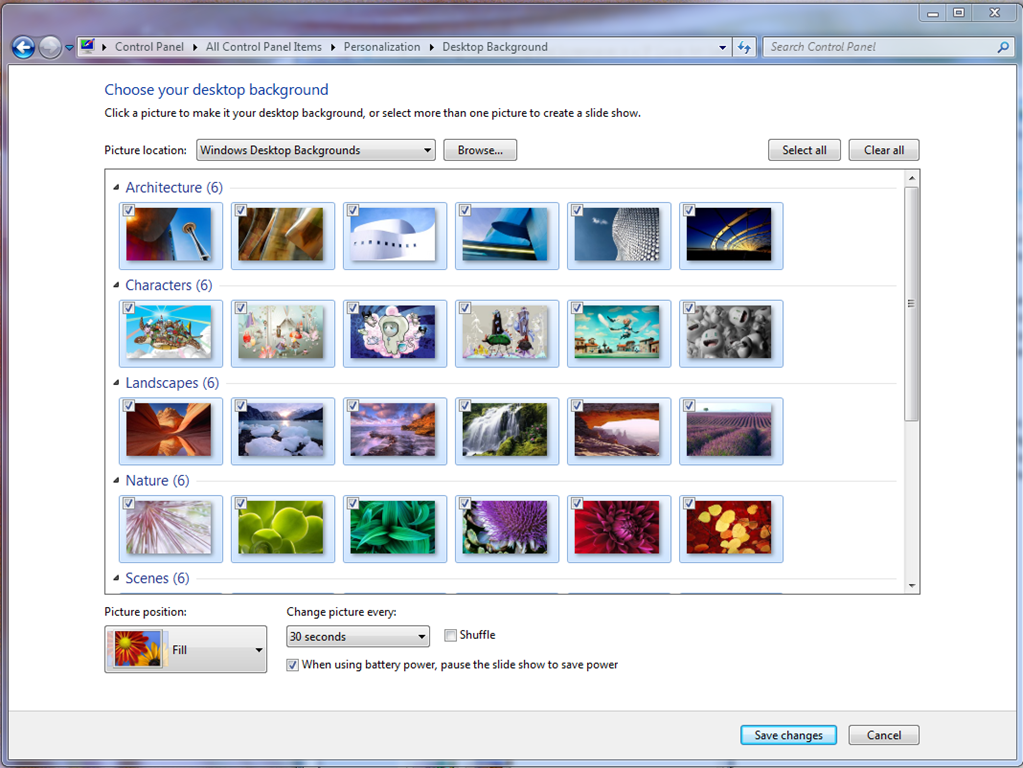
At the bottom is a link to “Desktop Background” – select it. You’ll then see:
I normally use another program for switching backgrounds, but Windows 7, and most other OS systems, have a simple desktop changer built in. You can select the built-in program for Windows 7 up at the top of this screen, it’s called “Windows Desktop Backgrounds.” Then hit browse and find the folder with your art. Set the “Picture Position” to Fill, and “Change picture every” to 30 seconds. You can change this to a real time interval later, for now this will quickly show your images to you for testing.
For years I used a program called Webshots, and it’s wonderful, but it wants to show pictures in its file format. You can add your pictures to its format, but that’s extra work. Recently I’ve discovered John’s Background Switcher. Gizmo’s Freeware has a whole list of Wallpaper Changers. I like John’s Background Switcher because it can handle many sources for pictures, including online galleries, and even images from my Webshots folder.
Other Galleries
I have other galleries other than SF Cover Art, like astronomy photos and copies of famous paintings. If you search around for Desktop Art or Background Art, you’ll find a myriad of images to collect. Here’s an astronomy desktop.
I’m also fascinated by historical photographs, like this street scene.
Having photos, or copies of artwork blown up and randomly shown is very stimulating. Photos induce interesting contemplative states of mind for me. I’m very inspired by visuals. At my work office, visitors often sit across from me and stop talking because they get mesmerized by images on my computer screens. I have a dual monitor setup at work.
I’ve always loved book, magazine and album cover art. I’ve collected art books for decades. I hated when LP covers shrank to the size of CD covers. Paperbacks are naturally small to begin with. So putting this kind of artwork on a 23” 1080p screen really showcases the art. If you have a HTPC, you can also use the same techniques for putting art on your large high definition television screen.
My art books seldom get looked at, but stuff on my desktop gallery gets looked at every day. It’s a visual reminder of how big the universe is when I’m sitting in front of a 23” monitor all day long.
One reason I switched from Webshots to John’s Background Switcher is that program makes it easy to add new photos to my desktop galleries. Whenever I find something good on the net I just do a right click, save image as, and put it on of my desktop background folders. I also have a folder in Dropbox so I can save images from any computer I use.
Back in the early 1970s my roommate Greg and I would use macro lenses and photograph covers of The Magazine of Fantasy and Science Fiction, Astounding & Analog, Galaxy & If, as well as book covers and show them at our SF Book Club meetings. People loved seeing the SF/F art blown up big. Putting covers on your desktop is much easier and you get to see them everyday.
In recent years TV makers have been adding features from the Internet (Netflix, Pandora, etc.) to their sets and calling them Smart TVs. Let’s imagine the trend continuing so that we have Genius TVs – what features would they have? Do we really want them?
Right now we have many devices, services, apps, sites that all work in different ways. Smart devices are ones where two technologies blend together, like Bluetooth consoles in cars recognizing Bluetooth smartphones so you can have hands free phone calls while driving. To make them smarter, they can also be GPS screens, rear view videos, engine monitoring, radios, CD players, etc. Genius devices are one that blend in many technologies and make them work together. Bluetooth, Wi-Fi, Broadband, USB, TCP/IP are all enabling technologies that bring electronic devices together.
In a way, all of this is very scary because we’re making machines smarter and smarter. If you’ve ever read John Varley’s classic story, “Press Enter ■” you’ll know what I mean, but for right now we’re all rushing headlong into convergence of intelligent machines. Most people love their gadgets but often get overwhelmed in how to manage them. That’s why inventors work so hard to let machines talk to one another so they can figure out how to work together without human intervention.
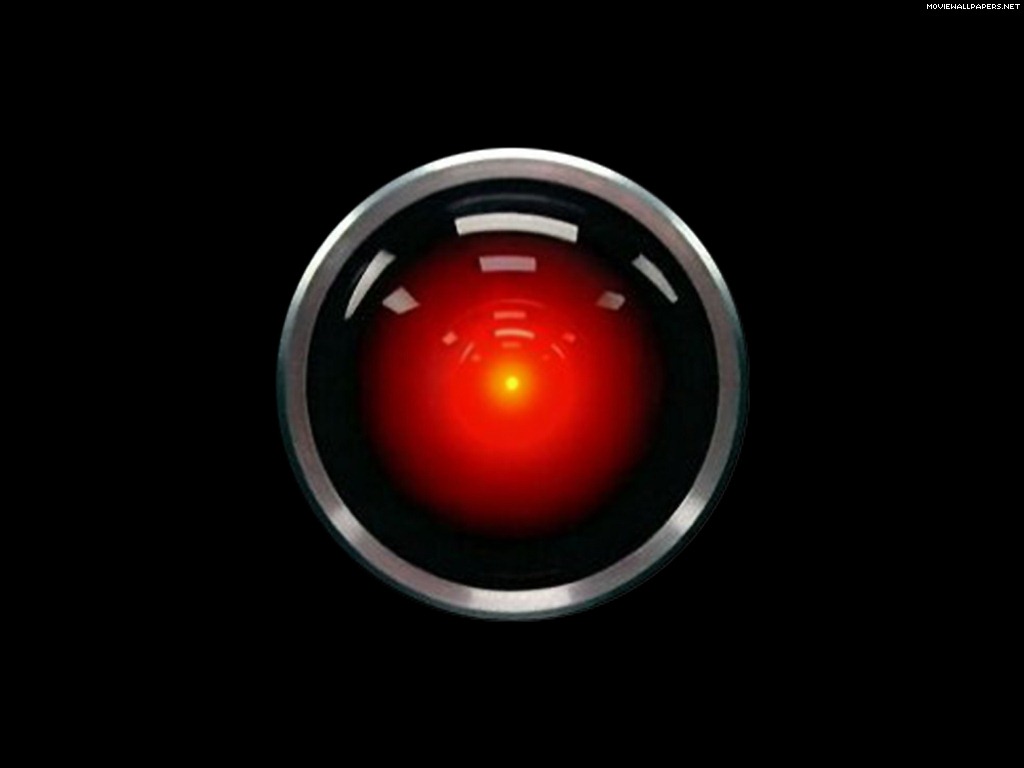
This also reminds me of scenes from the dystopian film Fahrenheit 451, based on the classic Ray Bradbury novel, and of course, Big Brother screens in Nineteen Eighty-Four. I’m in love with gadgets, but such gadgets haven’t always been portrayed well in science fiction. And there was HAL 9000 of course.
Our machines are getting smarter to make it easier for us to be dumber.
Here’s an example. When I sat up my new Roku I had to add each channel I wanted, and for each channel the Roku would give me a code that I had to enter in at a web browser. For Netflix I went to http://www.netflix.com/roku and entered the code, and then went back to the Roku to see that I had been validated. In the future I could validate my identity with the Roku, and then it could go down its lists of channels and automatically check with each service to see if I had an account and configure the Roku device for me. The smarter Roku would know more about me, and have access to my accounts.
With a Genius TV, I should be able to identify myself and it should configure itself automatically for everything I like to do with its designed features. It will be a video phone, and so it will get my contacts from the cloud, so I can say, “Call Connell” and it will know who I want. Or I could say, “Take me to the next episode of Breaking Bad I want to watch” or “I want to look at all the photographs of my father” and it would know what I want to do. Of course, I’ll be developing a symbiotic relationship with my Genius TV.
If you’ve ever used the program Zite on the iPad you’ll know how a program can consolidate your interests with articles appearing on the Internet each day. I should be able to tell my Genius TV that I’m interested in learning about how people lived in Boston from 1850-1875 and it would go get me diaries, photos, newspaper articles, books, etc., and format them in an interesting way to process all the data. This goes way beyond Google. I’m talking about a digital Jeeves like in the P. G. Wodehouse books who is smarter than me, and who can take care of all my needs. Siri is the first step to a Genius TV. But what if we all had our own personal Siri that really knew us?
A Genius TV must be completely Internet aware, not just design to work with a few services like a Roku box. It needs to be voice activated. It needs to integrate with my Internet provider, phone provider, my TV provider, broadband provider, my cloud services, my home security provider, utility provider, security cams, home network, cameras, and even local over-the-air TV and radio. I mean, this sucker’s got to be aware of everything. Before we all run headlong into this future, I really do recommend reading “Press Enter ■” if you can find a copy. [There are no legal copies I can link to, but just remember my warning. There are dangers to the future we’re all heading into.]
We won’t have an Einstein level Genius TV for years, but TVs on sale today are getting smarter all the time. So this essay should help you think about the possibilities the next time you buy a new TV. The simple way to look at it is to think about what devices that you own now that you can eliminate. Think how smartphones have eliminated so many older gadgets, well the same thing will happen to smart and genius TVs.
Here’s all the devices that’s connected to my current entertainment center in my den.
56” TV
Blu-ray player
CD/SACD player
Receiver
Roku
Home Theater PC
Old game unit
Ethernet switch
5 speakers
I picture a Genius TV being a larger wall mounted screen with maybe or maybe not a visible speaker bar, and that’s it. Elegant and simple. It can see me and I can talk to it.
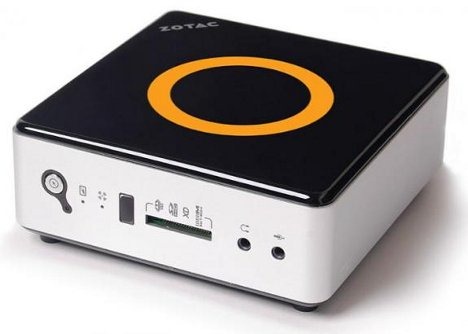
I can buy the physical setup now if I’m willing to give up CD/DVD/BD discs and go without the computer and better sound I get from the receiver/amp. Right now Smart TVs don’t have PCs built into them. My current HTPC is bigger than the receiver, but I could buy one that’s smaller than a Mac Mini. Music, movies and radio are all available via a computer now, so I could do a lot of consolidation now by buying a smart TV from Sony or Samsung, and a Zotac mini-PC.
I could fake the start of a Genius TV by buying a Smart TV and adding a small computer like this one,
However, a real Genius TV will have a fully functional computer built-in. An iPad screen has more pixels than a HD TV, and smartphones and tablets now have 2 and 4 core CPUs. They are small and getting smaller and cheaper. Adding one to a TV set is a no brainer. Just think of of a smart TV as a 60” iPad. Once you have a computer inside your TV you are connected to the world. You don’t need a stereo receiver to get local AM/FM radio because you can get internet radio from all around the Earth. TVs are built with 5.1 surround sound now, so we can jettison the receiver. See how it eliminates older devices?
Most people have already given up CDs and DVDs, and BDs never really caught on. But we’ll also give up game discs, paper photographs, and even paper personal records, books, newspapers and magazines. The closer we get to Genius TVs, the less clutter we should have in our lives. We’ll have different size screens. Now’s the time to ask if this is good or not, because we’re already moving in this direction as fast as inventors can invent. Machines have eaten our music, and they are about to eat our books.
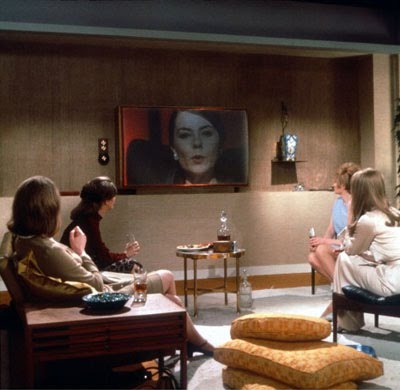
Contemplate everything you use a TV or video screen for now. How could you converge all of these activities into one elegant device? One that would integrate or replace your other devices. You’d still need a smartphone, and maybe a tablet, but all the TVs and computers in your house could be replaced by a Genius TV in each room, like the wall screens in the houses in the classic film Fahrenheit 451 shown above.
What all do you do with your TV, computer, phones and other gadgets in the house now?
Watch over-the-air TV
Watch cable/satellite/broadband TV
Watch DVD/Blu-ray discs
Watch Roku, AppleTV or similar Internet TV devices
Play video games with Xbox, Wii, Playstation
Use a computer connected to your TV or display
Skype
Video picture frames
Play family videos
Look at family photos
Listen to AM/FM/satellite music with a receiver hooked to TV
Listen to subscription music via the internet
Listen to ripped music on a hard drive
Watch pay-per-view TV
Run computer programs
Use tablet/smartphone apps
Use smartphone
Read books
Take an online course
Play DVD courses from The Teaching Company, or other educational training
Record shows with DVR
Medical monitoring
Web cameras
Security cameras
Okay, you get the picture. Now think of the electronic components involved:
Screen with 1920×1080 resolution
TV tuner
Ethernet networking, wired or wireless
Cable/satellite tuner
Roku/AppleTV/etc. tuner
Computer
Sound/speakers
Hard drive
DVD/Blu-ray drives
Lots of clickers to control each device
Computers, tablets, ebooks, smartphones, GPSes, etc.
But let’s simplify this system.
1920×1080 screen (or 2048×1536 or 4096×2160)
Electronic brain – or TV/CPU
Soundbar
Like the old component stereo systems of old, it’s easier to build and maintain a system from parts, that way you can upgrade or replace any part without replacing the whole. The TV/CPU would have components itself. Power supply, motherboard, memory, SSD drive. It’s time to get away from optical drives, so let’s just assume our Genius TV won’t use DVD or Blu-ray, but the TV/CPU could have a slot for a drive for be backward compatible for those people who collected thousands discs and can’t part with them.
Den and living screens would be wall mounted, and they would include a video camera. I picture soundbars now, but even they could be shrunk or hidden so all we see is the big screen. That leaves us to imagine the TV/CPU. They could be designed to easily hide in various kinds of furniture or also wall mounted. They would need two wires, one for the power and the other for TV/Internet, which is now coax, but that wire could be redesigned into a wireless network. Computers are becoming powerful enough, and wireless networking fast enough, that we might only need one TV/CPU brain to control all the screens in the house. Our Genius TV could be completely hidden away, near where the fiber optic cable comes in from the street.
Of course, the controllers (clickers, keyboards, mice, game controls, motion sensors) for each screen in the house would be wireless, and we’d need them until which time we perfect human-machine verbal communication, and the video cameras that watch us can read our every movement and intent. One day it will be just intelligent screens and people.
I think TVs should have full computer power, but not need Apple or Microsoft operating systems. They will use those OSes for the foreseeable future, but eventually that will change. I picture Genius TVs more like giant tablets with personalities. The current iPad has more screen resolution than a HD TV. Imagine if your TV had a library of apps like you find at the Apple or Android app store and could talk to your as easy as you talk to your friends?
Isn’t it time we have a world standard operating system? So any screen size can run the same apps? Once the screens become Geniuses, it won’t matter what OS they run, they will be smarter than us anyway.
If all our data is in the cloud, would we even need a SSD drives? Wouldn’t 16-32gb of local memory for each screen handle it all? After the optical drive disappears won’t hard drives disappear next?
Can you imagine the opening menu on this Genius TV?
TV
Movies
News
Magazines
Music
Audiobooks
Internet
Apps
Videophone
Games
Photographs
Videos
Documents
Security
Medical
Or would we even need a menu if it was completely voice activated? Most people can’t imagine the possibilities. I’m sure I’m just barely scratching the surface of what’s possible. Could you have have imagined the iPhone back in the 1990s? Look at the video on this page about Pebble watches. It’s a Bluetooth watch the integrates with your smartphone. This synergy between two devices, watch and smartphone, creates surprising spinoffs. Combing TVs, computers, internet, cable TV, phones, AI, etc. will produce some surprising spinoffs we can’t foresee now.
One thing that’s sweeping the country right now is online education. At first in colleges but also for K-12 schooling too. If you seen TED talks and Khan academy videos, imagine what a Genius TV could do for education. Combine it with Skype and Google Hangout and home schooling becomes more social. But instead of studying with children from the same school, or district, it would be possible to find other students anywhere in the world to form a study group.
If you have a 14-year-old kid who is fascinated by chemistry, you can hook them up with other 14 year-olds also fascinated by chemistry, and have them watch lectures from the very best chemistry professors in the world, and then have them remote view chemistry laboratories that are doing real chemistry. Suddenly a TV becomes a lot more than a TV. And computers become more than computers.
What happens if politics becomes truly participatory? Why let just 100 senators vote on a bill, when anyone who is interested could participate? TV has always been passive. The Internet and computers are active. Combining live events with the internet and TV screens should produce endless forms of real-time two-way/multi-way social networking.
What happens when your computers, TV, utility meter, security system and medical monitors mind meld into one system? Is it a computer? Is it a TV. Do we need a new name? Let’s not pick HAL 9000. We’ll interact with large wall sized screens, so we’ll think we’re talking to a TV, but one that’s very smart. Not some box that just passes on hundreds of video feeds. As we add more intelligence to these devices won’t they seem more intelligent and individual?
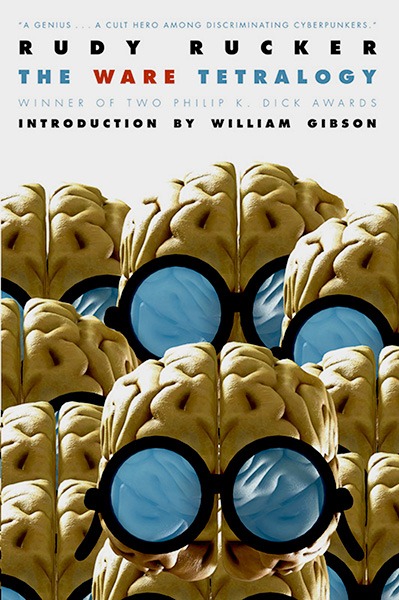
Read Wake by Robert Sawyer. No, I mean it. You need to be prepared for the future. There are science fiction stories that can help you imagine this future better than I can. Read Rudy Rucker’s The Ware Tetralogy. People are all nuts over vampires, zombies and werewolves right now. Those undead creatures aren’t real and won’t happen. Intelligent machines are happening. Pay attention. We’re all gadget crazy, but what happens when our TVs do become geniuses?
In the early 1990s my friend Mike bought a copy of Minix that promised to be a home version of UNIX. At the time I was into GENIE, CompuServe, Prodigy and BBS systems. I even ran my own 2-line bulletin board. I liked the promise of UNIX and how it networked. Luckily I worked at a university and also had access to USENET and FTP. This was before the web. I eventually found my way to a USENET group that talked about Linux, and it was free. At the time I was hesitant to spend $69 for Minix, so Linux intrigued me. However, the instructions for getting the code, making the install discs, and installing Linux were daunting. I’ve forgotten all the details, but it involved a DOS program for making the floppies, and I had to make a bunch of floppies. This might have been Slackware, but I don’t remember. It was a long way from Ubuntu 12.04.
After much work with FTPed files, I finally got Linux going on an old machine, but I was frustrated that it wouldn’t do any of the things I normally did with a computer at the time. It was neat, but Linux wasn’t ready to be my computer OS. After that I’d try Linux again and again, as it evolved, hoping it would become something I’d want to use as my full time computer system. I remember I was so excited when I got Yggrasil and I could install Linux from a CD. I could install it from the CD, but I couldn’t mount the CD afterwards. This was before standard IDE drives and each CD device had its own drivers. I can remember being so happy the first time I finally got Linux to mount a CD.
Then came Redhat and things got much easier. Over the years Linux distributions got so easy to install that it was almost nothing to throw Linux on a computer, but I always took it off almost as fast. After Windows 95 came out, and then Windows 98, using Microsoft got addictive and standard. I got used to all the popular programs and games and it was just painful to try and switch to Linux.
And why did I want to switch? The whole open source programming movement was so appealing. The idea of free and DIY made so much sense. I thought Linux would catch on and everyone would eventually make it their OS of choice. But that never happened. Linux has become a standard for servers and supercomputers, but for desktops it’s never been able to compete with Windows and Macs because they have so much commercial software that’s a breeze to install and use. It’s a breeze now to install Linux, but adding other programs, especially those not prepackaged for a specific distribution, can still be a major headache.
I could switch to Ubuntu or Mint today and do most of what I like to do on a computer, but with programs that are clunky compared to the slick ones I use on my Windows 7 machine. If I was truly tempted to switch operating systems it would be to Macintosh OS X, but even OS X is a pain to use after being addicted to Windows all these years.
I’ve been waiting for a long time for the Linux desktop to surpass Windows, and KDE and Gnome have come a long way, but desktop Linux just never catches up. Most of the people reading my blog will not even know what I’m talking about because Linux is so esoteric. Over the years I’ve talked a few people into trying Linux. Linux is great for people who only use Firefox or Chrome to do everything they do on a computer. But I still like Word, Photoshop, Audible Manager, iTunes, Rhapsody, Spotify, Webshots, and many other Windows based programs. But even if I was totally cloud based in all my apps, I just prefer Chrome on Windows much more than Linux or the Macintosh.
I recently install Kubuntu on my home Linux box so I could play with Amarok on Linux, but I quickly grew disappointed with it. I loved how Amarok will find lyrics to display as it plays songs, and the program is rather nice overall, but it feels years behind other programs on Windows 7 and Lion. Spotify also does lyrics now, and they scroll as the songs plays, and the lyric being sung is highlighted. Spotify is blazingly fast, Amarok is not.
I keep waiting for Linux, like waiting for Godot. Linux is always on the horizon, close but far. For awhile Windows XP was having so many problems that I thought I jump over to Linux, but then XP shot ahead and became reasonable stable. Then Windows 7 came out, and I even prefer it over OS X. I’m not sure about Windows 8, but I’ll probably get hooked on it too. Ubuntu is trying hard to leap ahead, to catch up, but by the time it gets where it’s going, Windows and Mac OS X have shot ahead again.
I want Linux to be my desktop operating system because the Linux philosophy is just so much cooler than the commercial alternatives, but I’m hooked on their crack and I just can’t give it up.
It’s sad to admit, but I’m tired of waiting. Actually, I’m tired of thinking about computer operating systems. I started using computers in 1971, and I’ve been waiting over forty years for the future to arrive when computers would do everything, and I’d live with the perfect human/machine interface. I’m tempted to say Windows 7 is it, and I plan to go no further. I remember working with a guy who retired and bought a computer with latest WordStar and DOS who told me that system would have to last him the rest of his life. I wonder if he lived long enough to eat those words?
Computers have been the most fascinating invention in my lifetime, and I have put a lot of my life into learning them, but I think I have reached a point where I don’t want to care about them anymore, not as a hobby or topic of interest. I just want to use them. I want computers to be invisible and all I see if my work. I want the Wizard of Oz to stay unseen behind the curtain. Linux still demands too much working under the hood, getting grease on my hands, and requiring a toolbox of tools to keep things running. Windows 8 promises to be the operating system so mundane that it’s transparent.
I guess I’m ready for computers to just be magic rather than advanced technology.
The sad thing is technology changes too fast. What I learned about the IBM 360 forty years ago is all forgotten now, and there’s a long line of other machines and operating systems that came after it that I’ve forgotten too. I can’t remember how many programming languages and operating systems I’ve forgotten. Computer technology has been dazzling, mesmerizing, diverting, but what was it all for? I used to be able to use a slide rule as quick as some people could use a calculator, but that skill is gone too. Technology knowledge isn’t like scientific knowledge, or history or mathematics. It’s not cumulative. Gadgets just keep changing.
I think computers have become good enough that computer literacy is no longer required. They aren’t idiot proof yet, but they are getting there. At one time I thought desktop Linux would be the winner, but I think the race is over and Linux never made it to the finish line for the personal desktop OS. I also believe, sometime in the near future we’ll buy computers and we won’t even care what operating system is on them, or what version. We probably won’t even think of them as computers.
I had no trouble getting the Windows 8 Consumer Preview on the first day. I did an in-place upgrade that quickly installed on my i3 test machine. Booting up into Metro was like falling into a rabbit hole, or playing a new video game, because I had to click here and there just to find all the new menus. I’m a computer support person, and I know Metro is going to shock my users. Metro is obviously designed for tablet users. One of Metro’s app panes is the desktop – which is great for people wanting to escape Wonderland quickly and get back to the real world.
I stayed in Metro and was sliding through its screens and installing apps almost immediately. Cutting the Rope was a more fun using a mouse, and reading USA Today was easier to deal with on a big screen using a mouse, which goes to show you that poking the screen with a finger might not be the ultimate human computer interface.
I often wish when using my iPad 2 that my apps were on my big monitor, especially Zite. I use my iPad 2 because I love Zite, Words with Friends and Kindle for the iPad. And it’s only the Kindle app that I want to use away from the desk. And even then, my iPad 2 is so dang heavy that it’s a hassle to use. I have to prop it up with pillows to get comfortable.
I love my iPad 2 and Kindle 3, but to be honest, I’m perfectly adapted to sitting at a desk using a computer with a mouse and 23” monitor with 1920 x 1080 resolution when interacting with programs. Passive reading is different. But back to Windows 8, using Metro is like using a big tablet at my desk, and that’s fun. I wish it had Zite.
I hate that Windows, Mac OS X and Linux are all moving away from the desktop UI that I’ve grown to love so dearly. Using Metro means living with a different UI. People will get use to it, but it’s going to be a big move.
I hate icons on the desktop. I consider my desktop my picture gallery. Beautiful photographs from Webshots sooth me all day long at work and all evening long at home. I want 100% of my screen for art and photos, and that’s possible with Windows 7. All the new OSes for Windows, Macs and Linux want to clutter up the UI with widgets, and that annoys me. Luckily Windows 8 lets me drop back into the old UI where I can hide all the icons and make the taskbar auto-hide.
I worry that Windows (and all computers) will evolve away from that classic desktop metaphor. I remember the world of DOS, and the text based interface, so I know the world of computers can go through major paradigm shifts. If feel that about to happen again, and I’m already nostalgic for the old user interface.
Windows 8 isn’t Windows 7 even when it looks like Windows 7. I couldn’t even find the shut down menu. The old view is there for now, but it’s been altered.
To be honest, I’m not giving Windows 8 a proper test drive because I don’t have a touch screen monitor. Using the mouse, I have to fumble around trying to figure out what would probably be natural gestures if I was using my fingers on a multi-touch display. It took me awhile to learn that moving the mouse to the corners brought up the “Charms” – translucent menu options. The elegance of Windows 8 won’t truly reveal itself until I see it on a tablet or a touchscreen monitor.
Windows 8 comes with apps, like tablet and smartphone apps, and not applications, like in the old days of software programs. Windows 8 also has an App Store, where it’s easy to find more apps to add to Metro.
Metro is a very busy user interface to me, but it works with its own logic, like iOS, but unlike iOS, apps can interact, making Metro more like a multi-tasking desktop OS. Metro is a new look and I’m sure I’ll get used to it, but it is jarring. I have Windows 8 Consumer Preview set up on test machine at work, so I’ll be learning it hit and miss when I get some extra time. Whether or not I recommend we roll it out in the future is yet to be determine. My users are very conservative. Many found moving from XP to Windows 7 upsetting, but Windows 7 has won everyone over. However, in the past year more professors have been wanting Macs because they have iPhones and iPads. I’ve yet to have a user bring me a Windows Phone to set up. Microsoft needs to get Windows 8 tablets out there as soon as possible, or the shift between Windows 7 will be to Mountain Lion instead of Windows 8.
Microsoft Office
I installed Microsoft Office 2010 but since there is no Start Menu with All Programs I couldn’t find the Office apps. I switched back to Metro and found them as small square panes, and rather ugly ones at that. I’m surprised Microsoft didn’t make eye candy versions of its flagship products. When I launched Word, I saw the desktop background for a second and then a full-screen view of the standard Word app ready for me to start typing – all very normal. If you minimize the window, you’ll see you’re back in the desktop mode.
User Interface
Strangely, Windows seems to be moving away from windows, and dialog boxes, and other standard interface pop-ups. Windows 8 tries to stay in full screen mode for each app. Overall, this feels like Microsoft is trying to simplify all actions to their basic nature. I imagined their engineers asking at every step, “Do we need this?” And second guessing them, I think most of the time the answer was “No!”
Windows introduced the vertical and horizontal scrolling windows. Windows 8 is trying to simplify the desktop by doing away with overlapping windows and using sliding panes, or screen swapping techniques. Their engineers have been paying attention to the minimal UI of smart phones and tablets.
Impressions
For the average experienced Windows user switching to Windows 8 will take a little time, but not much. I’m sure, hidden away will be a lot of new subtle features that will take time to discover. So far I have found no compelling feature to make me want to switch. Windows 7 is so good that I prefer it over Mac Lion and Ubuntu machines I have at work. I now have 4 major OSes to use in my office. I’ll see how Windows 8 grows on me.
– – –
For more of the nitty-gritty details see this article at Computerworld.








 Auxiliary Memory