
by James Wallace Harris, 12/12/24
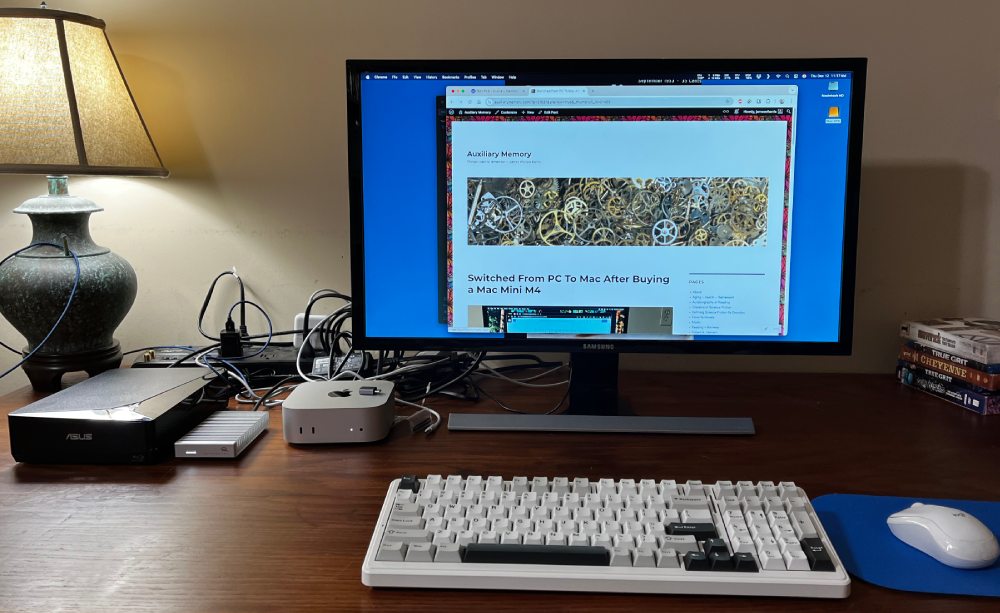
I’ve wanted to own a Mac since 1984, but they were always too expensive. When Apple announced the Mac Mini M4 had 16GB of memory as the base memory for $599, I preordered one from Amazon. They had it for $579.
I love Windows. But my Intel NUC has been annoying the crap out of me with its fan noise. I even went into the BIOS and set the processor to its lowest performance level so it should overheat less, but the fan still whined, but not as much. And it got less hot to touch. I don’t know why, but even when I didn’t use it background processes were always running something. I checked for viruses and malware but didn’t find any. I opened the NUC and vacuumed the dust, making sure that wasn’t a problem. I don’t know why, but that fan whine just got to me.
I never hear the Mac Mini M4. Nor does it get warm. I added a 4TB external hard drive to handle my 2TB Dropbox drive and a folder of Plex movies and TV shows. The heavy-duty OWC enclosure with metal fins gets warm sometimes, but it’s quiet.
I love the quietness of the Mac Mini, but I’m worried about the OWC external drive. The light comes on when I’m not using the machine, and it’s sometimes warm when I haven’t used the Mac for hours. I’m worried that something is running in the background that I might not like.
Modern computers run dozens of processes in the background, and this is starting to annoy me. I was hoping the Mac ran fewer. It’s a major reason why I considered switching to Linux. I never know if those processes are essential, corporate spying, or malware activity.
The trick to switching to the Mac was finding software that served the same functions as all my Windows programs. Office 365 runs on both platforms. No problem there. I use Microsoft Edge browser on Windows, Linux, iOS, Android, and Mac. Obsidian runs on PC, Mac, and Linux.
I was quite happy with Office 365 on the Mac. It even installs Microsoft Defender, which includes more than just anti-virus tools. However, I’ve taken all the Microsoft programs off the Mac Mini because Activity Monitor shows that Microsoft runs too many processes.
I’m testing to see if I want to standardize on pure Apple apps or pure Open Source programs. I mention this because switching to the Mac is like switching to Linux. You can try to make everything work like it did on Windows, or you can go native.
My first big hurdle was Adobe Photoshop Elements 2021. My copy came with a Mac version but wouldn’t load on the Mac Mini. I thought I’d switch to Gimp because it runs on PC, Mac, and Linux. But I just don’t like Gimp. I solved the problem by using the online app, Photopea. It works great on all three platforms. Photopea works like Photoshop Elements and Photoshop, so no learning curve.
Ripping disks with MKV works even better on the Mac. Plex works fine from the Mac. I took down the Intel NUC I used as a Plex server. Since I have so much space on the Mac Mini’s external drive, and because it is quiet and power-efficient enough to run all the time, I made it my Plex server. Even my favorite CBR reader, YACReader ran on the Mac (as well as Windows and Linux).
The Mac doesn’t work with my Plustek OptiBook flatbed scanner or my favorite program for scanning and mass manipulating images, IrfanView. I just can’t find a driver for the Plustek for either the Mac or Linux and no other program I’ve ever used even comes close to the utility of IrFanView.
Also, I can’t find a screenshot program that functions as well as Windows Snipping Tool, or ShareX.
I own a copy of Abbyy Fine Reader for Windows 15, but they’ve moved to a subscription program. I don’t know if I’m ready to subscribe to the Mac version, especially since I can’t use my scanner. I used to scan old science fiction magazines and fanzines to convert to CBR files and needed the Plustek, IrfanView, Abbyy Fine Reader, and Scan Tailor for the job. That task might have to stay on my Windows machine. But it might just retire from that hobby.
I’m not keen on how Mac OS does many things, but that might be because I’m used to doing it differently on Windows for decades. I’m adapting. I can go days without turning on my Windows machine.
One thing that has made migration easier is I keep all my files on Dropbox. I’ve always been annoyed when using one machine and remembering a file I created is stored locally on another machine. It’s so much easier to keep things on Dropbox and I can access the files from Windows, Linux, Mac OS, iOS, and Android.
There’s a lot I have left to learn about using a Mac, but it doesn’t seem to be too much trouble to do the Mac way of doing things. I am disappointed my PlusTek scanner doesn’t work.
I’ve wanted to switch to Linux for years, but never could because it didn’t have the programs I use to scan magazines or drivers for my scanner. So the Mac and Linux are equal in that.
Now that I’ve been using the Mac Mini M4 for a couple weeks, I love the hardware, but I still don’t like Apple’s operating system. It works, but it’s not what I’ve been using for decades. Using MacOS reveals just how much I love Windows 11. I wish Windows 11 ran on the Mac Mini M4.
I don’t like having an external SSD. The OWC housing and 4TB Crucial SSD work fine, but there’s something else on the desk. That bugs me. Knowing what I know now, I wouldn’t try switching to a Mac. I’m going to stick with it, at least for several months.
I write this in case you’re seduced by the Mac Mini M4 mania and haven’t bought one yet.
I love the high-tech of the M4 chip. I love having such a powerful machine. However, all I really needed was a new mini PC that was quiet.
JWH


i bought an iphone 14 a few weeks ago; i returned the damn thing because i couldn’t get any answers at the apple store on how to set it up, and i felt that, with winter bearing down on me, a shearling vest was what i needed more. (it gets cold in northern california.) i’m still not impressed by instant communication, and still feeling a bit nostalgic for telegrams and card catalogs. as henry gibson said, years back, i hope the ducks hold out.
As to screenshots, have you tried the built-in Mac keystrokes? Command-Shift-3 will give you a full screen and Command-Shift-4 will let you select a portion of the screen. By default I think the images are placed on the Desktop, but some time back I changed it (I forget how just now) to place them in my Downloads folder.
There is also a nifty utility called Yoink that improves Drag ‘n’ Drop but also has a screen capture function that I use a lot.
For editing images, which I do rarely and I always forget how to do and have to re-figure out each time from scratch, I’ve been using Acorn, which just came out with release 8.0. Powerful, yet easy to use, or so they tell me.
As a new Mac user, you might want to check the list of Mac keyboard shortcuts. There are a lot of them, way too many to learn, but I only use a handful, or perhaps two handfuls. Like:
Shift-Command-N: Create a new folder in the Finder.
Control-Command-N: Create a new folder and add the highlighted files into it (this one isn’t on that list)
Command-T: Open a new tab.
Command-N: Open a new Finder window.
Oh, and have you noticed that instead of printing to a printer, you can print any document to a PDF from the printer dialog? I use that all the time.
You might be able to answer a technical question that Googling so far hasn’t answered. My external drive gets warm even when I’m not using the computer. Sometimes the light on the external drive is on when I haven’t been using the computer. What is running in the background that uses the external drive? I put Dropbox on the external drive, and I’m wondering if Dropbox is doing a lot of routine maintenance?
In the Utilities folder in Applications there is an app called Activity Monitor. Try running that to see what processes are running and using the CPU.
I got a used HP desktop that makes very little noise and works perfectly well, for $50. The catch was it lacks the TPM chip needed to run Windows 11. Though, there’s a simple hack that can be done to get it to run. The other catches is it has 8gb of ram, and being from 2014 it cannot really run a fast internal SSD. I haven’t noticed any glaring performance deficiency — yet. I may get a more modern and truly Win-11 capable one in the future.
I would suggest you get a quieter Windows machine, such as a laptop. They can be had for around half the price of that mac.