
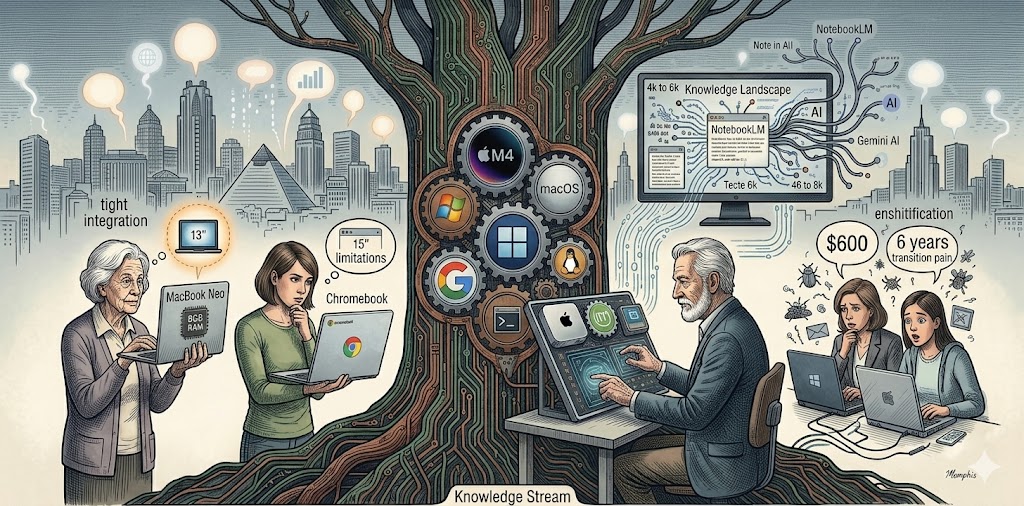
by James Wallace Harris, 3/15/26
I’ve been helping friends and family with their computers for decades. I managed hundreds of computers at work. I’ve set up thousands of computers since 1978. In the old days, it was easy, just recommend Windows to the average computer user, and Mac OS to Apple fanatics. But in 2026, Windows is annoying many people, Apple computers are becoming affordable, and Linux use is spreading. Plus, there are options like Chrome OS for minimalists. It’s much harder to help someone pick a new computer today, with prices spiking, AI, and all the new chips.
I’m not even sure what computer OS I want for myself anymore. I was a faithful Windows user for decades. Yet, I’m writing this post on a Linux machine, running the Mint distro, an operating system suitable only for the nerdiest of computer geeks. However, my main machine is a Mac Mini M4 since I packed away my Windows machines.
Since retiring, far fewer people ask me for help buying a new computer. And I have much less experience shopping online and visiting Best Buy. But a couple of my friends, whom I picked out their current laptop, are talking about needing a new computer. Their main concern is price. Both spent $600 for Windows laptops about six years ago.
Several decent laptops in the $500-650 range are currently for sale from Lenovo, HP, Dell, and Samsung. Any of these machines would be superior to what they had before. All are configured with an i5, 16GB of memory, and between 256GB and 1TB SSD drives. Each model has a 15.6-inch screen. Recommending them would cause them the least amount of transition pain for my two friends
However, Apple’s new MacBook Neo for $599 is an excellent deal. The Mac Mini M4 at $599 is what got me to switch to MacOS last year. And both of my friends use iPhones and iPads. If they were willing to suffer learning MacOS, they might be happier with the MacBook Neo if they could handle a 13-inch screen.
The Neo has only 8GB of memory and a 256GB SSD. For their use, that’s no problem. However, for $100 more, they could get a 512GB drive and Touch ID. The real problem with the Neo’s small screen. I have the MacBook Air M1 with the 13-inch screen, and it’s really too small for my liking. The cheapest MacBook with a 15-inch screen is the Air, at $1,299. They won’t spend that kind of money.
There’s another factor. Windows machines typically last 5-6 years, while the latest Apple computers with the super-efficient and powerful Apple Silicon chips might last years longer. None of my other machines matches the quality of the Mac Mini and Air. It’s not even close.
The 13-inch screen on the MacBook Neo and Air has a default resolution that makes the typeface tiny. Of course, Janis and Linda are used to 6-inch and 10-inch screens on their iPhones and iPads, so they might adjust. I set my MacBook Air to a lower resolution to make the typeface bigger and easier to read. But this sometimes causes a problem when a button I’m supposed to click is off-screen. I have to change the resolution, click the button, then change the resolution back.
There are Chromebooks with 15 to 16-inch screens within my friends’ price range. And these are a possibility. But I have to explain their limitations, and I’m not sure if my friends will understand. If everything you do is within a browser window, then Chromebooks are a good solution.
Since I’ve been migrating away from Office 365 to Google Drive, I could almost switch to a Chromebook myself. Most of my computer work is writing, browsing, and emailing. It’s only when I want to scan old magazines and create PDF and CBR files that I need programs that Chromebooks can’t install.
I use my MacBook Air M1 machine only to write when I’m sitting in a recliner, and it does the job fine. And I do that in a Chrome browser window while using Google Docs. I could have bought a Chromebook and saved half of what I spent on the Air.
But there are other things to consider. There is a synergy between my iPhone, iPad, MacBook Air, and Mac Mini. And since I’m subscribed to Google Gemini, their AI, there is a reason to use Google Chrome, Google Docs, and all the other Google services, which all work with Apple hardware. It helps that Google and Apple are becoming big buddies. Having tight integration between my hardware platforms and all my software has many synergistic benefits. Yet, I must admit, those benefits require a learning curve.
I admire Linux. I root for Linux. But I’d never recommend Linux to a casual computer user. Being a Linux user is like being Sisyphus – always having to roll a rock uphill. It’s fun if you can dig it, but painful if you can’t.
The easiest solution for my friends (and me) is for them to buy something like what they had before. But that pains me. Windows is suffering tremendous enshitification. And Apple is producing stunning hardware, hardware that’s becoming affordable.
Technologically, my Mac Mini M4 is by far the most advanced computer I’ve ever owned, and it only cost me $549. The MacBook Air M1 was $749, and it’s been the nicest laptop I’ve ever owned.
The last computer I helped a friend buy was a tiny Mini PC. She had an HP laptop that was giving her trouble, but didn’t want to spend $600 for another one. She already owns an external monitor, keyboard, and mouse that she uses with the laptop. I asked her if she ever took her laptop on trips. She said no, that it always stayed on the desk. I said she could get a tiny Mini PC with an N95 chip for $190, which was more powerful than her laptop. She’s been happy with that solution.
Most people don’t need powerful computers. Only gamers and content creators need to get expensive machines. I know several people who only use their phones for functions they once used on computers. Sme other friends find that a tablet covers all their computing needs.
It’s gotten very hard to recommend computers for people. AI has the potential to shake things up even more. If people get used to talking to their computer and asking it to do the work, the whole human-computer interface might change. We could all end up talking to our watches.
Most of my friends are retired. A few still take courses that require a computer. But for the most part, without needing a computer for school or a job, the desire to own computers diminishes. Most of the fun functions that families bought home computers for have moved to smartphones, smart televisions, and smart home products.
I might tell my two friends to try buying a keyboard for their iPads and see if they can get by without laptops. MacOS and iPadOS are getting closer, so features and functions are crossing over to the other form factor.
If I gave up on digitizing old books and magazines, I could probably adapt to blogging on my MacBook Air. I’m amazed by how so many young people only have laptops. But I haven’t made that decision yet. If I only browsed the net, emailed, and needed a word processor and spreadsheet rarely, I could consider a tablet with a keyboard.
I think the trend is towards smaller computers, or even away from computers. I’m still stuck in the past. I love large high-resolution monitors. I gave up loving big tower computers years ago and switched to mini PCs. I haven’t paid close attention to what all my friends are using, but I think desktop computers are disappearing from homes.
Finally, I will say that learning to use AI might make people want a big monitor again. If you enjoy learning, researching, and writing, Google’s Gemini and Notebook LM are wonderful tools. Juggling lots of knowledge works great on 27 to 32-inch high-resolution monitors. If you think you’ll be into that, I highly recommend the latest Mac Mini with the most memory and the largest 4k to 6k monitor you can afford.
Gemini, my AI of choice, just told me it currently offers more features to Windows users, but it’s catching up quickly for Mac users. I was disappointed to discover that many Gemini and CoPilot features I enjoy on the Mac aren’t available on Linux. That’s pushing me towards the Mac and away from Linux. I wrote the first draft of this post on Linux, but moved to the Mac to finish it.
Most people will use AI on their phones for reference and chatting. AI could replace Googling. However, if you create any kind of content, AI could influence how much computer power you will want in the future. I’m not sure anyone knows how much they will use AI in the coming years. It could inspire hobbies and pursuits we can’t imagine now.
I’d say the Mac Mini ($599) with a 27″ 4K monitor ($300) offers the most bang for the buck if you want to get into content creation and play around with AI for under $1,000. It’s also good for programming. But it’s overkill if you just browse the web, do TurboTax once a year, and maybe write a few letters or create a spreadsheet of your expenses. Gamers will want to stick with Windows, although many are moving to Linux. Production content creators will want something faster.
JWH
 Auxiliary Memory
A great reflection on operating systems in 2026: Windows is sinking, Apple Silicon is surprising everyone, and Linux remains a niche market. But the mini PC with an N95 for $190 as a practical solution for basic users… now I totally get it!