
I’ve been a bookworm my whole life, and for as long as I can remember I’ve wished I had a list of all the books I own. I’d also love to have a list of all the books I’ve read. I think it would be impossible to create the second list, but the first list would only be a matter of typing. And now with the Internet and the ISBN book number, it’s even less typing than before. I could even buy a barcode reader that looks up information automatically online without typing at all. My first consideration was to buy a standalone computer program like Book Collector from Collectorz.com, or even design my own database or spreadsheet with Access and Excel, but I decided the fun solution is to use a Web 2.0 online book cataloging site.
The Internet has added an extra twist to this list making activity, called social cataloging. By entering your books into an online database it allows social network programs to compare your list to lists created by millions of other bookworms. The synergy of doing this offers endless social networking possibilities. The obvious one is to find other readers who have similar reading tastes to yours that will help you find great books to read that you’ve missed. For people trying to build big personal libraries, it’s fascinating to know the size of other collector’s collections. The largest on LibraryThing is 43,061 books. Also on LibraryThing, the most reviewed book is Twilight (1,386 reviews), the most owned book, Harry Potter and the Philosopher’s Stone (47,598 people out of 1,035,403 members), or that my favorite science fiction writer, Robert A. Heinlein has 72,427 books in those collections, as compared to my second favorite science fiction writer Philip K. Dick who has 46,991 books in LibraryThing user’s homes. That’s out of 48,365,418 total books catalogued.
The trouble is there are many wonderful book cataloging sites to choose from, each with their own plus and minuses. Luckily, all are free except LibraryThing, and it’s free for your first 200 books, so you can try them all. The sites I’ve found so far are (there may be more):
Each of the sites try to make it easy to enter books, but they all do it differently. They each have millions of books already catalogued, so the quickest way to add a book to your list is to find it first on their list by searching on the ISBN and then hitting the add button. This can be made even faster with a barcode reader, but I don’t have one. I’d say it’s taken me a couple hours to enter in 58 books at LibraryThing. This is slow because I like selecting the right cover photo to match the cover of the book I own, and I started with a shelf of old books without ISBN numbers. That means searching by author or title, or even entering in all the book info myself. I could probably do 60 books in 20 minutes if they were all recent and I only needed to use ISBN. Usually when you get a book with ISBN, the cover and all the other information is already there.
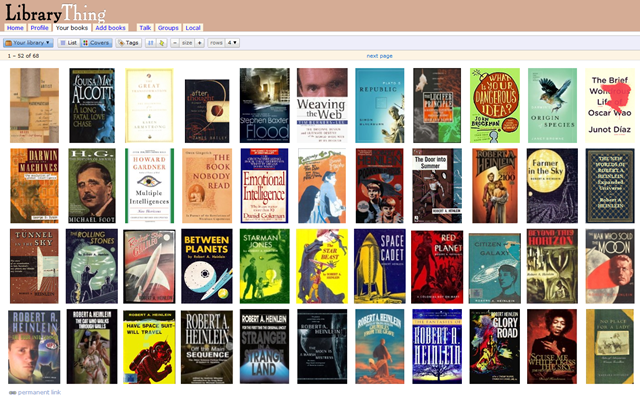
I’ve taken to LibraryThing, but when I finished building my list I could export my library to another site to see if I like their social networking features better. Or I’ve thought about using one site for listing books I own, and another for books I can remember reading. Or use another site for just my non-fiction science and history books to see if I can find readers with my exact interests. The different cataloging sites have discussion groups for books, or linking systems to Facebook and blogging sites, so if you like to discuss and review books, these systems connect you to other people who are looking to read reviews or talk about books too.
On one blog I read a post by a woman who said her family paid for three separate $25 lifetime subscriptions to LibraryThing, for herself, her husband and her kid, so I’m assuming there’s long term rewards for doing the work of entering a book collection into the system. I won’t know for awhile. I’ve got 18 more shelves of books to enter, and then I’ve got to try all the different features, but I’ll get back to you with more info.
I’ve added books with all of these systems and I find it easiest to add books to LibraryThing, especially when dealing with manual adds. LibraryThing was the only site to have any books by Lady Dorothy Mills, an author I collect. Her books are very rare, and they only had 3 of 15 I own. These systems are far from perfect, and the quality of the data is imperfect. It would be great if everyone catalog the precise edition they owned, but that doesn’t happen.
Anobii, Shelfari and WeRead are probably best for people with newer books and people looking for more social interaction since they have the largest number of members. They are slicker sites with more glitz than LibraryThing. GoodReads is in the middle. Google Books merely lets you tag books without any reporting features or social networking. It is good for links to the web, and if you’re a complete Google user in general.
One of the fun things about adding books to LibraryThing is it tells me how many other members own the book when I add it to my collection. For books by Lady Dorothy Mills, out of over a million users, I’m the only one that has any of her books. I really like it when I find just a few people who also own the same book, like the 2 other people that own In Search of Paradise a biography of Charles Nordhoff and James Norman Hall, the guys who co-wrote Mutiny on the Bounty. Are those two people much like me?
JWH – 2/7/10
I finished my data entry and my library can be seen here. To me, the fun way to view is by cover art. Open your browser to fill the screen and then click the Covers button. I have 706 books. I learned a lot by creating this catalog. For one thing, I have too many books, and I plan to thin my collection when I get a chance. The largest portion of this collection is unread by me. My bookstore roaming eyes are far bigger than my reading stomach. I really wish I had more time to read.
JWH 2/16/10
 Auxiliary Memory