Zite versus RSS

Up until recently RSS was the best technology for taming the Internet.  You selected a RSS reader, like Google Reader, and subscribed to all the sites you thought valuable.  The trouble is most sites send too many posts, so you get way more feeds than you want to read.

What I dreamed about was software that would look at what’s being published on the Internet while being able to read my mind and select just the stories I would love to read.  Zite isn’t that software, but it’s pretty damn close.  It does all the hard work of surfing the net far and wide to find what I might like to read, and then slowly learns from what I really like.  It becomes a customized magazine.

When I got my iPad I started out with the popular Flipboard app that supposedly sent me the stories I wanted to read, but not really.  I then discovered Zite, and within days, nearly every story they send to the main section is one I want to read.  I get stories from The New York Times, The Economist, and from blogs I never heard of, as well as hundreds of other sources famous or obscure, but they all produce great essays and articles I want to read.  Of course those same sites might produce dozens of other articles too, ones other people want to read but not me, but Zite doesn’t send me those.  This is how Zite beats RSS.

As I read I thumbs up or thumbs down what I like, just like with Pandora and music, and the Zite engine pays attention.  Whatever kinds of algorithms Zite uses, they are very smart.

Sadly, Zite is only for the iPad.  I wished they had a desktop version.  Zite has made me love my iPad, but I spend most of my time at my desk.

I really look forward to reading Zite every day, or even twice a day.  I’m thrilled by the content it finds for me.  It is the best of the best of the internet, suited for my tastes.

There are some obstacles to overcome.  Are there stories I’d also like to read that Zite misses?  For instance Zite introduced me to the website The Millions, a site for book lovers, with two great articles, “(Re)Imagining True Lives: On Historical Fiction” and “The Million Basic Plots.”  While in Zite and reading the article, there’s a button for the Web.  I pushed it and it takes me to The Millions home page where I can read other articles.  And if I find another one I like, I can click the Options button and thumbs up that article too.

Yet, with all the great reading Zite provides I still wonder what I’m missing.  But Zite provided an answer to that too, with “Why keeping up with RSS is poisonous to Productivity, sanity” by Jacqui Cheng at ARS Technica.  Cheng makes a good point about living with ignorance.  The reason why RSS is flawed is because it gives me too much to read.  And thinking about all the stuff I might be wanting to read is just as flawed.  Cheng said she went without RSS and just read a few good sites and felt just as informed.  I’ve always wondered if I could pick just one news site, or newspaper, or news magazine, or even news television show, and get all the news I really needed.  But when I think about doing that, I start fearing what I would be missing again.

Zite seems to be a great compromise.  My experiment now will be to see if Zite can be my only source of news by being the best news aggregator.  Zite was recently bought by CNN which is putting a huge scare in us Zite fans, but owners of Zite and CNN swear they will not allow Zite to become a conduit for CNN News.

When I read Zite I use several built-in tools.  It has buttons for Instapaper, Twitter, Facebook, Email and other social functions.  I have a Twitter account that I use like Instapaper.  Most web sites now have icons for tweeting all their articles.  To remember what I’ve read, or want to read, I just tweet it to myself.  But I’m also using Instapaper to compare the two.  I email articles to friends I think would like them, and on rare occasions I’ll send an article to Facebook.

Zite begs for the synergy of all these programs, and it would be cool if Zite eventually incorporated their functionality into Zite.  Zite needs to be incorporated into the browser so it will work from desktops including PC, Mac, and Linux, and it needs to work with smartphones and all tablets.  Instead of saving to Instapaper or Twitter, it should let me mark the articles I want to save to call up within Zite.  And it should allow people to share their Zite reading with other people.  Wouldn’t it be fun to see what your friends or famous people like to read?

Zite has a lot of possibilities, but it needs to get away from the iPad only platform.  Zite is the first app that I feel makes my iPad worth owning.

Now there are some storm clouds on the horizon for apps like Zite, Flipboard, Pulse and others.  They take content from other sites, often removing their ads, and presenting them to you in a reformatted, easy to read format.  This undermines the financial foundation of the original news sites, but it’s well within the link sharing paradigm of the world wide web.

The Internet is killing paper newspapers and magazines.  And paper newspapers and magazines are having a hard time transitioning to the internet and find new financial models of support.  These news aggregators are a threat to them, but if both sides work together it could be a big win-win situation.  Newspapers and magazines have always had the same problem as RSS feeds, they present you will more stories than you want to read.  In our fast paced world that’s only going faster and faster, that’s too much of a time waster.

To see what all these apps look like:

JWH – 9/7/11

News Processing on the iPad with Flipboard

There is too much goddamn information in this world – but what can we do about it?

First off, we could ignore it.  Take up reading  Sci-Fi novels or watching reality TV and just tune out the world.  Well, that doesn’t work for me.  I’m a little like that robot in Short Circuit, Johnny 5, who craves more input.  Johnny 5 can read an encyclopedia in a matter of minutes and begs for more, but I can’t.  I don’t want to be like God and know about every dang sparrow that falls from a tree, but I do want a rough idea of what’s going on around this old reality each day.

What I crave is a good steady flow of knowledge about this world and the cosmos.  I like learning new things, but I also need time to ponder fresh data and digest it.  Like most people I want to be up on current events, and not too out of touch with popular culture.  I’m not quite ready for the youngsters to be laughing at me for not knowing the current crop of glitterati of the moment, although I really don’t care, either about being laughed at or who is currently grabbing their 15 minutes of fame.

The trouble is we live in world overflowing with information.  If facts were water droplets there would be no land on this planet.

Keeping up with the news used to mean reading the newspaper or maybe a couple of magazines. Then came television which really made being nosey addictive.  Now with the world wide web we have access to countless newspapers, magazines, television stations, web sites, blogs all coming to us at once.  It’s a wise man who knows what he doesn’t want to know.

For some people getting their daily dose of reality is as simple as watching the NBC Nightly News 30 minutes a day.  But this is baby food news, predigested bites served from little jars and spoon fed to those who are still in the crawling stage of exploring reality.  The next step up for toddlers is the PBS NewsHour.  But then we run into the issue of facts per hour barrier.  How many people really want to spend more than a hour a day getting the news when most of it is repetitive and overly verbose.

What if you could read reports, study graphs and photos and see video clips at your own pace – tailored just your informational curiosity?  That’s what I’m trying to do with my iPad

A tablet computer can nicely format text for reading, show video clips in bright clarity, and display photos that look better than a slick magazine with the extra feature that you can zoom in on them for close study.  It’s outdoes the newspaper, magazine and competes well against the television and the web.

The trick is to get just the right words, videos and photos to view on the tablet.  And it’s a very hard trick.

Enter Flipboard for the iPad.  It does several things, but not perfectly – yet.

  • RSS feed reader
  • Twitter client
  • Facebook client
  • Digests many popular magazines, newspapers and websites

I already like taking in Facebook and Twitter content better on the iPad and Flipboard because Flipboard formats this web content to look like a elegantly laid out magazine.  It’s far more eye catching, but then Facebook is a homely looking website, so it’s not that hard to beat.

It’s also nicer to read RSS content on Flipboard than Google Reader, although there are some big limitations.  RSS feeds come through in two styles.  Some sites send the whole page, and others send just a teaser and a link back to the original web page.  They want you to come look at their ads.  Falling out of Flipboard into its browser mode is unpleasant.  I don’t like reading web pages on the tablet even with the magic of spreading and pinching pages to make them readable.  If I’m going to read the web I’d rather be sitting at my 22” desktop screen. 

However, many websites do send the full pages in their feeds and these look wonderful on the iPad because Flipboard makes their content look like it was published in an issue of National Geographic.

To make up for this limitation of RSS feeds Flipboard has contracted with publishers like Condé Nast to stream their content into Flipboard’s beautiful formatting.  These do come with original ads or even extra ads, but they look like they do in magazines, and not like web pages.  However, these pages are handled different from the RSS content.  Instead of scrolling up to read a long article, they are formatted into pages that you have to flip.  Here’s what Flipboard looks like:

After configuring Flipboard with my accounts at Facebook, Twitter and Google Reader I opened Flipboard and started flipping.  Fantastic first impression, and then I noticed, gee, there’s a lot of damn pages to read here.  Now that’s the essential key to using Flipboard, cutting down your input.

I’m leaving Facebook as it is, but I’m thinking of cutting out a lot of “friends.”  On Twitter, which was already minimally used, I cut out very active feeds.  Then I went to Google Reader and deleted RSS subscriptions to any feed that used the teaser method of providing content.  I only want complete articles sent to me.  I also deleted feeds that sent articles by the hundreds.

What I want is my own personalized digital magazine that I can flip through each day and keep up with what I’m interested in.  It’s going to take awhile to customize Flipboard to get things just the way I like things.  It will  take a few more revisions of the program too.

Flipboard opens on the Favorites section.  The first page has 9 photo squares that each equal a content source.  With the More feature you can add 12 more squares on the next page, each a new content source.

Through the More feature – content from professional publishers like Time, Wired, National Geographic, The New Yorker, Salon, Huffington Post, Elle, Rolling Stone, etc. can be added to the Favorites squares.  Flipboard can expand your magazine to cover endless varieties of news.  This canned list of content that Flipboard has arranged with publishers is ever growing.  They sort this content by twelve categories but that will probably expand too.   You can use these many sources to build new Favorites sections. These pages look like actual magazine pages with ads, and they might be direct copies from printed pages, or facsimiles.

What Flipboard is doing is trying to be the best RSS feed reader possible, but it’s going beyond the RSS feed with contractual agreements with magazines, newspapers and television shows to provide custom Flipboard feeds not based on the RSS standard.

Now this is all wonderful, and it does reduce the hurricane of data from the Internet into merely a fire hose of magazine pages, but it’s still too much.

What’s needed is artificial intelligence to monitor my reading tastes and further customize the content flow to just stuff I want to read.  I want Flipboard to be much more than what it is.  Which brings me to Instapaper – a web service that allows web readers to save content to read later.  Flipboard can be configured so if you tap an icon at the bottom of the page and select Read Later the article is saved at Instapaper so you can read it later.  But you have to read it at Instapaper web or quit Flipboard on the iPad and launch the Instapaper app.  What would be neat is if Flipboard saved the read later articles in it’s own app – so one of my Favorites squares would be Read Later.  And of course, Flipboard would need to create a browser add-on to mark pages like Instapaper.

Now, I have figured out how create a workaround for this.  I can just Tweet everything I see on the web that I want to read later.  But this isn’t exactly what I want.  What I want is for a Flipboard AI to know what I want to read and have it ready like the President’s assistants with his morning briefing of the news.

The whole key to all of this is reducing the flow of things to read.  Flipboard can’t do this – yet.  Maybe not ever.  It might take another app invention to do what I want.  What might be needed is a social network of very like minded readers.  Digg, Reddit and StubleUpon are much too broad.  Essentially I want a 30 minute briefing on reality each day, with the option to read one long article that might take 15-30 minutes more reading time if I have it.  I don’t want to spend 30 minutes a day trying to find the news that I want.

It might be possible to hook me up with the right 100 people who like to read the same exact content as I  do.  Then each of us would have to spend 5-10 minutes a day looking at Flipboard or the web and mark the best articles for our daily custom reading, which would be a cross tabulated to find the most popular for all of us to read.

Another way would be to allow readers to list specific topics they are interested in and the amount of words they want on these topics.  For example, I might say I want Cosmology articles that run from 500-1,500 words.  Anything shorter or longer is excluded.

Right now the iPad is another big time waster like TV and the web.  I know a lot of people who like to watch their TV shows and movies on their iPad.  The iPod made music listening very private, now tablet computers are making TV watching very private.  Apps like Flipboard could also manage my TV shows too – that’s another issue.

JWH – 8/16/11

The Significance of the Spotify Revenue Model–A New Social Promotion Paradigm

Spotify is popular European streaming music service that has come to America.  It’s not that we didn’t already have American streaming music services from Rhapsody, Rdio, MOG, Napster, Microsoft, Sony and others, but Spotify is different, it has a free, ad-supported option besides it’s two paid options.

Allowing people to listen to music for free is significant.  Lala.com, also offered a free option, but Apple bought Lala and killed it.  I wonder if Apple will buy Spotify?  Free is a threat to the status quo, but legally free means a new paradigm in promoting music.

Would-be rock stars dream of riches so how will free music help them? To become an actual star means finding a million fans – it’s all about promotion.  If your songs sucks, no amount of promotion will help, but if they are great, without listeners no one will know.  And the best way to promote a product is word of mouth.  And social networking on web pages, blogs, Twitter, Facebook, or even email, is word of mouth promotion on steroids.

It used to be radio airplay created hit songs. But who listens to radio anymore?  Now-a-days people use YouTube.  Adele’s “Rolling in the Deep” is at 106,083,210 plays on YouTube.  Of course that could be 10 million fans listening 10 times each, or 1 million fans listening to the song a hundred times, or it could be me listening for 10 times before I bought the CD, and another guy out there listening to it for 106,083,200 times.  But this is the kind of promotion that payola can’t even touch.  Free is more contagious than the common cold. 

Most people I know who want to share a song with a friend checks YouTube to see if there’s a video so their friends can hear it for free.  But what if there’s no video?  Bummer.  There’s always finding a pirate copy, but that’s a pain and could be dangerous.

Spotify is the new kid in town that could replace YouTube’s as the go-to place to have friends try out songs.  But there’s a minor hitch.  You have to be a Spotify member and install the client software before you can play songs for free.  Now that’s not much more work than getting Acrobat Reader so you can read PDF files, but it is some extra work.  If Spotify gets the kind of market penetration as Flash then it will be a snap to share songs.

Spotify will replace Billboard as the definer of Hit Lists. But this depends on everyone using Spotify.  It would help if they had a web client.  It would also help if they had an embeddable player so web pages and blogs could just add a play button so when someone writes about a song they could press a button and listen while they read. 

WordPress does have a MP3 player I could embed in my writing here, but I’d have to load the song onto the WordPress server first, and since most songs are copyrighted, that’s illegal.  But Spotify, and other streaming services, could legally arrange to stream music to such embedded buttons, and they and the record companies would want such buttons if they also had a button next to the play button to return you to the album page where you’d see ads and more promotions for the artist and their albums.

Now this assumes Spotify remaining the only music streaming service with a free option.  What if that’s not the case?  What if they all offer ad-supported listening?  This will cause terrific competition for membership.  People will chose which service from a variety of features.  Price has always settled down to $5 a month for computer streaming and no ads, and $10 a month if you want to hear music on your mobile device (smartphone, MP3 player, tablet).  I would expect the Spotify competitors to come out with free ad-supported versions soon.  The ad supported version is like getting heroin for free.  Anyone who loves music will pop for the $10 deal eventually.

What the artists and record companies will want is the most efficient way to create massive audiences for songs.  I would guess royalties from subscription music is based on plays.  If no one listens to your album, you don’t make any money.  So they game switches from how many songs you can sell, to how many people can you get to play your song on the various subscription services.  Money from subscribers and ads are out of your control – everything is about getting people to listen.

And since anyone can listen for free, this should wipe our piracy – at least for songs on subscription services.

I’d love to be able to write album reviews and be able to embed a player for each song I review so people could play the songs while they read what I’m saying about them.  Right now I can do this:  “Rolling in the Deep” by Adele.  If you have Spotify you can click the link to play that song.  What I want is a graphic with CD controls and a play button so if you pressed it the song would play right in the browser where you are reading this.  WordPress offers that feature if I pay $19.95, but I couldn’t legally upload the song for you to try it.  If I could, I would gladly pay the $19.95 – but then the artist wouldn’t earned royalty credits.  It would be much easier for all concerned if streaming music services just offered embedding controls that WordPress, Facebook, etc. could incorporate like they do when I embed a YouTube video.

If such subscription music players were widely used, artists would get more play credits.

By the way, Adele’s “Rolling in the Deep” gained 26,000 plays as I wrote this blog.

JWH – 8/5/11

Spotify versus Rdio, MOG, Napster and Rhapsody

[This review of Spotify is essentially part 2 of my review of MOG v. Napster v. Rdio v. Rhapsody.]

Spotify is finally here and I got my invite to use the free portion of the service, which is ad supported for streaming millions of songs through a computer.  Spotify also offers two other pricing options.  For $4.99 you can get unlimited computer streaming without commercials, and for $9.99 get unlimited computer streaming and on-the-go music for your smartphone or iPod.

Spotify requires downloading and installing a client to use, unlike all the other services that can work through the web.  Think of the client as a customized browser just for music.

My first impression is Spotify is BLAZINGLY fast!  Second, the sound quality is excellent with 320kbps streams.  Third, without me noticing it, Spotify indexed all the songs on my computer and added them to their search engine.  One of the first things I did was search for music I know that’s not on the other services, and was deceptively blown away when Spotify started playing Willis Alan Ramsey’s legendary out-of-print CD.  It wasn’t until after I searched on Nanci Griffith’s “Daddy Said” and it started playing that I realized I was playing my own songs.  I was disappointed that Spotify’s library wasn’t truly unlimited, but this is a very cool feature.  With one search engine I can play Spotify’s library of 15 million songs and my library of 18,000+ songs.

Spotify works with a client that must be installed on your computer – and for disciples of Steve Jobs, yes, there is a Mac client.  If you have an iPhone or Android smartphone, and you’re willing to pay the $9.99/month Premium fee you can sync your Spotify playlists to play offline.  If you’re online (Wi-Fi or 3G/4G) you can stream the entire site.  Users of the Free and $4.99 Unlimited plan can use the Spotify client to load your personally owned songs to your mobile phone or iPod.  What this means is Spotify wants to replace Windows Media Player or iTunes to manage your music – but it doesn’t require any conversion – Spotify just indexed my songs immediately after installing.

The client for Spotify is streamlined and basic, with a dark background – it reminds me of sleek basic version of iTunes.  Spotify is rather plain looking compared to Rdio my current favorite streaming music service, and Rhapsody, my longtime favorite.  Those sites love to show lots of album covers, but Spotify doesn’t do that.  It has two areas of the client where random visual ads pop up, but they hardly bother me, and I hate ads.  One reason why they don’t bother me is who looks at the client when they are playing music?  But on the other hand there are audio ads!!!  Now that might take some getting used to.

Having an ad support site means millions of people can try subscription music and discover why spending $4.99-$9.99 a month for subscription music is one of the most fantastic bargains on Earth right now.  I can even get my wife and other friends that refuse to pay for music hooked on Spotify.

I’m playing Colbie Caillat’s new album All of You while I write this review and so far I’ve had three commercial interruptions between songs.  The ads so far seem to be music related spots, and the audio ads have been either for Spotify Premium or other album artists – nothing as offensive as AM radio ads – so far.

Spotify does have social features but not wonderfully integrated like Rdio.  They seem to depend on Facebook or Twitter, although you can get the URL of any album, song or playlist and send it to your friends who have Spotify and they can then play what you want them to hear.  I didn’t test the Facebook feature because I hate sharing on Facebook.  I’m afraid Spotify would annoy my friends like Farmville fanatics with their sharing.

Spotify is slick in its simplicity.  Here’s what it’s Chart’s list page looks like, that show the Top 100 Songs and Albums.  [Try clicking on the images to see larger views.]

Spotify

Notice the ad on the right.  Now here’s what the album page looks like:

Spotify-Album

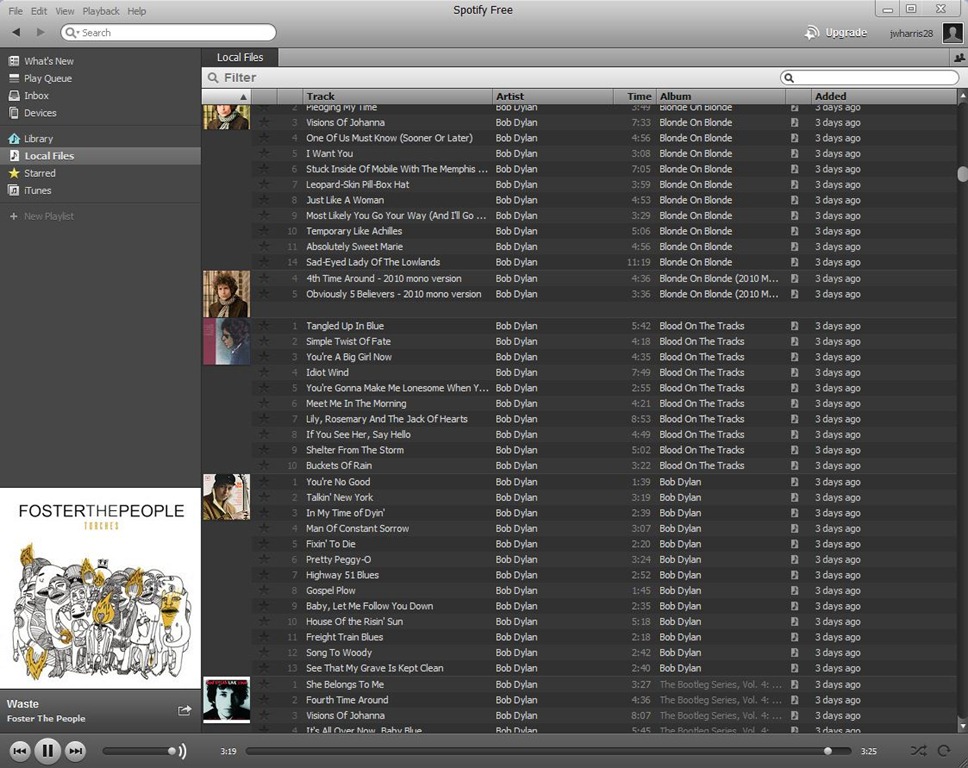
And here’s how Spotify shows my Bob Dylan albums.

Spotify-LocalSong

Go to http://spotify.com and request free invite.  Try out the service.  If you’ve never used a subscription music service Spotify is a great introduction.  But do yourself a favor if you like it, spend $4.99 and try out http://rdio.com for a month.  Read my review of the four other top music subscription services.  They each have unique features that make them all worthy considerations.  At the very minimum, if you love music get the free version of Spotify.  If I wasn’t so attached to Rdio right now I would buy the Unlimited version of Spotify, and I might still, it’s a very slick and FAST music player.

The reason why I’m sticking to Rdio is I have two friends at work that use it too, and the social features are addictive.  For so long music has become a solitary pursuit with people plugging in and tuning out.  Now, music is becoming social again.  I have great nostalgia for when I was growing up and me and my friends would get together and play albums.  No one seems to do that anymore.  Well, with subscription music services you can, just not together in the same room.

A third co-worker is definitely going to join Rdio, and a fourth is considering it.  That kind of momentum is sealing my allegiance to Rdio.  But subscription music is just catching on and Spotify might be the service to join, especially if you have a lot of music buddies on Facebook.

To sum up the comparisons I’d say MOG is a top consideration if you want the most efficient way to make playlists and you want to play music through your Roku.  Napster is your choice if you love playing songs from Billboard charts that go back to the 1950s.  Rhapsody might have the widest selection of songs, and it seems to have the most supplemental information and it has a great blog.  Spotify is great for two reasons.  First, there’s a free version, so everyone can use it.  Second, it’s perfect for people who have large personal collections of MP3s because Spotify integrates its collection with yours seamlessly.  Finally, I believe Rdio is best for people who like to share music with real world friends and discover new music by social networking with online friends.

I imagine all of these services will evolve quickly and develop new features and copy the best features of their competitors.  I believe streaming music is the future of music distribution and the end of owning music – except for true collectors who like to fill their houses with 78s, 45s, LPs and CDs.

JWH – 7/21/11

Should Amazon Charge Sales Tax?

Borders bookstores are closing and laying off 10,700 employees.  Bookstar closed months ago.  Record stores are almost gone.  How many other retailers are going out of business not because of the recession, but because of Internet sales?  And I have to admit I love Amazon and buy most of my books there, and when I bought CDs, I bought them mainly from Amazon.  I also buy my underwear, running shoes, pet supplies and other stuff from them too.

How can people not want to shop Amazon with it’s deep discounts and no sales tax, and if you buy $25, no shipping.  It’s a lean mean selling machine.  But is Amazon and other Internet retailers good for the economy?  My state, Tennessee, like so many others is really hurting for revenue.  If everyone bought locally the state would have more sales tax and maybe more people with jobs to pay even more taxes.

Taxes are considered satanic now, but I can’t help but wonder how much Tennessee would gain if they could collect taxes from Internet retailers.  Amazon has taken a rather arrogant approach to this – fighting states every way they can not to  charge sales taxes.  I don’t know why, I’d still buy from them if they charged sales tax, they offer deep discounts that are hard to resist.

The other thing I have to ask myself, is why am I buying more online when I should be buying less?  When I visited Borders last week I was shocked by changes I saw there, a store I’ve been shopping at for years.  It’s a national company like Amazon, so why should I feel any different about it going out of business rather than Amazon?  I think one reason we don’t pay sale tax with Amazon is because they are going to set up two distribution centers in Chattanooga, employing 1200 regular and 2000 seasonal people.  But does that offset the sale tax revenue and does it make up for all the jobs lost to Amazon’s competitors?  Isn’t this the same story as Walmart, but without the big superstores?

It’s way too hard to understand the subtle economics behind this issue, but I would love to see a well researched documentary on the subject.  I did find this video but it’s heavily bias.  I need to see an in-depth NOVA episode devoted to this issue.

Evidently, sometimes jobs are worth more than sale tax revenue, or so this article from The Tennessean suggests.  It hurts my head trying to understand this problem.  Should I feel good about shopping with Amazon, or should I not?  So Tennessee has made a deal and gets jobs instead of sales taxes, but what about all the other states that don’t get distribution centers?

I admit I have no answer for the question I asked at the top of the page.  Maybe it’s just too complex to answer.  Maybe I should just accept what my state law makers have decided, assuming they know best.  I don’t know.

Yet, I have one last thing to wonder about.  What if everyone bought everything they could online?  Besides book and record stores, what other kinds of merchandise can online retailers take away from local businessmen?  Mail order businesses have been around since the 19th century – do they show the limits of what people will buy sight unseen?  Could it be that book and record stores are disappearing because physical books and records are disappearing?

If that’s true, what’s going to happen to Amazon?  Well, they selling Kindles, MP3 songs and downloadable movies and TV shows.  If physical book and CD sales are down, then why do they need so many distribution centers?  Well, Amazon is selling other stuff.  I’ve also bought things like a HDMI cable, a Blu-ray player, computer parts, and TV antennas from Amazon, as well as running shoes and underwear.

Maybe the Amazon sales model is just progress and there’s no going back.  I still feel bad about Borders and Bookstar though.

JWH – 7/18/11