Can You Call Yourself an Expert in Any Subject?

I would think most people could call themselves master in the subject of themselves.  But do you have any topics that you feel you are an expert?  Think small when considering this unless you’re really the leading authority in a bigger subject.  For example, I might be an authority on Lady Dorothy Mills, a forgotten writer from the 1920s. 

I’ve kept a web site about Lady Mills for years trying to find anyone still interested in her work.  About once a year I get an email from someone who has run across her name and wants to know more, or has a tidbit of information for me.  I recently learned that Lady Mills has a sister in her 90s living in New Zealand, so I’m going to consider her the Master of the Topic.

Also, I’ve maintain a web site on the classics of science fiction – but there are many people interested in this topic, so maybe I’m only a scholar.  Topics are relative.  Some topics are too big to rank their specialists, like astronomy, but it might be possible to rank astronomers on a narrower topic, like studying cosmic background radiation.

From reading this essay I hope the next time you meet a person that asks you what you’re in to you can be a bit more specific than “I like music and movies.”  Think about what you like to read.  What topics perk up your ears when the television is on.  What do you like to argue about at parties.  Maybe once you think about this idea of ranking specialists you might like to specialize in a topic.

For the purposes of this essay I created a rough way to rank the levels knowledge on any topic.

Membership Levels in Knowledge of a Topic
Master 1
Authority 2 – 9
Expert 10 – 99
Scholar 100 – 999
Student 1,000 – 9,999
Amateur 10,000 – 100,000
Fan 100,001 – 1,000,000

For big academic subjects a person needs to have a Ph.D. and written widely on a particular subfield to call themselves an authority or expert.  But it’s possible to narrow your focus, say pick a dead person, or work of art, and master the topic.  For example, we might consider David McCullough the master of the topic of John Adams. 

Or I would guess Bill Patterson is the master on the topic of the science fiction writer Robert A. Heinlein, but he might have rivals.  We have to wait and read Patterson’s first volume of Heinlein’s biography when comes out in August.  In the tempest in a teapot world of Heinlein knowledge there’s a contentious society fighting to claim authority turf.  If the going is tough at the top, it’s easier to claim a smaller peak, like Joseph T. Major did by mastering the topic of Heinlein’s juveniles with his book Heinlein’s Children.

At 58 I’m rather old to be thinking about what I want to be when I grow up, but I don’t think I’m too old to become ambitious about studying a specialized topic and trying to master it.  After my last post, Xmind Mapping LibraryThing Tags, I’ve been inspired to discover what subjects I’m the most interested in and start systematically studying them.  Hell, I could become a specialist in online library cataloging programs with not too much work. 

Everyone should have twelve topics they love at the moment.  These topics should be subjects that would thoroughly delight you to discuss at parties and around the water cooler at work.  I’m actively studying all the topics I’m interest in and want to pick twelve to consciously pursue.  The trouble is I need to narrow down my specialties.  I can say I like to read books about artificial intelligence (AI) and robots, but that’s way to big a topic other than just being a general fan. 

The other day I saw a video of a robot that solves a Rubik’s Cube in 12 seconds or less.  I wonder if the guy who built this robot is the absolute master of the topic, or if there are other robots that can do the Rubik’s Cube.  As a fantasy, I’d love to program a computer to read science fiction novels and write scholarly papers about any SF story I fed it, but that’s way too ambitious.  I might could become a scholar of robot characters in science fiction, maybe even an expert.  

Right now I’m just having fun contemplating this idea and what topics I want to pursue.  I hope to come up with a list soon.

JWH – 2/22/10

Xmind Mapping LibraryThing Tags

I’ve finished entering in all my books into LibraryThing and I’m now working on organizing my collection by tags.  Tags are like a simplified Dewey Decimal system, but you can also think of them as virtual bookshelves.  Tagging lets me see how my library reflects lifelong interests.  But tagging, like all book classification systems, is a tricky business.  I currently have 705 books, all with tags, but unfortunately, I’m not sure I like my present tagging system, and that means going through all 705 books and altering the tags once again.  Luckily, I had light bulb switch on in my brain this morning while showering.  Why not mind map the problem with Xmind?  Here’s the way things are now:

Tags1

By creating tags Nonfiction and Fiction I can get quick counts of each, currently 584 to 121 in favor of Nonfiction.  The above mind map uses the largest of my actual Tags:

Tags-photo

I’ve already decided I have too many tags.  Since I’m planning on re-shelving my books in tag groupings to make them easier to find, I would put the one book about telescopes with all the astronomy books.  I’d probably also shelve the six books on robots with the eleven books on AI, and eliminate humor and poetry as tags because I just don’t have enough books on those topics to justify a tag.  I could convert Humor to Memoir and start beefing up that category.  See, there’s lots to think about when playing home librarian.  If all I had was science fiction, I’d just alphabetize my shelves by author.

The fun thing about this work is realizing the reality behind it.  I have 705 physical books on four bookshelves at home and one at work.  Then I have all those books vaguely shelved in my mind.  To be honest, I can only remember a small fraction of my books at any one time.  And when I do remember a book I want, it’s very hard to find the physical copy.  I’m using LibraryThing to aid my brain in understanding my library of 705 books – to help remember all my titles, and hopefully create a system to quickly find the physical volume.

In other words, I have books, a brain and a database.  The LibraryThing is only a list making tool.  By adding Xmind, I’m adding a visual modeling tool into the mix.  Science shows us that our brains can only handle so many objects in our conscious minds at once.  Seven things is where we max out, and even holding seven things in the mind is hard.  Xmind allows me to go beyond the seven limit and visually map out more items on my computer screen, but even mind mapping has limits.  I can’t mind map a 1,000 objects.  I haven’t learned it’s limit, but I’d guess it’s less than 100 items, and maybe less than 50.

Think of it this way:  How many aspects of reality do you specialize in studying?  I have 35 books on space exploration.  I’m no expert, far from it.  But it’s a topic I like.  I have 47 books on programming, most of which are on languages I’m forgetting because I’m switching to new ones.  I am a ASP programmer.  I’m becoming a PHP programmer.  The better I get at PHP the more I will forget ASP.

We can only keep up with a limited number of topics in life, and the books I’ve bought reflect those topics.  I plan to use LibraryThing and Xmind to refine my focus and help me zero in on the topics I want to study the most.  I already spotted topics in my collection that I’m considering abandoning, like Kerouac and Wyatt Earp, and new topics I want to pursue, like cosmology and mapping the universe.

Under the new system I’ll tag topics I want to pursue.  (And it’s logical that I’d shelve books on each of those topics together.)  I created a new mind map based just on topics, and not levels of organization like nonfiction, science, astronomy, cosmology.  I still have too many topics to pursue, but things become clearer.

Tags2

Under my old system I tagged any book, fiction or nonfiction related to science fiction with a tag for SciFi, and since I have a whole lot of books by and about Robert A. Heinlein, I had a tag for Heinlein too.  So one of his novels could get tagged:  Fiction, Novel, SciFi, Heinlein.  With such tagging I could create lists of all my fictional books, all my novels, all fiction and nonfiction books related to science fiction and any book with a Heinlein connection.

Under the simplified system this won’t work anymore.  A tag of Heinlein would mean any book about Heinlein.  If I wanted a list of books by Heinlein I could search by author.   A SciFi tag means books about science fiction.  I’d have no way of listing all my science fiction novels and short story collections separate from general fiction – that is just by using the Tag concept in LibraryThing.  However, LibraryThing also has the Collection object.

I could create Fiction and Nonfiction collections, and then my tags would only apply to those books.  Under the Fiction collection, I could have novels about cosmology and AI.  This offers a lot of flexibility and new insights on how to organize my books both physically and mentally.  But how do I model this in Xmind?  And are the distinctions Fiction and Nonfiction really important?

Take Jack Kerouac.  He wrote novels.  He was a character in many novels.  And whole libraries have been written about his books, his life, and his characterizations, and the people around him and their characterizations.  I could change my topic label from Kerouac to The Beats and be more accurate about my interests.

What about science fiction?  Is it science or fiction?  Actually my interest in science fiction can reflected in more specific tags:  AI & Robots, Space Colonization, Homo Sapiens 2.0, Mars, The Moon and Intelligent Life.  But how do I categorize the Mars of Edgar Rice Burroughs versus Kim Stanley Robinson versus NASA?  Do I make categories:  Real Mars and Fantasy Mars?  They are two separate topics about reality, what we know about the real planet Mars, and what we know about all the fantasies about the imaginary planet Mars.

This opens up a whole new way of thinking, a whole new way to attack the problem, and more important than that, a whole new way of living.  What are my core topics?  Can I mind map them?  Could you make a list of all the subjects you care about the most?  Ones you could feel like a semi-expert in a discussion.

This project will take me awhile, so I can’t produce my final list for this post.  But I think I’m on to something.  Instead of flitting from one topic to the next and accidently collecting books, I need to decide what topics I want to specialize in studying, and build my library to support those interests.

JWH – 2/21/10

Developing My Book Identity with LibraryThing

I’ve got my books cataloged into LibraryThing and I’m now having big fun playing with my collection.  The collection, 706 books, is starting to take on an identity as I tag the books into subject categories.  And I do mean, an identity, like a personal identity, because my library is public, and I’m getting hung up about its appearance.  For itself, and for how it represents me.

It’s book vanity I know.  I had a few books I was too embarrassed to put in, and I found I didn’t want to list my wife’s books because they weren’t part of my self-image.  And I’m thinking about culling some books because they just aren’t me.  But as I tag books into categories I realize those topics are the ones I’ve been fixated on my whole life.  Just how many people like to collect biographies of Jack Kerouac, Wyatt Earp, Bob Dylan and Philip K. Dick? 

Back in the 60s, they had a saying, “You are what you eat.”  Well, I say, “You are what you read.”

The LibraryThing collection represents my physical collection of books, but its also a snapshot of my lifelong personal interests.  Since I own books on subjects I’m no longer interested in, I’m thinking I should cull them from my collection.  There’s two conflicting desires here, (or sins).  The first could be called book gluttony, and the second, book pride.  Do I want to own a lot of books, or do I want to own the books that best paints a clear picture of who I am? 

LibraryThing is a very flexible database, and I could use it’s Collections feature to define more than books I own, like books I hope to read, books I want to buy, or books I’ve read but no longer own.  I could even create a collection “Books That Define Me” and list books I own and don’t own.  I could also create a collection called “It Ain’t Me Books” for my guilty pleasures.

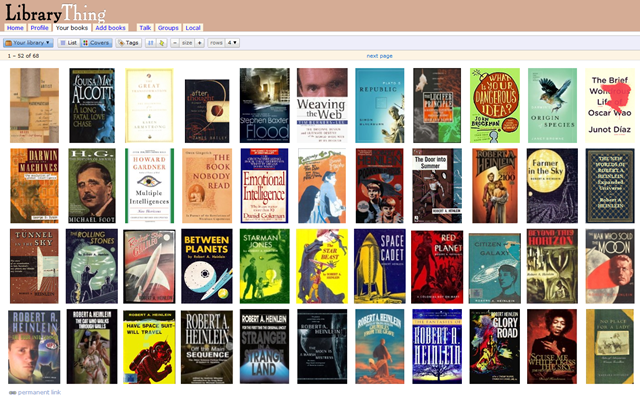
The more I play with LibraryThing the more I realize how many ways I can slice and dice my book collection.  I sit in front of the LibraryThing page, press buttons and links, and make different piles of books to contemplate.  I love using it in cover image mode.  LibraryThing lets you select different size graphics for the covers, and I like the three row size.  It annoys me to see books with bad cover scans, or bummer of bummers, no covers at all. Again, I think this is a vanity thing.  I’ve gotten all hung up on having the same cover as the book I own, but some books I own don’t have dust jackets.  Should I show them with jackets when I don’t own them?  Some books have multiple dust jackets to choose from, would it be unethical to use a cover that I like better than the one I own?  One I’d like to see in cover view better, and one I’d like other people to see. 

Hell, you can judge a book by its cover!!!  And I want you to judge my books by their covers.

Some of my oldest books may never had had dust jackets.  I’ve never even seen photos of their dust jackets.  I’ve thought about creating covers for them with Photoshop.  Isn’t that weird?  I hate seeing the naked books in cover view mode.  LibraryThing offers a variety of generic book covers to use, but I don’t like using them.  I care more about how my books look than how I look.

So far I’ve been pretty honest and listed all but a couple books I own.  I won’t name the lame books I’m too embarrassed to list, but I probably should, just to truly reflect my honest book personality.  And I guess I should just scan my books without dust jackets to show what they really look like.  And I might allow myself to scan the book covers I have when my copies are better than the cover art within LibraryThing.  If LibraryThing was for book collectors, we’d have to catalog exact editions and photograph the specific books I own, but LibraryThing isn’t that exact.

I do wonder if the next time I’m at a bookstore if I’ll buy a book because it’ll make my book personality appear smarter, or because its cover will make it look more beautiful.  Vanity, all is book vanity.

JWH 2/16/10

LibraryThing, Goodreads, Shelfari, Google Books, Anobii, WeRead

I’ve been a bookworm my whole life, and for as long as I can remember I’ve wished I had a list of all the books I own.  I’d also love to have a list of all the books I’ve read.  I think it would be impossible to create the second list, but the first list would only be a matter of typing.  And now with the Internet and the ISBN book number, it’s even less typing than before.  I could even buy a barcode reader that looks up information automatically online without typing at all.  My first consideration was to buy a standalone computer program like Book Collector from Collectorz.com, or even design my own database or spreadsheet with Access and Excel, but I decided the fun solution is to use a Web 2.0 online book cataloging site. 

The Internet has added an extra twist to this list making activity, called  social cataloging.   By entering your books into an online database it allows social network programs to compare your list to lists created by millions of other bookworms.  The synergy of doing this offers endless social networking possibilities.  The obvious one is to find other readers who have similar reading tastes to yours that will help you find great books to read that you’ve missed.  For people trying to build big personal libraries, it’s fascinating to know the size of other collector’s collections.  The largest on LibraryThing is 43,061 books.  Also on LibraryThing, the most reviewed book is Twilight (1,386 reviews), the most owned book, Harry Potter and the Philosopher’s Stone (47,598 people out of 1,035,403 members), or that my favorite science fiction writer, Robert A. Heinlein has 72,427 books in those collections, as compared to my second favorite science fiction writer Philip K. Dick who has 46,991 books in LibraryThing user’s homes.  That’s out of 48,365,418 total books catalogued.

The trouble is there are many wonderful book cataloging sites to choose from, each with their own plus and minuses.  Luckily, all are free except LibraryThing, and it’s free for your first 200 books, so you can try them all.  The sites I’ve found so far are (there may be more):

Each of the sites try to make it easy to enter books, but they all do it differently.  They each have millions of books already catalogued, so the quickest way to add a book to your list is to find it first on their list by searching on the ISBN and then hitting the add button.  This can be made even faster with a barcode reader, but I don’t have one.  I’d say it’s taken me a couple hours to enter in 58 books at LibraryThing.  This is slow because I like selecting the right cover photo to match the cover of the book I own, and I started with a shelf of old books without ISBN numbers.  That means searching by author or title, or even entering in all the book info myself.  I could probably do 60 books in 20 minutes if they were all recent and I only needed to use ISBN.  Usually when you get a book with ISBN, the cover and all the other information is already there.

LibraryThing

I’ve taken to LibraryThing, but when I finished building my list I could export my library to another site to see if I like their social networking features better.  Or I’ve thought about using one site for listing books I own, and another for books I can remember reading.  Or use another site for just my non-fiction science and history books to see if I can find readers with my exact interests.  The different cataloging sites have discussion groups for books, or linking systems to Facebook and blogging sites, so if you like to discuss and review books, these systems connect you to other people who are looking to read reviews or talk about books too.

On one blog I read a post by a woman who said her family paid for three separate $25 lifetime subscriptions to LibraryThing, for herself, her husband and her kid, so I’m assuming there’s long term rewards for doing the work of entering a book collection into the system.  I won’t know for awhile.  I’ve got 18 more shelves of books to enter, and then I’ve got to try all the different features, but I’ll get back to you with more info.

I’ve added books with all of these systems and I find it easiest to add books to LibraryThing, especially when dealing with manual adds.  LibraryThing was the only site to have any books by Lady Dorothy Mills, an author I collect.  Her books are very rare, and they only had 3 of 15 I own.  These systems are far from perfect, and the quality of the data is imperfect.  It would be great if everyone catalog the precise edition they owned, but that doesn’t happen.

Anobii, Shelfari and WeRead are probably best for people with newer books and people looking for more social interaction since they have the largest number of members.  They are slicker sites with more glitz than LibraryThing.  GoodReads is in the middle.  Google Books merely lets you tag books without any reporting features or social networking.  It is good for links to the web, and if you’re a complete Google user in general.

One of the fun things about adding books to LibraryThing is it tells me how many other members own the book when I add it to my collection.  For books by Lady Dorothy Mills, out of over a million users, I’m the only one that has any of her books.  I really like it when I find just a few people who also own the same book, like the 2 other people that own In Search of Paradise a biography of Charles Nordhoff and James Norman Hall, the guys who co-wrote Mutiny on the Bounty.  Are those two people much like me?

JWH – 2/7/10

I finished my data entry and my library can be seen here.   To me, the fun way to view is by cover art.  Open your browser to fill the screen and then click the Covers button.  I have 706 books.  I learned a lot by creating this catalog.  For one thing, I have too many books, and I plan to thin my collection when I get a chance.  The largest portion of this collection is unread by me.  My bookstore roaming eyes are far bigger than my reading stomach.  I really wish I had more time to read.

JWH 2/16/10

Repairing Broken iPhones

Everyone loves their iPhones, and until they drop their iPhone and smash the glass screen, they won’t know just how much they really love their iPhone and how much they can hate Apple and AT&T.  The iPhone isn’t engineered to be repaired, and its especially not designed for the average user to repair.  It could have been.  Until people get addicted to smart phones, and learn how easy it is to break them, and how expensive they are to replace, they’ll never ask why they can’t be repaired.  They should be easy to repair, but they aren’t.  Our throw-away society doesn’t promote that.  It’s a shame, because these elegant devices could have been easily engineered to allow owners to replace a broken screen, or a broken screen/LCD combo.  Actually, the glass touch screen and LCD should be one unit that could be quickly replaced with only a small screwdriver, for about $30-40, or at a repair shop for $60-70.

I’m a computer guy at work, so people tend to bring me their smart phones to configure for the Exchange server or ask for help and advice even though it’s not part of my job.  And some people have a knack for breaking their smart phones repeatedly.  The other day a young woman brought me her shattered iPhone and a repair kit she had bought online.  I told her I had no experience at repairing iPhones, couldn’t guarantee my work and iPhones weren’t designed to be opened by users.  She had seen several films on Youtube and urged me to try.  So I did – and we almost succeeded. 

It’s an extremely tedious process to replace the glass touch screen on an iPhone, and we succeeded, but unfortunately, in the process we damaged the LCD.  One online repair site kept telling us to use a hair dryer to soften the glue that holds the glass screen to the frame.  They should have warned us not to use the hair dryer before we had gotten the frame off the phone.  Here’s the best Youtube video we found.  It runs 5 parts.  Watch all 5 parts before thinking about doing this repair.  This video does cover the missing steps that other videos and web sites don’t cover, which is how to carefully remove the broken screen from the thin frame, and then how to remove all the old adhesive.  Even if you don’t need to repair an iPhone, these videos are an education in how smart phones are put together.

The iPhone I was working on was the third one this lady had dropped, and understandably AT&T wasn’t going to replace it.  They wanted $199 and two more years.  But since this woman is a poor graduate student, she couldn’t afford the price of replacement.  She started looking around the net and found various repair kits and videos.  Don’t be fooled, these are not easy and cheap solutions.  You can also shop around and find repair services that run $60-250 to repair an iPhone, including at your Apple Store for $199.  I would really advise using one of these services before going to the do-it-yourself route unless you are very patient, have great skills dealing with small parts, and are willing to risk failure.  We got everything back together and working but the LCD was blurry because of heat damage, so she had to order a replacement LCD. 

The young woman I was helping is buying a second touch screen now because the first one got a tiny crack in our first repair that got much larger in the second LCD repair, which she had found a Mac repair guy to help her with, and then got completely damaged in her day-to-day use.  I’m not sure these glass touch screen replacements are as sturdy as the original Apple screens.  She wants me to help her with the third repair, but I’m mentioning this because they teach another lesson.  If you start fixing iPhones, you’ll probably have to keep fixing them.  I’m urging the young woman to hone these skills herself if she remains poor and keeps breaking her phone. 

Another warning, it takes a lot of careful pressure to disassemble an iPhone and reassemble it, and you’re working with two very delicate parts:  the touch screen and the LCD.  If you break your iPhone regularly, developing the skills to replace the touch screen or LCD might be worth pursuing, otherwise, I’d recommend paying a service company to do the job and hopefully get a repair warranty.

Also the repairs are iffy at best because they require taking glued together parts apart, and then reassembling them with bits of two-side adhesive, and the results aren’t as solid as the original glued assembly.  They phones really were NOT meant to be repaired, but sadly they are easily broken.

The iPhone is a beautiful device on the outside, but on the inside its just a bunch of ordinary parts.  It’s a shame that it wasn’t designed in a modular fashion so replacing the screen/LCD only involved a few screws.  Ditto for the battery and memory.  If we’re going to save mother nature we need to build machines that last and are repairable.  The current design of the iPhone is obviously meant to sell more iPhones, and keep users tied to contracts.

What’s needed is a smart phone that’s completely modular in design so it can be easily repaired and upgraded, and one that isn’t tied to any phone service.  Phone and broadband data service is expensive because the cost of the phones are subsidized in the contracts.  We need to separate the phone from the service.  Remember when AT&T owned your household phones?**  Remember how cheap phones got once we got to own our own phones?  There’s no reason why smart phones should cost as much as they do other than that’s what the industry wants.  Cell phones are a commodity sold in the millions, so they should be cheap to make.  I’m hoping Android phones will bring down the price of the smart phone and the monthly cost of broadband service. 

I hope we can get phone makers to go green by making their phones repairable.  The iPhone I worked on should have had the touch screen and LCD as one solid piece that snaps onto the phone body, held in place by four tiny screws.  If the user breaks their phone, just buy that piece and replace it.  That way the phone could last years, making it a much greener device.

JWH – 2/6/10

**Kids, a long time ago phones were rented from Ma Bell, the affectionate name we gave AT&T, and when you cancelled your phone service you had to give back the phone.  This was before cell phones.  Most homes had only one phone, and it was tied to the wall with a stout wire.  Kids and parents would fight over sharing the phone.  Oh, and it came in one color, black.