Reading a Newspaper–Old Style

By James Wallace Harris, Friday, February 27, 2015

This past weekend, I decided to buy a physical copy of The New York Times Sunday edition because they were advertising the revamped magazine section in my digital edition. I figured it might be fun to read a newspaper again, by holding it. Sort of a little nostalgia trip. Sad to say, it was a sad trip, I got very little wistful fun going back this time.

One of the very first things I noticed about the physical paper was the low-resolution of the print. It was a smudgy, dull gray. Many pages looked blurry. The screenshot I took below from the NYT’s web site of it’s .pdf of the front page is many times sharper and easier to read. Just click on the image to enlarge it. I wish my digital subscription included a full .pdf version of the paper. It would solve many of the criticisms I have for reading newspapers old style.
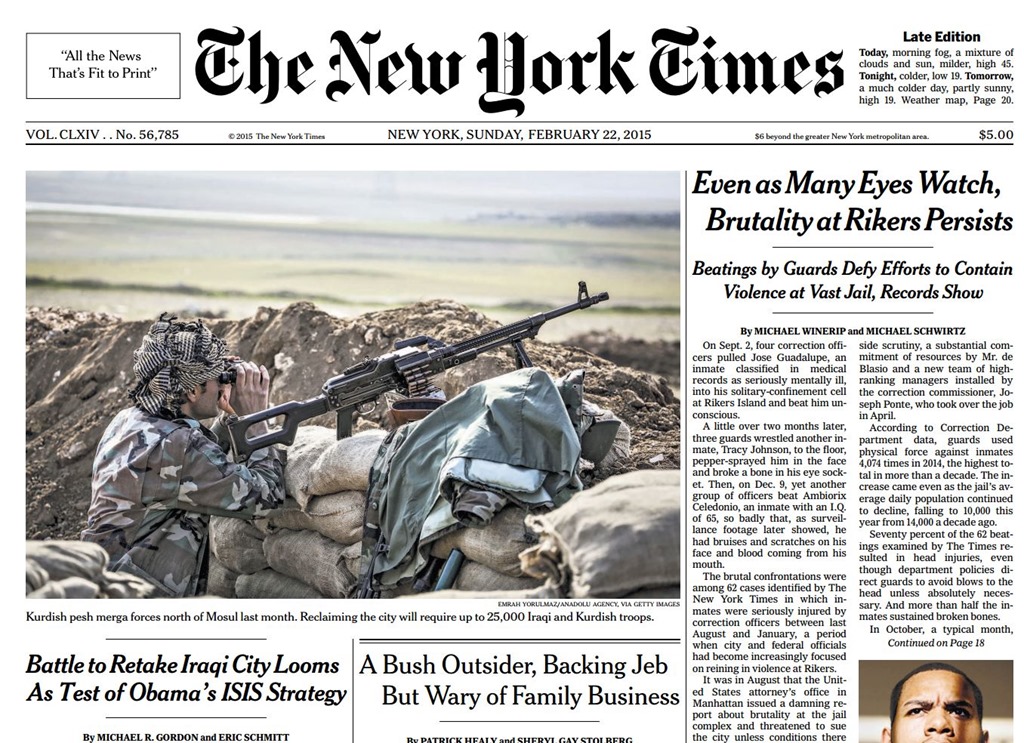
NYT-Feb22

There are many pluses to reading a newspaper the old fashioned way. First and foremost, I’m not at the computer. I spend a lot of time at the computer, on my tablet, or using my smartphone. So, returning to the tactile physical world is a real plus. The next advantage I noticed to reading the newspaper like I once read it, is the random nature of the content. Even though I subscribe to the digital edition of The New York Times, I read it very selectively, mainly by cherry picking the most interesting articles from the most emailed page. That means I don’t see a vast majority of the paper. Flipping through the entire paper shows me stories I would never read online because I would never search them out. The print layout is random, but holistic too. I looked at all the book reviews, rather than selective one as I do when online reading.

Strangely enough, the print ads are more appealing than online ads, even though most of them are a low-rez gray mush. In fact, the ads are so interesting, I would probably enjoy looking at the full paper each day on screen with a .pdf version. I have a 27” monitor which is great for reading online.

The magazine section, printed in color on slick paper, does beat the web visually. The new magazine section is like a real magazine. It’s easier to hold and read than the newspaper itself, which makes me wonder if print newspapers shouldn’t use that format?

Lastly, I get more of a feel of what’s going on around New York City from reading the print edition, than I do reading the digital edition.

The digital edition can easily feel like a world news paper. If I worked at it, I could dig through the entire paper by lots of online clicking, but I doubt I could see everything I saw by just laying the paper on the table and flipping page after page. But this brings me to the negative aspects of reading the pulped tree edition.

The font is tiny on the paper edition. Too small to enjoy reading. Generally, for any article that caught my eye, I’d just read the first few paragraphs, and then I told myself, if the article was appealing, to look it up later for online reading. I only pay for the web page edition, so I have no idea what the paper looks like on a table or smartphone. However, reading it online is much easier than reading in print. My Chrome browser sizes everything for my poor old eyes.

The physical paper is hard to hold and read. I had to sit at a table and lay it flat. But when I found something I wanted to read, I had to hold the paper up, and even fold it to get a comfortable reading distance and handhold. And I was very disappointed with the photos, both the news pictures, and the ads. There was an ad for model ships that really caught my eye, but the printing looked like 3D print without the glasses. And strangely enough, I missed the interactive slideshows and videos from the online edition.

Reading the newspaper again reminded me of one of the very annoying things I always hated about newspaper but had forgotten. Turn to page xx really bugs me. Do you turn now and read, and then jump back, or do you keep flipping pages and try to remember to spot the article you had started reading awhile back?

It’s sad to say, I just didn’t like reading the physical newspaper. It had a momentary cool factor of reminding me of the old days, but that wore off pretty quick. And when I was through, I felt guilty because I had a pile of paper that needed recycling. Some tree gave it’s life so I could read the paper, and now I was just going to throw it away. In a couple years I’ll probably buy a paper again, hoping to find that old pleasure of newspaper reading I had growing up, and probably once again I’ll realize why we move on with new technologies.

JWH

How to Fight a Virus on Your Computer

By James W. Harris, Thursday, February 26, 2015

WARNING: This is free advice, take at your own risk. I’m trying to be helpful, but without commitment.

Twice in the past month I’ve had to help people clean up a computer virus remotely over the phone, and both times Kaspersky 2015 Antivirus did the trick. At $39 for a 3 user license, it’s not first tool people want to turn to. What you want to do is try all the free tools first, and if they don’t work, consider buying Kaspersky, or another top level antivirus program.

Before I retired, I had to support hundreds of computers and their users. The first tool we tried when someone got a virus was Malwarebytes. If it was a minor infection, Malwarebytes would clean it up. If it was a bad infection, that infection wouldn’t let us install Malwarebytes. That’s a major indicator. You know you have a bad computer virus when you can’t install software, can’t run Microsoft updates, can’t get to the command prompt, or pursue any other course of action that might clean up the virus. Viruses are getting very clever about protecting themselves. [Home users get the free version of Malwarebytes and make sure you uncheck the box that asks you if you want to try the professional version when you run the install. The professional version is great if you want to pay for it, and have it run in background all the time. The free version is great for running occasionally, which takes up fewer resources.]

If you think you have a virus, try running your regular antivirus program doing a full scan. Then, run Disk Cleanup, and go through your Programs and Features control panel  and uninstall anything you know you don’t need. Don’t uninstall what you don’t know. Google the program to find out what it does if you don’t know.  Restart the computer. Try and install Malwarebytes again. If you can’t get to the internet, put Malwarebytes on a flashdrive using another computer. If something keeps Malwarebytes or other scanners from installing, then you probably have a nasty virus that’s going to take more work.

You can try some of the better free antivirus programs, but I’d avoid AVG. It’s become really annoying. Here are two reviews for free anti-virus programs at Gizmo’s Freeware and Tom’s Guide. The trouble with free is these companies have to find alternate ways to make money, and sometimes their methods can be very annoying. That’s why I don’t love AVG anymore.  Avira seems to be kinder in this regard.

Helping someone over the phone clean up a virus infected computer isn’t easy. Getting them to try a bunch of different free programs in hopes of finding one that works can be tedious, and usually people who ask me for help aren’t real keen on messing with computers in the first place. That’s why I’ve asked them to consider paying for a top level program like Kaspersky. It’s work like a charm twice now this month. That’s all I can say. You could buy it, and get nowhere.

I’m offering this experience because it might be useful, but I don’t want to be responsible for anything that goes wrong. However, in both the cases I’m referring to, these people couldn’t use their computers, and they wanted to avoid hitting the panic keys to reinstall Windows.

Kaspersky requires you to register before using it – they want to track your licenses. We’ve always gotten the cheaper version, the plain 2015 antivirus program. They offer more expensive suites. If you visit a lot of dangerous places on the Internet, you might want the extra protection. In both cases I mentioned, Kaspersky was able to install and run when the infected machines were not letting other programs install.

If you have a killer virus that stops all programs from installing, try and find an antivirus program that can run from a boot disc.  This bypasses Windows. Here’s a list of free ones. Here’s another view of 26 such utilities. These usually boot to Linux and often have hard to use interfaces. You need some Geek skills to use them. Often if you take badly infected machines to a computer shop or Geek Squad, they will want to wipe your disc and start over. Sometimes it takes many hours to clean up an infect computer, and they know it’s quicker to wipe a disk and start over. Otherwise they’d have to charge you $400.

Getting an infection on your computer can be very trying and depressing. The best thing to do is always run good antivirus software, always keep your operating system and programs up-to-date, and even consider running extra preventive measures. It’s not good to have two antivirus scanners running in the background at the same time – it causes a performance hit, and sometimes conflicts. However, I’m considering adding Webroot to my home computer. I used it at work. It’s an Internet base scanner, so it approaches problems from another direction. But that means paying two yearly fees. However, $39.95 a year keeps me thinking about it, rather than buying. If you visit a lot of iffy web sites, consider buying Malwarebytes. It’s not a general purpose antivirus program, but it does clean up the crap you step in while walking the seedy streets of the web.

JWH

Why Fixing Climate Change is Conservatives Worst Nightmare

by James Wallace Harris, Thursday, February 26, 2015

Conservatives deny climate change because they are savvy enough to understand what it takes to stop climate change, either intuitively, or with calculated conscious awareness. The only way to stop climate change is end business as usual, kill off marketplace capitalism, create a super-big federal government, increase taxes like crazy, and probably introduce the beginnings of a world government. Fixing climate change is their worst nightmare.

To solve climate change will mean giving up oil, gas and coal as cheap forms of energy. To solve climate change will require designing a steady-state economy that isn’t based on a cancerous consumption of the Earth. Industries depending on building cheap products in poor countries and selling them halfway around the world to more prosperous countries will have to stop. Such a steady state economy would probably put half of the population out of work, requiring a massive socialized form of government. To stop coal, oil and gas usage, and curtail other forms of greenhouse gases from being created, heavy carbon taxes will have to be rolled out. Trillions and trillions of dollars worth of extractive ores, minerals and gases will need to be left in the ground. People will have to stop living in mansions, driving SUVs, and developing every last acre of nature.

eco-catastrophe

Is it any wonder conservatives deny climate change? It’s much easier to promote business as usual and pretend the bill for economic collapse will be delivered to a future generation. Maybe they imagine after we kill off all life on Earth except humans, rats and cockroaches, after we destroy the atmosphere and ocean, we can just live on this planet in space suits, like we would have to on Mars. Some even talk about blasting off to outer space when Earth is used up. Of course, they always imagine they will be among the few to get a berth in one of those rare lifeboat rocketships.

Are liberals any more realistic? Can we build a society where everyone has a little house powered by sun and wind, with lawns made up of indigenous climate friendly plants and trees. Can we switch from packaged food to growing our own fruits and veggies or buying from local farmers. Can we build and decorate houses with renewable building materials? And work at nearby creative jobs that don’t hurt the environment, and commute to those jobs in small electric cars or bicycles? Are our egalitarian ecological fantasy lives their nightmare too? Is it any wonder that Republicans embrace climate change denial. They fear the future just as much as liberals, but their nightmare is different. Their whole way of life will be destroyed, just like Comanches and Apaches in the 19th century. They don’t want to move to the liberal reservation.

JWH

How Much Can We Learn About the World Traveling by Books?

By James Wallace Harris, Saturday, February 21, 2015

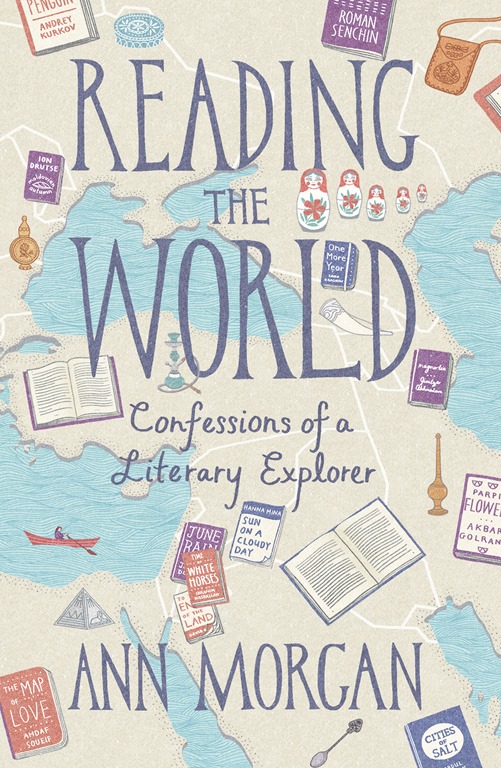
Ann Morgan has a new book out in England, Reading the World: Confessions of a Literary Explorer, due out in America May 4th, as The World Between Two Covers: Reading The Globe. Her book is based on her blog, A Year of Reading the World, where she created a reading challenge to read one book from each of the 196 countries. Here are the books she read. Now, don’t expect her book to be a retelling of the web posts, as she points out in her blog. It’s about the experience of the project.

worldbetweentwocoversreading-the-world

I’ve often thought of doing something like this. Like Ann Morgan, 99.9% of my reading comes from The United States, Canada, Australia or Great Britain. I’ve encountered this project before, over at A Striped Armchair, where super-bookworm Eva routinely reads books from around the world. It’s an inherently fascinating reading challenge, but as the review at the Telegraph points out, it’s full of flaws. How much would non-English speaking people learn about America from reading Jonathan Franzen or Philip Roth? Of course, Morgan wasn’t seeking a course in geography, but getting a sampling of the global literary landscape.

But what if we were trying to get a big picture of what life on planet Earth was like? What if you read 196 nonfiction books about all the countries of the world, wouldn’t that be a fascinating education? I just read Deep Down Dark by Héctor Tobar, about the Chilean mining disaster, but I really didn’t learn much about Chile. Some, but not much. I know lots of travelers who believe you have to visit a country to know it, but I’m not sure if that’s true either, not in the complete sense I’m talking about. Seeing the airport, a few tourist destinations, hotels and restaurants, doesn’t really tell you about the history, politics, social structures, economics, and on on. What about the news? I’ve been seeing a lot about Egypt in the news for the last couple of years, but hasn’t taught me much about the country either.

Ann Morgan set aside a year to learn about the world by reading novels. That’s very impressive, but more work than I want to commit to. I don’t even want to read 196 nonfiction books about the countries of the world. However, I wonder if I could tour the world in a year by watching documentaries? I’d have to watch four a week for a year, and that’s fairly reasonable. I wonder if Netflix has one on every country? Or would I even need to do that? What if I just read the Wikipedia entry for a country each night? Look at this one for Afghanistan. It’s incredibly informative. It’s so interesting, it makes me want to read a book about the country and watch documentaries, especially about its Paleolithic and Neolithic times. Of course, this makes me think I should just become a regular reader of National Geographic.

This concept of getting to know the world through books, either fiction or nonfiction, is a wonderful idea to think about. Here’s a list of countries at Wikipedia, it will give you the scope of the project. Even if you don’t start reading books, reading a Wikipedia article about a country now and then off your smartphone could be an excellent way to virtually travel the world.

JWH

Three Useful Internet Sites for a Dynamic Reading of Ulysses by James Joyce

By James Wallace Harris, Wednesday, February 18, 2015

Reading Ulysses by James Joyce can be very difficult, even daunting. Many well read readers consider Ulysses the number one novel of all time, because of it’s rich complexity and advanced writing techniques. Joyce intentionally made Ulysses a reading challenge, full of Easter eggs for readers to find and decipher, making it a novel worthy of multiple readings.

I have tried reading Ulysses before, but even after reading Portrait of an Artist as a Young Man three times, I wasn’t ready. One major barrier for me is my poor reading skills. I’ve been conditioned to read fast, always wanting to know what’s going to happen, by the plot driven novels of my youth. Ulysses is more like a great painting that you must study slowly and carefully, and for most of my life I never had the patience.

The range of what I could read took a quantum leap forward in 2002 when I started listening to audio books. Listening makes me read slow, and that changes everything. Also, professional readers showcase writing far better than my own inner voice. It’s like the difference between reading poetry and hearing it read aloud. Quality fiction should be heard. It should sound dramatic and dynamic, even poetical. Bad writing sticks out when read aloud. Once I started listening to Ulysses I could get into it. But still there was much I was missing.

Ulysses is famous for its stream of conscious writing techniques. If you just read it with your eyes, it’s easy to confuse the narrator with inner monologues. And even good audio book narrators don’t always distinguish between the two.

Ulysses is also full of allusions to real world and literary history, using colloquial and idiomatic words and phrases that are long out of fashion. Plus Joyce frequently cites lines of Latin, songs and poems that well educated people knew back then, but most people don’t know about today.

Luckily, I’ve stumbled upon two sites on the internet that are wonderful tools for helping me to read Ulysses in a very efficient manner. The first is  The Joyce Project that features an online version of Ulysses. Now most people hate reading online, but I have a major reason to get over that prejudice. The second site that I use is an audio performance of Ulysses at Archive.org. I read online as I listen to this online recording. This recording is very special because they use different actors for different characters, and they use a special effect for when Joyce is having his character speak in their internal voice. This is a tremendous advantage for understanding Ulysses. And I can’t emphasize enough how important it is to hear Joyce read by someone that can pronounce everything correctly, and even offer good accents.

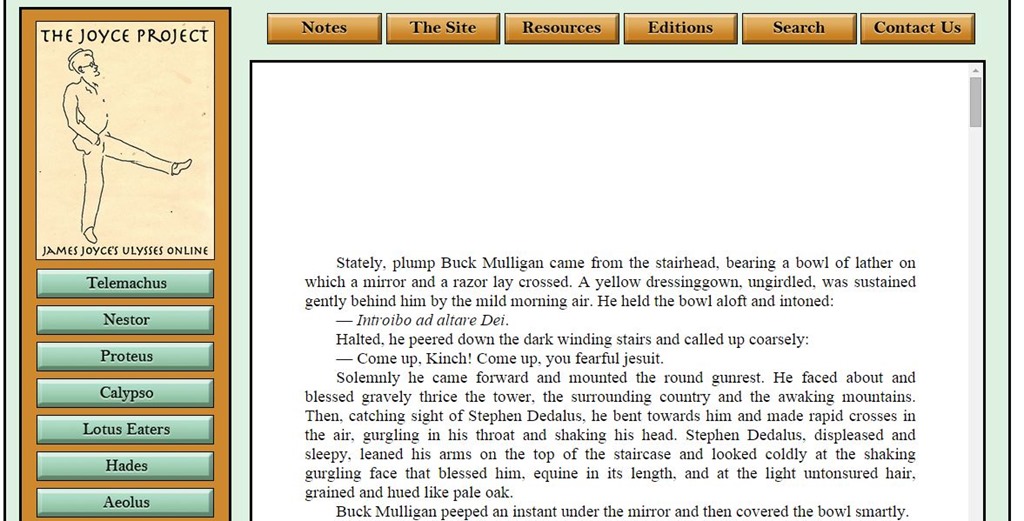
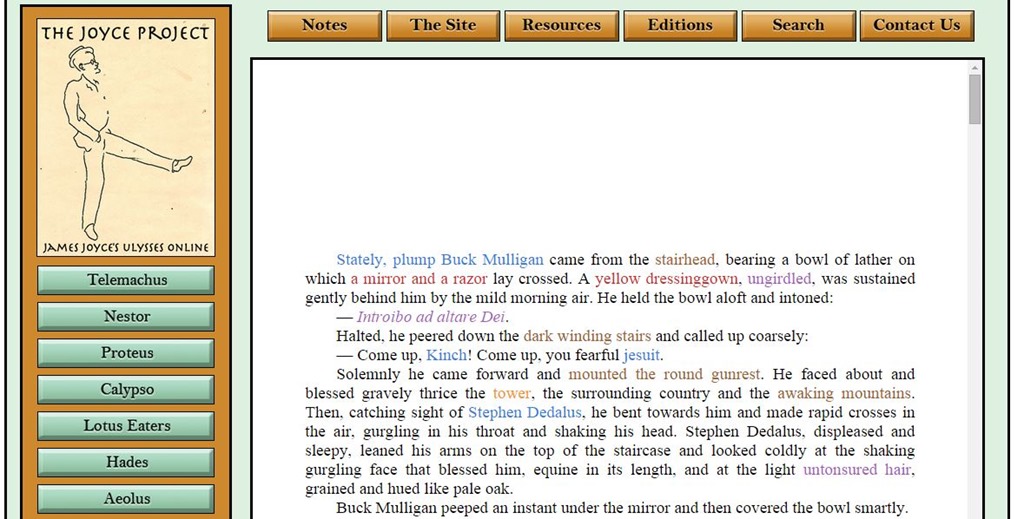
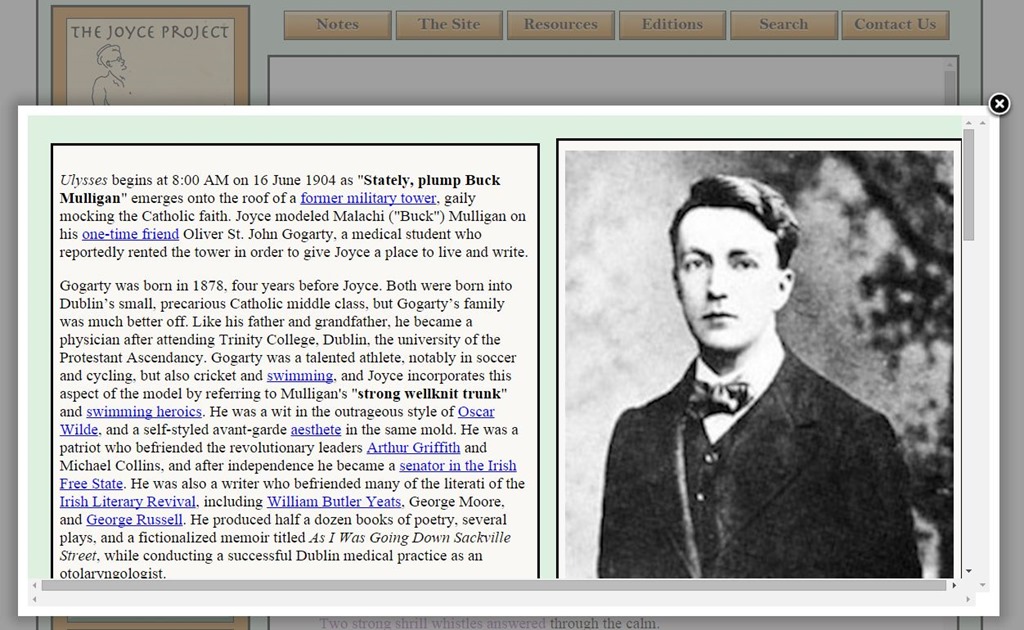
As an extra bonus, The Joyce Project has an annotation mode you can turn on, and certain words and phrases will appear in color that you can click on to read for elaboration. What I do is read and listen to each episode, and then go back and click on all the highlights. Here’s what the plain text looks like, then with the annotations highlighted, and then with the pop-up for the first annotation.  Clicking on the image will enlarge it.

The Joyce Project 1

The Joyce Project 2

The Joyce Project 3

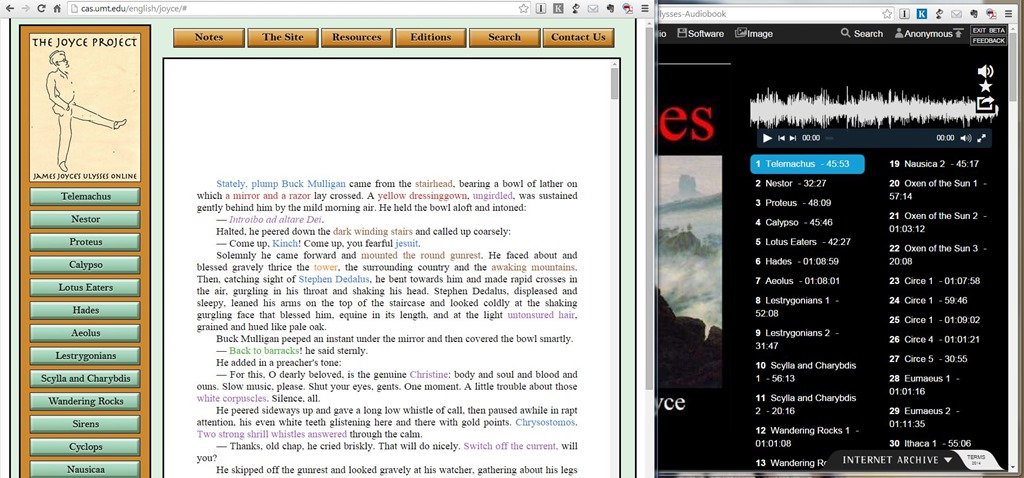
But what works really well is to open the The Joyce Project and the Archive.org audio player windows so they overlap, like this:

Read and Listen

This allows me start and stop the audio easily as I read, in case I do want to stop my reading to study an annotation.

Finally, there’s a third dimension to using the web for reading and studying Joyce – there’s a goldmine of supplemental material. I’m not pursing the study guides on my first reading except in a very limited way. Ulysses is a black hole for scholarship.

One site that is frequently recommended to me is Frank Delaney’s podcast re:Joyce. Delaney does one podcast a week and is up to #245, but only to episode five in the novel. He estimates it will take him 25 years to finish the project. Delaney is a famous author and broadcaster, and knows Joyce’s Ireland, so his rich voice and literary experience makes him a great guide for traversing the land of Joyce. His enthusiasm enhances the enjoyment of reading Joyce.

I figure the first two tools, the annotated text and the performance narration, are the two best tools I’ve discovered for reading Ulysses for the first time. And the Frank Delaney podcast is a wonderful supplement for those people who want to take their first step into Joyce scholarship.

JWH